
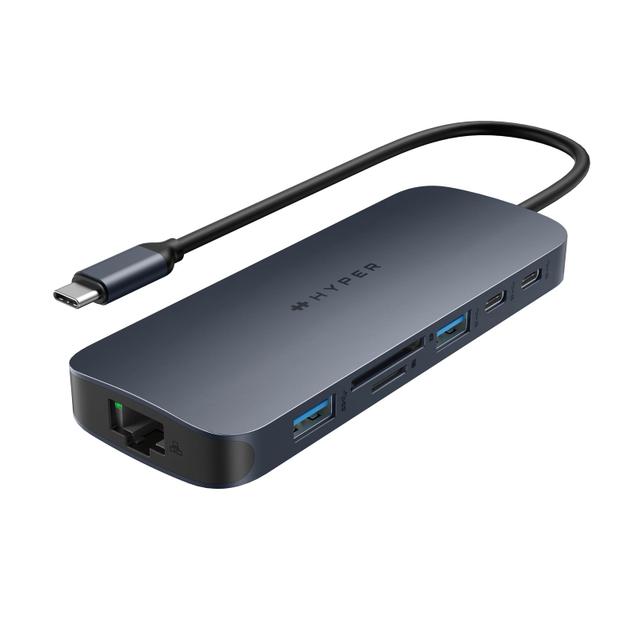
Hyper HyperDrive Next 10-Port USB-C Hub
Expert rating7 / 10
- Connection Type:
- USB-C (compact aluminum unibody)
- Total Ports:
- 10
- Max Display Support:
- Single display
- Power Delivery:
- 100W passthrough
Consumercarts is reader-supported. Learn more
Disclaimer: The price and specification of the given product may differ from the actual product. Please confirm on the retailer's website before buying.
Manufacturer: Hyper Last updated: September 12, 2026
Where to buy
- Best BuyGo to store
- AmazonGo to store
Hyper HyperDrive Next 10-Port USB-C Hub Review
The Hyper HyperDrive Next 10-Port USB-C Hub packs 10 ports into a compact aluminum unibody enclosure with a single 4K@60Hz output, dual card readers, and GbE, sized to sit under a laptop rather than beside it.
Hyper machines its docks from a single block of aluminum rather than assembling a plastic shell around separate components, which gives the HyperDrive Next a noticeably sturdier feel than most hubs in its price range. It also explicitly supports iPad Pro alongside Mac and Windows, a compatibility note most competitors leave out, making it a natural fit for anyone who splits work between a laptop and a USB-C iPad.
Comparison to Alternatives
Against the OWC Thunderbolt Dock, the OWC offers Thunderbolt bandwidth and dual display support for creative work, while the HyperDrive Next trades that ceiling for a smaller, unibody-milled form factor and explicit iPad support at less than half the price. Against the ASUS DC5, both are compact hubs, but the HyperDrive Next adds a GbE port and card readers the DC5 skips entirely.
Our verdict
Reviewed by Burooj Alam. Rated by us, not by users.
Expert rating7 / 10
A sturdily built compact hub that stands out for its iPad Pro support and unibody design.
Best for
- iPad Pro and MacBook users who want one hub for both devices
- Buyers who value solid aluminum build quality over plastic hubs
- Single-monitor desks needing a card reader and Ethernet in a small footprint
Not for
- Multi-display setups needing more than one external monitor
- Windows enterprise fleets needing Thunderbolt-level throughput
- Users who need over 100W of charging power
Specifications
What these specs meanIdentity
| Brand | Hyper |
|---|---|
| Model Number | HyperDrive Next 10-Port USB-C Hub (HD4005GL) |
| Connection Type | USB-C |
| Port Configuration | 1x USB-C PD input (140W), 2x USB-C 10Gbps data, 1x USB-A 10Gbps, 1x USB-A 5Gbps, 1x HDMI 4K60, SD + microSD 4.0 (312MB/s), GbE, 3.5mm combo audio |
| Max Display Support | Single display |
Host connection
| Thunderbolt Version | None |
|---|
Ports & Power
| Max Display Resolution | Single 4K@60Hz |
|---|---|
| Total Ports | 10 |
| Ethernet | Yes |
Host power
| Host Power Delivery | 140 W |
|---|
Display engine
| DisplayLink Driver Required | No |
|---|---|
| Max Displays Windows | 1 |
Display output
| Max Single Display Resolution | 4K |
|---|---|
| Max Single Display Refresh | 60 Hz |
Video ports
| HDMI Port Count | 1 |
|---|---|
| DisplayPort Port Count | 0 |
| DisplayPort Version | None |
Data ports
| Downstream Thunderbolt Port Count | 0 |
|---|---|
| USB-A Port Count | 2 |
| USB-C Data Port Count | 2 |
| Max USB Data Rate | 10Gbps |
Network and storage
| Ethernet Speed | 1GbE |
|---|---|
| SD Card Slot | UHS-II |
| microSD Card Slot | UHS-II |
Audio and control
| Audio Jack Configuration | Single Combo |
|---|
Compatibility and physical
| macOS Supported | Yes |
|---|---|
| Windows Supported | Yes |
| ChromeOS Supported | Yes |
| Weight | 96.5 g |
FAQs
What are the key specifications of the Hyper HyperDrive Next 10-Port USB-C Hub (USB-C / 10 Ports / 100W Pass-Through / Single 4K@60Hz / Windows/Mac/iPad / ~$100)?
Key specs for the Hyper HyperDrive Next 10-Port USB-C Hub: Power Delivery 140 W, Host Power Delivery 140 W, Ethernet Yes, Ethernet Speed 1GbE, Connection Type USB-C, Port Configuration 1x USB-C PD input (140W), 2x USB-C 10Gbps data, 1x USB-A 10Gbps, 1x USB-A 5Gbps, 1x HDMI 4K60, SD + microSD 4.0 (312MB/s), GbE, 3.5mm combo audio.
Who is the Hyper HyperDrive Next 10-Port USB-C Hub (USB-C / 10 Ports / 100W Pass-Through / Single 4K@60Hz / Windows/Mac/iPad / ~$100) best suited to?
Best suited to: iPad Pro and MacBook users who want one hub for both devices; Buyers who value solid aluminum build quality over plastic hubs; Single-monitor desks needing a card reader and Ethernet in a small footprint.
What are the drawbacks of the Hyper HyperDrive Next 10-Port USB-C Hub (USB-C / 10 Ports / 100W Pass-Through / Single 4K@60Hz / Windows/Mac/iPad / ~$100)?
Not the best fit for: Multi-display setups needing more than one external monitor; Windows enterprise fleets needing Thunderbolt-level throughput; Users who need over 100W of charging power.
Compare and read more
- Anker 575 USB-C Docking Station (13-in-1, 85W Pass-Through, Dual Display) vs Hyper HyperDrive Next 10-Port USB-C Hub (USB-C / 10 Ports / 100W Pass-Through / Single 4K@60Hz / Windows/Mac/iPad)
- Hyper HyperDrive Next 10-Port USB-C Hub (USB-C / 10 Ports / 100W Pass-Through / Single 4K@60Hz / Windows/Mac/iPad) vs Microsoft Surface Dock 2 (USB4/USB-C / 6 Ports / 100W Host Charging / Dual 4K@60Hz / Windows)
- Hyper HyperDrive Next 10-Port USB-C Hub (USB-C / 10 Ports / 100W Pass-Through / Single 4K@60Hz / Windows/Mac/iPad) vs Satechi USB4 Pro Hub (USB4 / 8 Ports / 96W Pass-Through Charging / Dual 4K@60Hz / Mac/Windows)
- Dell Universal Dock UD22 (USB-C / 10 Ports / 90W Host Charging / Triple 4K@60Hz / Windows/Mac/Chrome) vs Hyper HyperDrive Next 10-Port USB-C Hub (USB-C / 10 Ports / 100W Pass-Through / Single 4K@60Hz / Windows/Mac/iPad)
- Dell WD19TB Thunderbolt Dock (Thunderbolt 3 / 12 Ports / 130W Host Charging / Dual 4K@60Hz / Windows) vs Hyper HyperDrive Next 10-Port USB-C Hub (USB-C / 10 Ports / 100W Pass-Through / Single 4K@60Hz / Windows/Mac/iPad)
- Why Your Docking Station Only Shows One External Display on a MacBook
- Why "Total Ports" on a Docking Station Doesn't Tell You Anything