
Consumercarts is reader-supported. Learn more
Dell WD19TB Thunderbolt Dock vs Hyper HyperDrive Next 10-Port USB-C Hub: Comparison
Dell WD19TB Thunderbolt Dock vs Hyper HyperDrive Next 10-Port USB-C Hub host power delivery compared
On host power delivery the spread is 36%, Dell WD19TB Thunderbolt Dock 90 W against Hyper HyperDrive Next 10-Port USB-C Hub 140 W, so Hyper HyperDrive Next 10-Port USB-C Hub takes it. Total ports runs the same way, 12 on the Dell WD19TB Thunderbolt Dock versus 10 on the Hyper HyperDrive Next 10-Port USB-C Hub, another win for Dell WD19TB Thunderbolt Dock.
Dell WD19TB Thunderbolt Dock vs Hyper HyperDrive Next 10-Port USB-C Hub: which one fits your build
it is not the pick for Non-Dell laptop owners wanting guaranteed Thunderbolt 4 certification and bandwidth. It is equally the pick for Dell Precision mobile workstation owners who need charging wattage above what most Thunderbolt 4 docks offer. The Hyper HyperDrive Next 10-Port USB-C Hub is the one to take for buyers who value solid aluminum build quality over plastic hubs, though it is the wrong buy for multi-display setups needing more than one external monitor and Windows enterprise fleets needing Thunderbolt-level throughput. It also earns its place with iPad Pro and MacBook users who want one hub for both devices. Our rating of the Dell WD19TB Thunderbolt Dock (7/10): A high-charging-wattage Dell dock built for Precision mobile workstations, though it's a generation behind on Thunderbolt. Our rating of the Hyper HyperDrive Next 10-Port USB-C Hub (7/10): A sturdily built compact hub that stands out for its iPad Pro support and unibody design.
Which is cheaper, Dell WD19TB Thunderbolt Dock or Hyper HyperDrive Next 10-Port USB-C Hub?
At the last price check the Hyper HyperDrive Next 10-Port USB-C Hub was $100 and the Dell WD19TB Thunderbolt Dock $250, a 150% premium.
Frequently asked questions
Do the Dell WD19TB Thunderbolt Dock and Hyper HyperDrive Next 10-Port USB-C Hub differ on connection type?
Yes. Connection Type reads Thunderbolt 3 on the Dell WD19TB Thunderbolt Dock versus USB-C on the Hyper HyperDrive Next 10-Port USB-C Hub.
Is the Ethernet the same on the Dell WD19TB Thunderbolt Dock and Hyper HyperDrive Next 10-Port USB-C Hub?
It is. Both are listed at Yes, so it is not a reason to pick one over the other.
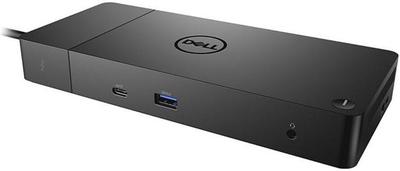

Specs and benchmarks
Brand
- Dell WD19TB Thunderbolt Dock
- Dell
- Hyper HyperDrive Next 10-Port USB-C Hub
- Hyper
Connection Type
- Dell WD19TB Thunderbolt Dock
- Thunderbolt 3
- Hyper HyperDrive Next 10-Port USB-C Hub
- USB-C
Model Number
- Dell WD19TB Thunderbolt Dock
- WD19TB
- Hyper HyperDrive Next 10-Port USB-C Hub
- HyperDrive Next 10-Port USB-C Hub (HD4005GL)
Port Configuration
- Dell WD19TB Thunderbolt Dock
- 1x TB3 downstream, 2x DisplayPort++ 1.4, 1x HDMI 2.0, 1x rear USB-C with DP 1.4, 1x front USB-C, 3x USB-A 5Gbps, GbE, front headset jack, rear line out
- Hyper HyperDrive Next 10-Port USB-C Hub
- 1x USB-C PD input (140W), 2x USB-C 10Gbps data, 1x USB-A 10Gbps, 1x USB-A 5Gbps, 1x HDMI 4K60, SD + microSD 4.0 (312MB/s), GbE, 3.5mm combo audio
Thunderbolt Version
- Dell WD19TB Thunderbolt Dock
- 3
- Hyper HyperDrive Next 10-Port USB-C Hub
- None
Max Display Support
- Dell WD19TB Thunderbolt Dock
- Dual 4K
- Hyper HyperDrive Next 10-Port USB-C Hub
- Single display
Max Display Resolution
- Dell WD19TB Thunderbolt Dock
- Dual 4K@60Hz
- Hyper HyperDrive Next 10-Port USB-C Hub
- Single 4K@60Hz
Total Ports
- Dell WD19TB Thunderbolt Dock
- 12Best
- Hyper HyperDrive Next 10-Port USB-C Hub
- 10-17%
Host Power Delivery
- Dell WD19TB Thunderbolt Dock
- 90 W-36%
- Hyper HyperDrive Next 10-Port USB-C Hub
- 140 W
Ethernet
- Dell WD19TB Thunderbolt Dock
- Yes
- Hyper HyperDrive Next 10-Port USB-C Hub
- Yes
HDMI Port Count
- Dell WD19TB Thunderbolt Dock
- 1
- Hyper HyperDrive Next 10-Port USB-C Hub
- 1
DisplayPort Port Count
- Dell WD19TB Thunderbolt Dock
- 2
- Hyper HyperDrive Next 10-Port USB-C Hub
- 0
DisplayPort Version
- Dell WD19TB Thunderbolt Dock
- 1.4
- Hyper HyperDrive Next 10-Port USB-C Hub
- None
Downstream Thunderbolt Port Count
- Dell WD19TB Thunderbolt Dock
- 1
- Hyper HyperDrive Next 10-Port USB-C Hub
- 0
USB-A Port Count
- Dell WD19TB Thunderbolt Dock
- 3
- Hyper HyperDrive Next 10-Port USB-C Hub
- 2
USB-C Data Port Count
- Dell WD19TB Thunderbolt Dock
- 1
- Hyper HyperDrive Next 10-Port USB-C Hub
- 2
Ethernet Speed
- Dell WD19TB Thunderbolt Dock
- 1GbE
- Hyper HyperDrive Next 10-Port USB-C Hub
- 1GbE
Weight
- Dell WD19TB Thunderbolt Dock
- 620 g
- Hyper HyperDrive Next 10-Port USB-C Hub
- 96.5 gBest
OS Compatibility
- Dell WD19TB Thunderbolt Dock
- Windows
- Hyper HyperDrive Next 10-Port USB-C Hub
- Mac, Windows, ChromeOS
Price
- Dell WD19TB Thunderbolt Dock
- ~$250
- Hyper HyperDrive Next 10-Port USB-C Hub
- ~$100


Which one should you pick?
Choose Dell WD19TB Thunderbolt Dock if you want the higher total ports (12 vs 10).
Choose Hyper HyperDrive Next 10-Port USB-C Hub if you want the higher host power delivery (140 W vs 90 W).
Price comparison
| Retailer | Dell WD19TB Thunderbolt Dock | Hyper HyperDrive Next 10-Port USB-C Hub |
|---|---|---|
| Newegg | $250.00 View on Newegg | |
| Best Buy | $100.00 View on Best Buy | |
| Amazon | View on Amazon |
Disclaimer: The price and specification of the given product may differ from the actual product. Please confirm on the retailer's website before buying.
Verdict
Dell WD19TB Thunderbolt Dock
7 / 10 Expert Rating
A high-charging-wattage Dell dock built for Precision mobile workstations, though it's a generation behind on Thunderbolt.
Hyper HyperDrive Next 10-Port USB-C Hub
7 / 10 Expert Rating
A sturdily built compact hub that stands out for its iPad Pro support and unibody design.