
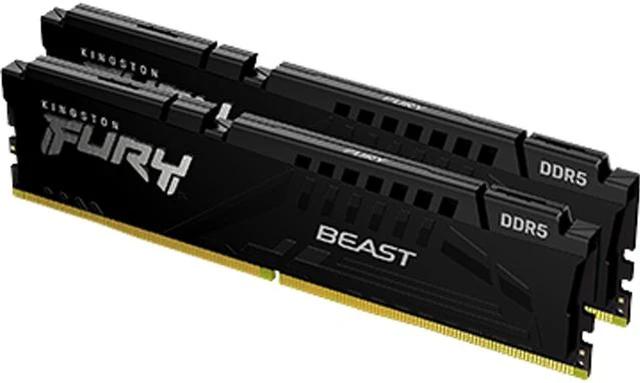
Kingston FURY Beast KF548C38BBK2-32
Expert rating7.9 / 10
- DDR Generation:
- DDR5
- Capacity:
- 32GB (2x16GB Kit)
- Speed:
- 4800MT/s
- CAS Latency:
- CL38
- RGB Lighting:
- No
- Module Height:
- 34.9mm (Low-Profile)
Consumercarts is reader-supported. Learn more
Disclaimer: The price and specification of the given product may differ from the actual product. Please confirm on the retailer's website before buying.
Manufacturer: Kingston Last updated: 2026-10-08
Where to buy
- AmazonGo to store
Kingston FURY Beast KF548C38BBK2-32 Review
Kingston FURY Beast KF548C38BBK2-32 is an entry-level DDR5 kit, 32GB (2x16GB) at the JEDEC-adjacent 4800MT/s CL38 speed grade, non-RGB and low-profile, aimed at buyers moving to DDR5 platforms without paying for RGB or high-frequency overclocking.
This is the kit for someone building a new Intel 12th/13th-gen or AM5 rig who wants DDR5's capacity and future-proofing but doesn't want to chase 6000MHz-plus kits and their price premiums. It's an honest, no-drama starting point, with a low-profile (34.9mm) heat spreader that clears large CPU air coolers.
A Sensible DDR5 Entry Point
4800MT/s sits right at the platform floor for both Intel 600/700-series and AMD AM5 boards, so this kit runs at rated speed even without manually enabling XMP on more conservative BIOS defaults.
Comparison to Alternatives
Against the Corsair Vengeance SODIMM CMSX16GX5M1A5600C48, a laptop-only single module, this is the desktop UDIMM alternative for anyone building rather than upgrading a notebook.
Our verdict
Reviewed by Burooj Alam. Rated by us, not by users.
Expert rating7.9 / 10
Best for
- First-time DDR5 builders on a budget
- AM5 or LGA1700 systems using stock BIOS memory profiles
- Buyers who don't need RGB and want a low-profile heat spreader
Not for
- Overclockers chasing 6000MHz+ DDR5
- RGB-themed cases
- Laptops (this is a desktop UDIMM)
Specifications
What these specs meanHow fast this kit is among DDR5 kits, rated from its speed and latency.
Identity
| Peak Bandwidth | 76.8 GB/s |
|---|---|
| Brand | Kingston |
| Part Number | KF548C38BBK2-32 |
| Series | FURY Beast |
Memory
| DDR Generation | DDR5 |
|---|---|
| Capacity | 32 GB |
| Speed | 4800MT/s (PC5-38400) |
| CAS Latency | 38 |
| Module Count | 2 |
| Voltage | 1.1 V |
Physical
| RGB Lighting | No |
|---|
Module and platform
| RAM Segment | Desktop DDR5 |
|---|---|
| Form Factor | 288-Pin UDIMM (Desktop) |
| Platform Optimisation | AM5 |
Capacity
| Capacity Per Module | 16 GB |
|---|
Speed and timings
| True Latency | 15.8 ns |
|---|
Overclocking profile
| XMP Support | Yes |
|---|---|
| XMP Version | XMP 3.0 |
| EXPO Support | No |
Silicon
| Memory IC | Undisclosed |
|---|
Physical and lighting
| Module Height | 34.9 mm |
|---|---|
| Colour | Black |
Commercial
| Warranty | Limited Lifetime |
|---|
FAQs
What are the key specifications of the Kingston FURY Beast KF548C38BBK2-32 (32GB 2x16GB Kit/DDR5 4800MHz/CL38/No RGB/Intel XMP 3.0)?
Key specs for the Kingston FURY Beast KF548C38BBK2-32: Capacity Per Module 16 GB, Capacity 32 GB, Speed 4800MT/s (PC5-38400), OC Profile XMP 3.0, Voltage 1.1 V, DDR Generation DDR5.
Will the Kingston FURY Beast KF548C38BBK2-32 (32GB 2x16GB Kit/DDR5 4800MHz/CL38/No RGB/Intel XMP 3.0) work with my current setup?
The Kingston FURY Beast KF548C38BBK2-32 (32GB 2x16GB Kit/DDR5 4800MHz/CL38/No RGB/Intel XMP 3.0) lists DDR Generation is DDR5. Check that against the hardware you already own before buying, since this is the field that most often decides whether a part fits. Our upgrade checker at /upgrade can confirm compatibility for common combinations.
Who is the Kingston FURY Beast KF548C38BBK2-32 (32GB 2x16GB Kit/DDR5 4800MHz/CL38/No RGB/Intel XMP 3.0) best suited to?
Best suited to: First-time DDR5 builders on a budget; AM5 or LGA1700 systems using stock BIOS memory profiles; Buyers who don't need RGB and want a low-profile heat spreader.
What are the drawbacks of the Kingston FURY Beast KF548C38BBK2-32 (32GB 2x16GB Kit/DDR5 4800MHz/CL38/No RGB/Intel XMP 3.0)?
Not the best fit for: Overclockers chasing 6000MHz+ DDR5; RGB-themed cases; Laptops (this is a desktop UDIMM).