
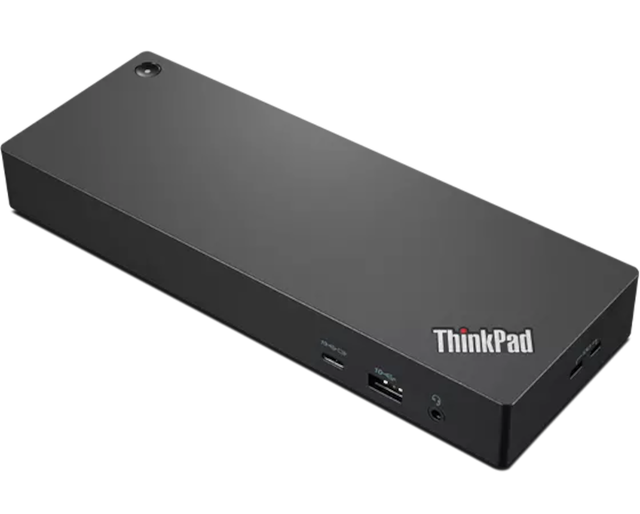
Lenovo Legion Gen 2 USB-C Gaming Dock
Expert rating8 / 10
- Connection Type:
- USB4 (gaming-focused)
- Total Ports:
- 9
- Max Display Support:
- Dual 4K
- Power Delivery:
- 135W
Consumercarts is reader-supported. Learn more
Disclaimer: The price and specification of the given product may differ from the actual product. Please confirm on the retailer's website before buying.
Manufacturer: Lenovo Last updated: September 12, 2026
Lenovo Legion Gen 2 USB-C Gaming Dock Review
The Lenovo Legion Gen 2 USB-C Gaming Dock is a gaming-laptop-focused dock with RGB lighting, an SD card slot for streaming overlays, HDMI 2.1 output up to 144Hz, and 135W charging for power-hungry gaming laptops.
Every other dock on this list is built for office productivity; this one is built for frame rates. HDMI 2.1 support pushes refresh rates to 144Hz at 4K, which matters if your external monitor is a gaming panel rather than an office display, and the built-in SD card slot is aimed squarely at streamers pulling footage off action cameras or capture rigs. RGB accent lighting and 135W of charging headroom round out a dock that's clearly meant to sit next to a Legion laptop, not a ThinkPad.
Comparison to Alternatives
Against the Razer USB4 Dock, both target gaming laptops with USB4-class performance, but Razer tops out near standard 4K@120Hz while the Legion dock's HDMI 2.1 ports push to 144Hz for competitive gaming monitors. Against the Lenovo ThinkPad Universal Thunderbolt 4 Dock, the ThinkPad dock is built for enterprise fleet stability with no gaming features at all, while the Legion Gen 2 trades that seriousness for RGB lighting, higher refresh rates, and a streaming-friendly SD slot.
Our verdict
Reviewed by Burooj Alam. Rated by us, not by users.
Expert rating8 / 10
The clear pick for Legion or other gaming laptop owners who want high refresh rate external displays.
Best for
- Gaming laptop owners running external monitors above 60Hz
- Streamers who want a built-in SD card slot for capture footage
- Legion and other RGB-themed gaming setups
Not for
- Enterprise IT fleets, since it has no centralized management or enterprise support
- Office productivity setups that don't need high refresh rate HDMI
- Buyers who find RGB lighting distracting on a desk
Specifications
What these specs meanIdentity
| Brand | Lenovo |
|---|---|
| Model Number | Legion Gen 2 USB-C Gaming Dock |
| Connection Type | USB4 (USB-C, gaming-focused) |
| Port Configuration | 1x USB-C upstream (USB4), 4x USB-A, 1x HDMI 2.1, 1x DisplayPort, 1x SD card slot, 1x 2.5GbE |
| Max Display Support | Dual 4K |
Ports & Power
| Max Display Resolution | Dual 4K@144Hz (HDMI 2.1) |
|---|---|
| Total Ports | 9 |
| Ethernet | Yes |
Host power
| Host Power Delivery | 135W host charging |
|---|
FAQs
What are the key specifications of the Lenovo Legion Gen 2 USB-C Gaming Dock (USB4 / 9 Ports / 135W Host Charging / Dual 4K@144Hz / Windows / ~$250)?
Key specs for the Lenovo Legion Gen 2 USB-C Gaming Dock: Power Delivery 135W host charging, Ethernet Yes (2.5GbE), Connection Type USB4 (USB-C, gaming-focused), Port Configuration 1x USB-C upstream (USB4), 4x USB-A, 1x HDMI 2.1, 1x DisplayPort, 1x SD card slot, 1x 2.5GbE, Max Display Support Dual 4K, Max Display Resolution Dual 4K@144Hz (HDMI 2.1).
Who is the Lenovo Legion Gen 2 USB-C Gaming Dock (USB4 / 9 Ports / 135W Host Charging / Dual 4K@144Hz / Windows / ~$250) best suited to?
Best suited to: Gaming laptop owners running external monitors above 60Hz; Streamers who want a built-in SD card slot for capture footage; Legion and other RGB-themed gaming setups.
What are the drawbacks of the Lenovo Legion Gen 2 USB-C Gaming Dock (USB4 / 9 Ports / 135W Host Charging / Dual 4K@144Hz / Windows / ~$250)?
Not the best fit for: Enterprise IT fleets, since it has no centralized management or enterprise support; Office productivity setups that don't need high refresh rate HDMI; Buyers who find RGB lighting distracting on a desk.
Compare and read more
- Elgato Thunderbolt Dock (Thunderbolt 4 / 8 Ports / 96W Host Charging / Dual 4K@60Hz / Mac/Windows) vs Lenovo Legion Gen 2 USB-C Gaming Dock (USB4 / 9 Ports / 135W Host Charging / Dual 4K@144Hz / Windows)
- Belkin Thunderbolt 4 Dock Pro (12 Ports / 90W Upstream + 15W Downstream TB4 / Dual HDMI 2.0 / 8K30 or Dual 4K60 / Gigabit Ethernet) vs Lenovo Legion Gen 2 USB-C Gaming Dock (USB4 / 9 Ports / 135W Host Charging / Dual 4K@144Hz / Windows)
- Lenovo Legion Gen 2 USB-C Gaming Dock (USB4 / 9 Ports / 135W Host Charging / Dual 4K@144Hz / Windows) vs Plugable TBT4-UDZ (16-in-1 / Thunderbolt 4 / Quad Display / 100W PD)
- Lenovo Legion Gen 2 USB-C Gaming Dock (USB4 / 9 Ports / 135W Host Charging / Dual 4K@144Hz / Windows) vs Razer USB4 Dock (USB4 / 14 Ports / Dual 4K@120Hz / Thunderbolt 4-Equivalent Performance)
- Lenovo Legion Gen 2 USB-C Gaming Dock (USB4 / 9 Ports / 135W Host Charging / Dual 4K@144Hz / Windows) vs StarTech.com Thunderbolt 4 Dock (Thunderbolt 4 / 11 Ports / 90W Host Charging / Dual 4K@60Hz / Mac/Windows)
- Best Docking Station for a Single-Cable Laptop Setup
- EDID Emulation Explained: Why Your Monitor Resets When You Switch