
Consumercarts is reader-supported. Learn more
Lenovo Legion Gen 2 USB-C Gaming Dock vs Plugable TBT4-UDZ: Comparison
Lenovo Legion Gen 2 USB-C Gaming Dock vs Plugable TBT4-UDZ host power delivery compared
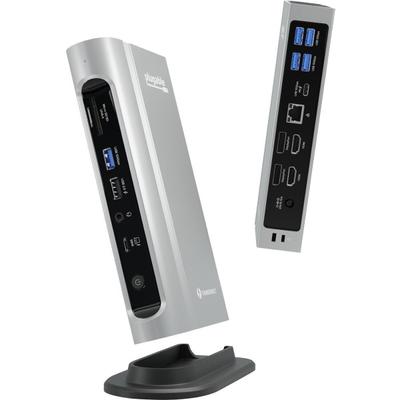
The first real difference is host power delivery: Lenovo Legion Gen 2 USB-C Gaming Dock 135W host charging against Plugable TBT4-UDZ 100 W. Add total ports to that, 9 on the Lenovo Legion Gen 2 USB-C Gaming Dock versus 16 on the Plugable TBT4-UDZ, and the pattern holds. They differ on port configuration too, 1x USB-C upstream , 4x USB-A, 1x HDMI 2.1,... on the Lenovo Legion Gen 2 USB-C Gaming Dock versus 1x TB4 host, 2x HDMI 2.0, 2x DisplayPort 1.2,... on the Plugable TBT4-UDZ.
Who each one is for
Buy the Lenovo Legion Gen 2 USB-C Gaming Dock for Gaming laptop owners running external monitors above 60Hz and Legion and other RGB-themed gaming setups, though it is not built for office productivity setups that don't need high refresh rate HDMI and buyers who find RGB lighting distracting on a desk. The same goes for streamers who want a built-in SD card slot for capture footage. Avoid it for enterprise IT fleets, since it has no centralized management or enterprise support. Take the Plugable TBT4-UDZ for fully-loaded desk setups needing maximum port count and four-display support across Mac and Windows. It is the wrong buy for simpler setups that don't need 16 ports, a more focused dock may be easier to manage. Our rating of the Lenovo Legion Gen 2 USB-C Gaming Dock (8/10): the clear pick for Legion or other gaming laptop owners who want high refresh rate external displays. Our rating of the Plugable TBT4-UDZ (8/10): the widest port count in our docking station lineup, with four-display support for fully-loaded desks across Mac and Windows.
Lenovo Legion Gen 2 USB-C Gaming Dock vs Plugable TBT4-UDZ price
The Plugable TBT4-UDZ asks 16% more, $290 against $250 for the Lenovo Legion Gen 2 USB-C Gaming Dock.
What Lenovo Legion Gen 2 USB-C Gaming Dock and Plugable TBT4-UDZ have in common
Everything else lines up. Ethernet read the same on both, so those are not worth weighing.
Frequently asked questions
Which is cheaper, Lenovo Legion Gen 2 USB-C Gaming Dock or Plugable TBT4-UDZ?
The Plugable TBT4-UDZ asks 16% more, $290 against $250 for the Lenovo Legion Gen 2 USB-C Gaming Dock.

Specs and benchmarks
Brand
- Lenovo Legion Gen 2 USB-C Gaming Dock
- Lenovo
- Plugable TBT4-UDZ
- Plugable
Model Number
- Lenovo Legion Gen 2 USB-C Gaming Dock
- Legion Gen 2 USB-C Gaming Dock
- Plugable TBT4-UDZ
- TBT4-UDZ
Port Configuration
- Lenovo Legion Gen 2 USB-C Gaming Dock
- 1x USB-C upstream (USB4), 4x USB-A, 1x HDMI 2.1, 1x DisplayPort, 1x SD card slot, 1x 2.5GbE
- Plugable TBT4-UDZ
- 1x TB4 host, 2x HDMI 2.0, 2x DisplayPort 1.2, 3x USB-A 10Gbps, 2x USB-A 5Gbps, 1x USB-A 2.0, 1x USB-C 10Gbps, 2.5GbE, SD + microSD UHS-II, 3.5mm headset jack
Total Ports
- Lenovo Legion Gen 2 USB-C Gaming Dock
- 9-44%
- Plugable TBT4-UDZ
- 16Best
Host Power Delivery
- Lenovo Legion Gen 2 USB-C Gaming Dock
- 135W host charging
- Plugable TBT4-UDZ
- 100 W
Ethernet
- Lenovo Legion Gen 2 USB-C Gaming Dock
- Yes
- Plugable TBT4-UDZ
- Yes


Which one should you pick?
Choose Lenovo Legion Gen 2 USB-C Gaming Dock if you already have it on hand or find it at a lower price.
Choose Plugable TBT4-UDZ if you want the higher total ports (16 vs 9).
Price comparison
| Retailer | Lenovo Legion Gen 2 USB-C Gaming Dock | Plugable TBT4-UDZ |
|---|---|---|
| Consumercarts listing | $250.00 View on Consumercarts listing | |
| Amazon | $289.99 View on Amazon | |
| Newegg | View on Newegg |
Disclaimer: The price and specification of the given product may differ from the actual product. Please confirm on the retailer's website before buying.
Verdict
Lenovo Legion Gen 2 USB-C Gaming Dock
8 / 10 Expert Rating
The clear pick for Legion or other gaming laptop owners who want high refresh rate external displays.
Plugable TBT4-UDZ
8 / 10 Expert Rating
The widest port count in our docking station lineup, with four-display support for fully-loaded desks across Mac and Windows.