
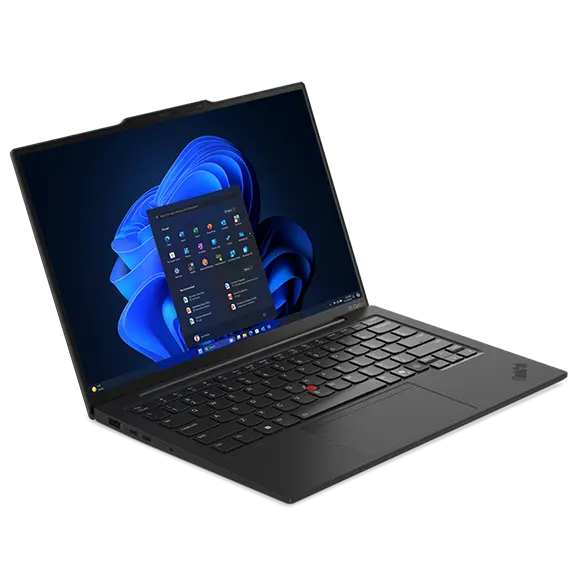
Lenovo ThinkPad X1 Carbon Gen 13 Aura
Expert rating8.7 / 10
- CPU:
- Intel Core Ultra 7 268V
- Memory:
- 32GB LPDDR5X-8533, soldered
- Display:
- 14in 2880x1800 OLED 120Hz
- Weight:
- 0.99 kg
Upgrade and repair this laptop
Consumercarts is reader-supported. Learn more
Disclaimer: The price and specification of the given product may differ from the actual product. Please confirm on the retailer's website before buying.
Manufacturer: Lenovo Last updated: 2026-10-08
Lenovo ThinkPad X1 Carbon Gen 13 Aura Review
The ThinkPad X1 Carbon Gen 13 Aura Edition runs a Core Ultra 7 268V with 32GB of LPDDR5X-8533 memory on package, a 1TB PCIe 5.0 x4 drive, and a 14in 2880x1800 OLED panel at 120Hz, in a chassis under one kilogram.
Lenovo states the memory configuration plainly: soldered to the system board, no slots, dual channel, and not upgradable. There is one M.2 2280 slot and it ships occupied.
This is the machine the G16 is not. Under a kilogram, 57Wh, a 65W charger you can put in a coat pocket, and a panel that is better than anything in a gaming laptop at this weight.
The price is that every decision is final. The 32GB you buy is the 32GB you own in 2032, and the drive is the only part you can ever change.
Memory is on the package and that is permanent
Lenovo describes it as memory on package, soldered to the system board, no slots, and explicitly not upgradable. That is not a cost cut. LPDDR5X-8533 at this speed in a sub-kilogram chassis is only possible because it is soldered.
It does mean the capacity decision is the most important one you make at purchase. Lunar Lake configurations top out at 32GB. If you need 64GB, you need an Arrow Lake configuration of this same chassis instead, which is a different SKU rather than a later upgrade.
Storage: one slot, and it is full
A single M.2 2280 slot running PCIe 5.0 x4 on the V-series and H-series processors, or PCIe 4.0 x4 on the U-series. The 1TB configuration occupies it.
So the only upgrade this machine accepts is replacing the drive, not adding one. Clone before you swap, because there is nowhere to mount both at once.
What we have not verified
Lenovo publishes 500 nits for this panel without stating whether that is a typical full screen figure or a peak, so the brightness condition is recorded as vendor unstated. Sustained CPU power is not published and has not been measured here.
Our verdict
Reviewed by Burooj Alam. Rated by us, not by users.
Expert rating8.7 / 10
One of the few laptops where the weight figure is not a compromise hidden behind a bad panel or a small battery. A 2.8K 120Hz OLED and 57Wh under a kilogram is a genuinely hard engineering result.
Buy 32GB, not 16GB. This is a five to seven year machine for most buyers and the memory is the one decision that cannot be revisited.
Best for
- Travel and commuting where under a kilogram matters
- Long document and code sessions on an excellent OLED panel
- Anyone who wants Thunderbolt 4 and a 65W USB-C charger
Not for
- Anyone who plans to add memory later, nothing is upgradable
- Gaming beyond light titles, this is integrated graphics only
- Buyers who need more than one storage drive
Specifications
What these specs meanIdentity and variant
| Brand | Lenovo |
|---|---|
| Series | ThinkPad X1 Carbon Gen 13 Aura Edition |
| Series ID | thinkpad-x1-carbon-gen-13-aura |
| SKU Name | 21NS |
| Chassis Code | 21NS |
| Region Sold | Global |
Class and platform
| Laptop Class | Business |
|---|---|
| Release Year | 2025 |
| Operating System | Windows 11 Pro |
| Weight | 0.99 kg |
Processor
| CPU Brand | Intel |
|---|---|
| CPU Model | Core Ultra 7 268V |
| CPU Cores | 8 |
Sustained power
| Sustained Power Source | Not Measured |
|---|---|
| Power Adapter Wattage | 65 W |
Graphics
| GPU Brand | Intel |
|---|---|
| GPU Model | Intel Arc Graphics 140V |
| VRAM | 0 GB |
| Graphics Switching | Integrated Only |
Memory
| RAM Capacity | 32 GB |
|---|---|
| RAM Type | LPDDR5X |
| RAM Speed | 8533 MT/s |
| Memory Form Factor | Soldered |
| Memory Soldered | Yes |
| Max RAM Supported | 32 GB |
Upgradability
| RAM Slots | 0 |
|---|---|
| RAM Slots Free | 0 |
| Storage Slots | 1 |
| Storage Slots Free | 0 |
| Storage Form Factor | M.2 2280 |
| Storage Interface | PCIe 5.0 x4 |
| SATA Bay Present | No |
Storage as shipped
| Storage Capacity | 1000 GB |
|---|---|
| Storage Type | NVMe SSD |
Display
| Display Size | 14 inches |
|---|---|
| Resolution Width | 2880 px |
| Resolution Height | 1800 px |
| Refresh Rate | 120 Hz |
| Panel Type | OLED |
| Brightness | 500 nits |
| Brightness Condition | Vendor Unstated |
| Touchscreen | No |
| Colour Gamut | 100% DCI-P3 |
Battery and ports
| Battery Capacity | 57 Wh |
|---|---|
| Thunderbolt Support | Thunderbolt 4 |
| WiFi Standard | WiFi 7 |
FAQs
What are the key specifications of the Lenovo ThinkPad X1 Carbon Gen 13 Aura Edition (Core Ultra 7 268V, 32GB)?
The Lenovo ThinkPad X1 Carbon Gen 13 Aura Edition (Core Ultra 7 268V, 32GB) is a laptop from Lenovo. Key specs: Release Year 2025, Operating System Windows 11 Pro, Weight 0.99, CPU Brand Intel, CPU Model Core Ultra 7 268V.
Will the Lenovo ThinkPad X1 Carbon Gen 13 Aura Edition (Core Ultra 7 268V, 32GB) work with my current setup?
The Lenovo ThinkPad X1 Carbon Gen 13 Aura Edition (Core Ultra 7 268V, 32GB) lists RAM Type is LPDDR5X. Check that against the hardware you already own before buying, since this is the field that most often decides whether a part fits. Our upgrade checker at /upgrade can confirm compatibility for common combinations.
Who is the Lenovo ThinkPad X1 Carbon Gen 13 Aura Edition (Core Ultra 7 268V, 32GB) best suited to?
Best suited to: Travel and commuting where under a kilogram matters; Long document and code sessions on an excellent OLED panel; Anyone who wants Thunderbolt 4 and a 65W USB-C charger.
What are the drawbacks of the Lenovo ThinkPad X1 Carbon Gen 13 Aura Edition (Core Ultra 7 268V, 32GB)?
Not the best fit for: Anyone who plans to add memory later, nothing is upgradable; Gaming beyond light titles, this is integrated graphics only; Buyers who need more than one storage drive.
Featured in
Compare and read more
- Dell Latitude 5450 (Core i7-1355U, 16GB, 512GB) vs Lenovo ThinkPad X1 Carbon Gen 13 Aura (32GB, Core Ultra 7 268V)
- Dell Latitude 7450 (Core Ultra 7 155U, 16GB, 512GB) vs Lenovo ThinkPad X1 Carbon Gen 13 Aura (32GB, Core Ultra 7 268V)
- HP EliteBook 840 G11 (Core Ultra 7 165U, 16GB, 512GB) vs Lenovo ThinkPad X1 Carbon Gen 13 Aura (32GB, Core Ultra 7 268V)
- Lenovo ThinkBook 14 G6 IAP (Core i5-1335U, 16GB, 512GB) vs Lenovo ThinkPad X1 Carbon Gen 13 Aura (32GB, Core Ultra 7 268V)
- Lenovo ThinkPad T14 Gen 5 (Core Ultra 7 155U, 16GB, 512GB) vs Lenovo ThinkPad X1 Carbon Gen 13 Aura (32GB, Core Ultra 7 268V)
- Best Laptop Keyboards and Trackpads: What Actually Matters
- Laptop Build Quality and MIL-STD 810H Explained
- How Much Should You Spend on a Laptop in 2026?