
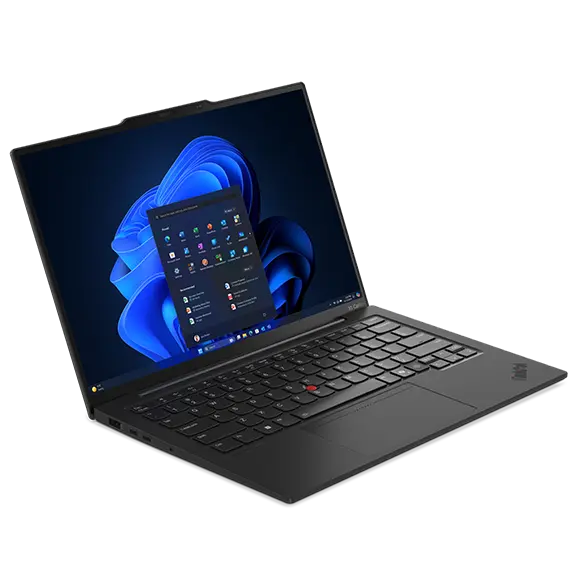
Lenovo ThinkPad X1 Carbon Gen 13 Aura
Expert rating7.9 / 10
- CPU:
- Intel Core Ultra 7 256V
- RAM:
- 16GB LPDDR5X, soldered
- Storage:
- 512GB NVMe SSD
- Display:
- 14" WUXGA IPS 60Hz
- Weight:
- 1.12kg
Upgrade and repair this laptop
Consumercarts is reader-supported. Learn more
Disclaimer: The price and specification of the given product may differ from the actual product. Please confirm on the retailer's website before buying.
Manufacturer: Lenovo Last updated: 2026-10-10
Lenovo ThinkPad X1 Carbon Gen 13 Aura Review
The entry configuration of the Lenovo ThinkPad X1 Carbon Gen 13 Aura Edition ships with an Intel Core Ultra 7 256V, 16GB of soldered LPDDR5X-8533 memory, a 512GB NVMe SSD and a 14-inch WUXGA IPS display.
This is the configuration to buy if you want the classic ThinkPad experience at 1.12kg without paying for the OLED touch panel. Everything from the CPU down to the memory is fixed at purchase, so the only real decision here is whether 16GB is enough headroom for your workload for the life of the machine.
Performance
The Core Ultra 7 256V is a Lunar Lake part built for efficiency rather than sustained multi-core throughput. Lenovo has not published or had independently measured a sustained wattage figure for this chassis, so treat this as a mainstream productivity machine rather than one for sustained compute workloads.
Upgradability
RAM: no. All 16GB of LPDDR5X-8533 is soldered; Lenovo's own documentation calls this configuration not upgradable. Storage: no free slot. One M.2 2280 PCIe 4.0 x4 slot, already occupied by the 512GB drive.
Battery life
The 57Wh battery is on the smaller side for a 14-inch business ultrabook, but the Lunar Lake platform's efficiency is built specifically to offset that. Lenovo has not published a light-load runtime figure we could independently verify for this SKU.
Display
The WUXGA IPS panel (1920x1200) trades resolution for battery life and cost compared to the 2.8K OLED option in the same series. 400 nits and full sRGB coverage are enough for office and document work, not colour-critical creative use.
Design and ports
At 1.12kg this is genuinely light for a 14-inch business laptop with a carbon-fibre-reinforced lid. Thunderbolt 4 and WiFi 7 are both present, matching the rest of the ThinkPad X1 line's port selection.
Our verdict
Reviewed by Burooj Alam. Rated by us, not by users.
Expert rating7.9 / 10
This X1 Carbon Gen 13 is the lightest ThinkPad X1 Carbon configuration at 1.12 kg, with a Core Ultra 7 256V, 16GB of LPDDR5X and a 14-inch 1920x1080 IPS screen at 400 nits. Thunderbolt 4 and WiFi 7 round out a clean office and document machine.
The spec is fixed, since memory is soldered and the single M.2 slot is already used by the 512GB drive. There is no OLED or touch option here, graphics are integrated, and heavy compute or content creation is not its job.
Best for
- Buyers who want the lightest ThinkPad X1 Carbon config
- Office and document work where 16GB is genuinely enough
- IT fleets standardising on a fixed, non-upgradable spec
Not for
- Anyone who wants to add RAM or storage later
- Buyers who want an OLED or touch panel
- Sustained heavy compute or content creation work
Specifications
What these specs meanIdentity and variant
| Brand | Lenovo |
|---|---|
| Series | ThinkPad X1 Carbon Gen 13 Aura Edition |
| Series ID | thinkpad-x1-carbon-gen13-aura |
| SKU Name | Ultra 7 256V / 16GB / WUXGA |
| Chassis Code | Gen 13 |
| Region Sold | Global |
Class and platform
| Laptop Class | Business |
|---|---|
| Release Year | 2025 |
| Operating System | Windows 11 Pro |
| Weight | 1.12 kg |
Processor
| CPU Brand | Intel |
|---|---|
| CPU Model | Core Ultra 7 256V |
| CPU Cores | 8 |
Sustained power
| Sustained Power Source | Not Measured |
|---|---|
| Power Adapter Wattage | 65 W |
Graphics
| GPU Brand | Intel |
|---|---|
| GPU Model | Intel Arc Graphics 140V |
| VRAM | 0 GB |
| Graphics Switching | Integrated Only |
Memory
| RAM Capacity | 16 GB |
|---|---|
| RAM Type | LPDDR5X |
| RAM Speed | 8533 MT/s |
| Memory Form Factor | Soldered |
| Memory Soldered | Yes |
| Max RAM Supported | 64 GB |
Upgradability
| RAM Slots | 0 |
|---|---|
| RAM Slots Free | 0 |
| Storage Slots | 1 |
| Storage Slots Free | 0 |
| Storage Form Factor | M.2 2280 |
| Storage Interface | PCIe 4.0 x4 |
| SATA Bay Present | No |
Storage as shipped
| Storage Capacity | 512 GB |
|---|---|
| Storage Type | NVMe SSD |
Display
| Display Size | 14 inches |
|---|---|
| Resolution Width | 1920 px |
| Resolution Height | 1200 px |
| Refresh Rate | 60 Hz |
| Panel Type | IPS |
| Brightness | 400 nits |
| Brightness Condition | SDR Typical |
| sRGB Coverage | 100 % |
| Touchscreen | No |
Battery and ports
| Battery Capacity | 57 Wh |
|---|---|
| Thunderbolt Support | Thunderbolt 4 |
| WiFi Standard | WiFi 7 |
FAQs
Can you upgrade the RAM in the Lenovo ThinkPad X1 Carbon Gen 13 Aura Edition?
No. The memory (16 GB of LPDDR5X) is soldered to the motherboard and there are no memory slots, so it cannot be upgraded after purchase. Choose the capacity you need when you buy.
Can you upgrade the SSD in the Lenovo ThinkPad X1 Carbon Gen 13 Aura Edition?
Yes. It has 1 M.2 2280 slot (PCIe 4.0 x4). As shipped the slot is in use, so upgrading means replacing the existing drive. It ships with 512 GB NVMe SSD.
What display does the Lenovo ThinkPad X1 Carbon Gen 13 Aura Edition have?
The Lenovo ThinkPad X1 Carbon Gen 13 Aura Edition has a 14-inch, 1920x1200, IPS, 60 Hz non-touch display.
Does the Lenovo ThinkPad X1 Carbon Gen 13 Aura Edition have Thunderbolt?
Yes. It supports Thunderbolt 4.
How big is the battery in the Lenovo ThinkPad X1 Carbon Gen 13 Aura Edition?
The Lenovo ThinkPad X1 Carbon Gen 13 Aura Edition has a 57 Wh battery.
Compare and read more
- Dell Latitude 5450 (Core i7-1355U, 16GB, 512GB) vs Lenovo ThinkPad X1 Carbon Gen 13 Aura (16GB, Core Ultra 7 256V, WUXGA)
- Dell Latitude 7450 (Core Ultra 7 155U, 16GB, 512GB) vs Lenovo ThinkPad X1 Carbon Gen 13 Aura (16GB, Core Ultra 7 256V, WUXGA)
- Dynabook Portege X30L-K (Core i7-1265U, 16GB, 512GB) vs Lenovo ThinkPad X1 Carbon Gen 13 Aura (16GB, Core Ultra 7 256V, WUXGA)
- HP EliteBook 1040 G11 (Core Ultra 7 165U, 16GB, 512GB) vs Lenovo ThinkPad X1 Carbon Gen 13 Aura (16GB, Core Ultra 7 256V, WUXGA)
- HP EliteBook 840 G11 (Core Ultra 7 165U, 16GB, 512GB) vs Lenovo ThinkPad X1 Carbon Gen 13 Aura (16GB, Core Ultra 7 256V, WUXGA)
- Best Mechanical Keyboard Switches Explained: Linear vs Tactile vs Clicky
- SSD vs HDD for Laptops: Why the Decision Is Basically Settled