
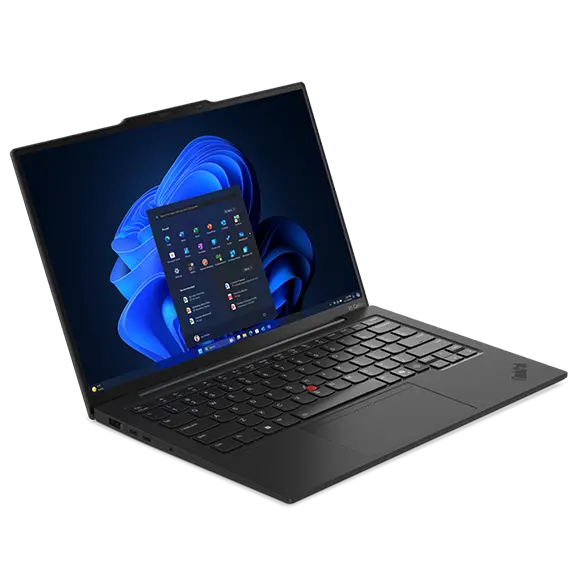
Lenovo ThinkPad X1 Carbon Gen 13 Aura
Expert rating8.6 / 10
- CPU:
- Core Ultra 7 258V
- GPU:
- Intel Arc 140V
- RAM:
- 32GB LPDDR5X
- Display:
- 14" 2880x1800 OLED 120Hz
Upgrade and repair this laptop
Consumercarts is reader-supported. Learn more
Disclaimer: The price and specification of the given product may differ from the actual product. Please confirm on the retailer's website before buying.
Manufacturer: Lenovo Last updated: 2026-09-30
Where to buy
- AmazonGo to store
Lenovo ThinkPad X1 Carbon Gen 13 Aura Review
The Lenovo ThinkPad X1 Carbon Gen 13 Aura Edition is a 14-inch business laptop from 2024 built around the Intel Core Ultra 7 258V. The screen is a 2880x1800 OLED panel at 120Hz. It weighs 0.99 kg.
The strengths: an OLED screen, long battery life (11 hours of Wi-Fi browsing) and a light 0.99 kg body. What holds it back: soldered memory and PWM flicker at lower brightness.
Processor performance
Measurements come from NotebookCheck's review unit 21NS0010GE with the Core Ultra 7 258V, 32GB of RAM, a 1TB PCIe 5.0 SSD and the non-touch 2.8K OLED panel.
The Intel Core Ultra 7 258V has 8 cores (4 performance and 4 efficiency), boosting to 4.8 GHz. It is a low-power chip tuned for battery life: fast for office work, browsing and photo edits, slower than 45W H-series chips in long renders. Its NPU is rated at 47 TOPS for on-device AI features.
NotebookCheck measured about 20W of sustained CPU power in this chassis. The chassis limit, not the chip rating, is what decides long render times. Across the 24 systems NotebookCheck has tested with the Intel Core Ultra 7 258V, it averages 555 points in Cinebench 2024 multi-core (range 406 to 660) and 118.7 single-core. Where this laptop lands in that range depends on how much power it lets the chip draw.
PugetBench (creative apps). These are Puget Systems' public results for the Intel Core Ultra 7 258V in its standard test, pooled across every system it was tested in, so this laptop's power limits can move them up or down. Higher is better.
| App | PugetBench score | Results |
|---|---|---|
| DaVinci Resolve | 21,202 | 11 |
| Photoshop | 6,860 | 185 |
| Lightroom Classic | 4,684 | 12 |
Graphics and gaming
Graphics come from the integrated Intel Arc Graphics 140V. It handles video playback, photo edits and lighter or older games at modest settings.
Gaming (average across systems). These are NotebookCheck's average frame rates for the Intel Arc Graphics 140V across every system it has tested with this GPU, not this laptop alone. Power limits differ between laptops, so this one can land above or below the average.
| Game | Settings | Average fps | Systems tested |
|---|---|---|---|
| Cyberpunk 2077 | Medium, 1080p | 36 | 41 |
| Cyberpunk 2077 | High, 1080p | 30 | 43 |
| Baldur's Gate 3 | Medium, 1080p | 32 | 38 |
| Baldur's Gate 3 | High, 1080p | 28 | 39 |
| F1 24 | High, 1080p | 57 | 28 |
| GTA V | High, 1080p | 61 | 33 |
Memory, storage and upgrades
Memory: fixed. 32GB of LPDDR5X-8533 is built into the chip package, so buy the amount you will need for the life of the laptop. Lunar Lake versions like this one top out at 32GB; only Arrow Lake versions offer 64GB.
Storage: replaceable. One M.2 slot, already in use (M.2 2280), PCIe 5.0 x4 NVMe.
Display
The 14-inch OLED panel runs at 2880x1800 (243 pixels per inch) and 120Hz. It is rated at 400 nits. NotebookCheck measured 410 nits with the near-infinite contrast OLED is known for. Color coverage is 100% sRGB and 100% P3, good enough for photo and video work. Response time is 1.9 ms, so motion stays sharp. The panel flickers at 240 Hz (PWM) at lower brightness, which matters if you are sensitive to it.
NotebookCheck found the panel not very accurate out of the box, so calibrate it before color work.
Thermals and noise
NotebookCheck measured 40.5 dB(A) under load and 23.2 dB(A) at idle. You will hear it, but it is not intrusive. The hottest surface reached 42.3 °C.
The Lunar Lake chip runs noticeably cooler than Gen 12: the hottest spot is the keyboard center, and the palm rests stay cool. The fans are silent at idle and no coil whine was found.
Battery life
The battery is 57Wh, larger than 60% of the business laptops we list. NotebookCheck got 11 hours of Wi-Fi browsing, but only 1 hour 24 minutes under full load. Fast charging: Rapid Charge, up to 80 percent in about 1 hour (with the system off or in standby).
That is roughly 30 percent more than Gen 12, making this the first OLED X1 Carbon with good stamina.
Design and build
Materials: Carbon fiber lid, magnesium bottom cover and keyboard frame (aluminum bottom on some models). At 0.99 kg it is lighter than every other business laptop we list. It measures 312.8 x 214.75 x 16.95 mm. The hinge opens slightly past 180 degrees with no wobble, and the lid can be lifted with one finger.
At about 982 g in the tested build, this is the lightest X1 Carbon yet and roughly ten percent lighter than Gen 12, helped by a switch to a magnesium base under the carbon fiber lid. The body still feels solid, with only slight give when pressing the center of the bottom panel, though the black finish shows fingerprints quickly.
Keyboard and touchpad
The spill-resistant six-row keyboard has 1.5mm of travel and a typical ThinkPad feel that balances firmness and softness, with grouped function keys, larger arrow keys and a Copilot key that replaces the right Ctrl key. The backlight has two levels.
The reviewed unit uses a large matte glass haptic touchpad with adjustable click strength and built-in TrackPoint click zones, while a classic glass trackpad with three physical TrackPoint buttons is the other option and is the version NotebookCheck said US units shipped with at launch. Sign-in: Match-on-chip fingerprint reader in a keyboard key, IR camera for Windows Hello.
Ports and connectivity
It has 2x Thunderbolt 4, which runs docks, fast external drives and displays over one cable. It can drive up to 2 external displays. It charges over USB-C.
Full list: 2x USB-C Thunderbolt 4 / USB4 40Gbps, 2x USB-A 5Gbps, 1x HDMI 2.1, 1x 3.5mm headphone/mic combo jack, Kensington Nano Security Slot, Nano-SIM slot. Wireless: Intel Wi-Fi 7 BE201 2x2 and Bluetooth 5.4.
Webcam, speakers and extras
Webcam: 1080p FHD + IR with privacy shutter (8MP + IR option also listed). Speakers: 2x 2W stereo, Dolby Atmos, upward-firing under the keyboard.
The 1080p webcam gives weak image quality for a premium machine, which the review called the one real misstep. Business features include a discrete TPM, bottom-cover tamper detection, a fingerprint reader, an IR camera and a Kensington Nano slot, but there is no smart card reader and only the SSD and the customer-replaceable battery can be swapped.
Which configuration to buy
The Lenovo ThinkPad X1 Carbon Gen 13 Aura Edition name covers several builds. Processors: Core Ultra 5 226V, Core Ultra 5 228V, Core Ultra 5 238V, Core Ultra 7 256V, Core Ultra 7 258V, Core Ultra 7 266V, Core Ultra 7 268V, Core Ultra 5 225U, Core Ultra 5 235U, Core Ultra 7 255U, Core Ultra 7 265U, Core Ultra 5 225H, Core Ultra 5 235H, Core Ultra 7 255H and Core Ultra 7 265H. Graphics: Intel Arc Graphics 130V, Intel Arc Graphics 140V, Intel Arc 130T, Intel Arc 140T and Intel Graphics. Memory: 16GB or 32GB soldered LPDDR5X-8533 on package for Lunar Lake; 64GB only with Arrow Lake (LPDDR5X-8400). Screens: 14in WUXGA 1920x1200 IPS non-touch 500 nits 60Hz; 14in WUXGA 1920x1200 IPS on-cell touch 500 nits 60Hz; 14in WUXGA 1920x1200 IPS Privacy Guard 500 nits 60Hz; 14in 2.8K 2880x1800 OLED non-touch 400 nits 120Hz; 14in 2.8K 2880x1800 OLED non-touch 500 nits 120Hz VRR; 14in 2.8K 2880x1800 OLED add-on film touch 500 nits 120Hz VRR. Check the exact configuration on the listing before you buy.
No longer the newest: Lenovo has released the ThinkPad X1 Carbon Gen 14 Aura Edition (PSREF listing and a NotebookCheck review with Intel Core Ultra Series 3 Panther Lake chips), so Gen 13 is now the previous generation.
Alternatives to consider
- Dell Latitude 5450 (Core i7-1355U, 16GB, 512GB): Core i7-1355U, heavier at 1.50 kg and upgradeable RAM.
- HP EliteBook 1040 G11 (Core Ultra 7 165U, 16GB, 512GB): Core Ultra 7 165U, heavier at 1.34 kg.
- Lenovo ThinkPad T14 Gen 5 (Core Ultra 7 155U, 16GB, 512GB): Core Ultra 7 155U, heavier at 1.38 kg and upgradeable RAM.
Sources
Measurements come from NotebookCheck's review unit 21NS0010GE with the Core Ultra 7 258V, 32GB of RAM, a 1TB PCIe 5.0 SSD and the non-touch 2.8K OLED panel.
- NotebookCheck: Lenovo ThinkPad X1 Carbon Gen 13 Aura Edition laptop review (21NS0010GE, Core Ultra 7 258V)
- Lenovo PSREF: ThinkPad X1 Carbon Gen 13 Aura Edition spec sheet (PDF)
- Lenovo US: ThinkPad X1 Carbon Gen 13 Aura Edition (14in Intel) product page
- NotebookCheck: ThinkPad X1 Carbon Gen 13 Arrow Lake review (21NX008PGE)
- NotebookCheck: Lenovo ThinkPad X1 Carbon Gen 14 review
- Lenovo PSREF: ThinkPad X1 Carbon Gen 14 Aura Edition
- Puget Systems PugetBench public results
Our verdict
Reviewed by Burooj Alam. Rated by us, not by users.
Expert rating8.6 / 10
This X1 Carbon Gen 13 weighs just 0.986 kg yet carries a Core Ultra 7 258V, 32GB of LPDDR5X and a 14-inch 2880x1800 OLED panel at 120Hz. It is a strong choice for travelers who edit photos on the built-in screen, with 1TB of storage, WiFi 7 and Thunderbolt 4.
The 32GB of memory is soldered and the one M.2 slot is already filled, so settle on this configuration for the long term. OLED can show PWM flicker, so check that if you are sensitive to it.
Best for
- Photo and video editing on the built-in screen
- A full day away from the charger
- Carrying every day
Not for
- Anyone who wants to upgrade memory later
- People sensitive to PWM flicker
Specifications
What these specs meanIdentity and variant
| Brand | Lenovo |
|---|---|
| Series | ThinkPad X1 Carbon Gen 13 Aura Edition |
| Series ID | lenovo-thinkpad-x1-carbon-gen13-aura |
| SKU Name | Lenovo ThinkPad X1 Carbon Gen 13 Aura Edition (Core Ultra 7 258V, 32GB, 2.8K OLED) |
| Chassis Code | 21NS |
| Region Sold | Global |
Class and platform
| Laptop Class | Business |
|---|---|
| Release Year | 2024 |
| Operating System | Windows 11 Pro |
| Weight | 0.986 kg |
Processor
| CPU Brand | Intel |
|---|---|
| CPU Model | Core Ultra 7 258V |
| CPU Cores | 8 |
Sustained power
| Sustained CPU Power | 20 W |
|---|---|
| Sustained Power Source | Third Party Review |
| Power Adapter Wattage | 65 W |
Graphics
| GPU Brand | Intel |
|---|---|
| GPU Model | Intel Arc 140V |
| Graphics Switching | Integrated Only |
Memory
| RAM Capacity | 32 GB |
|---|---|
| RAM Type | LPDDR5X |
| RAM Speed | 8533 MT/s |
| Memory Form Factor | Soldered |
| Memory Soldered | Yes |
| Max RAM Supported | 32 GB |
Upgradability
| RAM Slots | 0 |
|---|---|
| RAM Slots Free | 0 |
| Storage Slots | 1 |
| Storage Slots Free | 0 |
| Storage Form Factor | M.2 2280 |
| Storage Interface | PCIe 5.0 x4 |
| SATA Bay Present | No |
Storage as shipped
| Storage Capacity | 1000 GB |
|---|---|
| Storage Type | NVMe SSD |
Display
| Display Size | 14 inches |
|---|---|
| Resolution Width | 2880 px |
| Resolution Height | 1800 px |
| Refresh Rate | 120 Hz |
| Panel Type | OLED |
| Brightness | 400 nits |
| Brightness Condition | SDR Typical |
| sRGB Coverage | 100 % |
| Touchscreen | No |
Battery and ports
| Battery Capacity | 57 Wh |
|---|---|
| Battery Life Light Load | 11 hours |
| Thunderbolt Support | Thunderbolt 4 |
| WiFi Standard | WiFi 7 |
FAQs
Can you upgrade the RAM in the Lenovo ThinkPad X1 Carbon Gen 13 Aura Edition?
No, it is fixed at purchase. Lunar Lake versions like this one top out at 32GB.
Is there room for another SSD?
There is no free slot, but the existing SSD can be swapped for a larger one.
How many hours does the Lenovo ThinkPad X1 Carbon Gen 13 Aura Edition last on battery?
11 hours of Wi-Fi browsing in NotebookCheck's test, and about 1 hour 24 minutes under full load.
Does it support Thunderbolt docks?
Yes, 2x Thunderbolt 4.
Is the screen good for photo editing?
Yes. It covers 100% of sRGB and 100% of P3.
What power adapter comes with it?
A 65W adapter. It can also charge from a USB-C charger.
What does it weigh?
0.99 kg.
Featured in
Compare and read more
- Dell Latitude 5450 (Core i7-1355U, 16GB, 512GB) vs Lenovo ThinkPad X1 Carbon Gen 13 Aura (32GB OLED, Core Ultra 7 258V)
- Dell Latitude 7450 (Core Ultra 7 155U, 16GB, 512GB) vs Lenovo ThinkPad X1 Carbon Gen 13 Aura (32GB OLED, Core Ultra 7 258V)
- Dynabook Portege X30L-K (Core i7-1265U, 16GB, 512GB) vs Lenovo ThinkPad X1 Carbon Gen 13 Aura (32GB OLED, Core Ultra 7 258V)
- HP EliteBook 1040 G11 (Core Ultra 7 165U, 16GB, 512GB) vs Lenovo ThinkPad X1 Carbon Gen 13 Aura (32GB OLED, Core Ultra 7 258V)
- HP EliteBook 840 G11 (Core Ultra 7 165U, 16GB, 512GB) vs Lenovo ThinkPad X1 Carbon Gen 13 Aura (32GB OLED, Core Ultra 7 258V)
- Laptop Ports Explained: USB-C, Thunderbolt 5, USB4, and What You Actually Need
- Laptop Screens Explained: Resolution, Size, Refresh Rate, and OLED vs LCD (2026)