
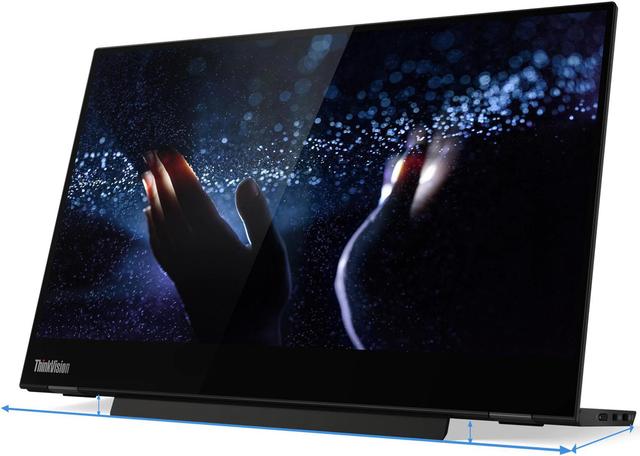
Lenovo ThinkVision M14t
Expert rating7.6 / 10
- Screen Size:
- 14 in
- Resolution:
- 1920x1080
- Panel Tech:
- IPS Touchscreen
- Refresh Rate:
- 60Hz
Consumercarts is reader-supported. Learn more
Disclaimer: The price and specification of the given product may differ from the actual product. Please confirm on the retailer's website before buying.
Manufacturer: Lenovo Last updated: 2026-09-12
Lenovo ThinkVision M14t Review
The Lenovo ThinkVision M14t is Lenovo's touchscreen portable monitor, a 14-inch USB-C display built to pair with ThinkPads for a second touch-enabled screen on the road.
We'd point business travelers here specifically for the touch layer, since it's genuinely useful for annotating documents or navigating Windows without reaching for a trackpad. At 0.56kg it's one of the lightest 14-inch portable monitors around, and Lenovo's folio case is sturdier than most of the cardboard-thin covers that ship with budget competitors.
Touch and Business Use
10-point touch works well for signing PDFs, marking up slides in a meeting, or using it as a second Windows Ink surface. It's not a drawing tablet substitute, palm rejection is basic and there's no stylus included, but for quick annotation tasks it beats reaching across to a laptop's own screen.
Weight and Build
At just over half a kilo, the M14t is noticeably easier to carry daily than the 15.6-inch options in this list. The folio case attaches magnetically and folds into a stand at two angles, and the single USB-C cable handles both video and enough power delivery to run the display without draining your laptop battery.
Comparison to Alternatives
Against the ViewSonic TD1655, another touch portable monitor, the Lenovo is smaller and lighter but the ViewSonic has a bigger 15.6-inch panel if screen real estate matters more than portability. Against the ASUS ZenScreen MB16AHP, the Lenovo skips the built-in battery entirely, so it's a worse pick for outlet-free travel but a better pick if touch input is the priority.
Our verdict
Reviewed by Burooj Alam. Rated by us, not by users.
Expert rating7.6 / 10
The lightest touchscreen portable monitor in this roundup and a natural companion for ThinkPad road warriors.
Best for
- ThinkPad users wanting a matching touch second screen
- Frequent flyers prioritizing low weight above all else
- Professionals who annotate documents or slides on the go
Not for
- Anyone needing a built-in battery for outlet-free use
- Users wanting a larger 15.6-inch or bigger canvas
- Gamers or colour-critical editors
Specifications
What these specs meanIdentity
| Brand | Lenovo |
|---|---|
| Model Number | M14t |
| Series | ThinkVision M14t |
| Color Gamut | 72% NTSC |
Panel
| Panel Type | IPS |
|---|---|
| Screen Size | 14 in |
| Resolution | 1920 x 1080 (Full HD) |
| Aspect Ratio | 16:9 |
Performance
| Refresh Rate | 60 Hz |
|---|---|
| Response Time | 6 ms |
| Adaptive Sync | None |
Features
| HDR Support | No |
|---|---|
| Curved | No |
Screen geometry
| Native Resolution | 1920x1080 |
|---|---|
| Screen Curvature | Flat |
Motion
| Max Refresh Rate | 60 Hz |
|---|---|
| Response Time GtG | 6 ms |
HDR and brightness
| SDR Brightness | 300 nits |
|---|---|
| Native Contrast Ratio | 700:1 |
Color
| Color Depth | 6-bit + FRC |
|---|
Connectivity
| USB-C DP Alt Mode | Yes |
|---|---|
| USB-C Power Delivery | 65 W |
Stand, mounting and form
| Height Adjustment Range | 11 mm |
|---|---|
| Pivot To Portrait | Yes |
| VESA Mount Pattern | 100x100 |
FAQs
What are the key specifications of the Lenovo ThinkVision M14t (14-Inch 1080p Portable Touchscreen IPS/60Hz/6ms/USB-C Single Cable)?
Key specs for the Lenovo ThinkVision M14t: Resolution 1920 x 1080 (Full HD), Refresh Rate 60 Hz, Panel Type IPS, Response Time 6 ms, Response Time GtG 6 ms, Screen Size 14 in.
Will the Lenovo ThinkVision M14t (14-Inch 1080p Portable Touchscreen IPS/60Hz/6ms/USB-C Single Cable) work with my current setup?
The Lenovo ThinkVision M14t (14-Inch 1080p Portable Touchscreen IPS/60Hz/6ms/USB-C Single Cable) lists Panel Type is IPS (10-point touch). Check that against the hardware you already own before buying, since this is the field that most often decides whether a part fits.
Who is the Lenovo ThinkVision M14t (14-Inch 1080p Portable Touchscreen IPS/60Hz/6ms/USB-C Single Cable) best suited to?
Best suited to: ThinkPad users wanting a matching touch second screen; Frequent flyers prioritizing low weight above all else; Professionals who annotate documents or slides on the go.
What are the drawbacks of the Lenovo ThinkVision M14t (14-Inch 1080p Portable Touchscreen IPS/60Hz/6ms/USB-C Single Cable)?
Not the best fit for: Anyone needing a built-in battery for outlet-free use; Users wanting a larger 15.6-inch or bigger canvas; Gamers or colour-critical editors.
Compare and read more
- AOC 27G4X (27-Inch QHD IPS/180Hz/1ms MPRT/Standard Gamut/HDR10/Budget High-Refresh Value) vs Lenovo ThinkVision M14t (14-Inch 1080p Portable Touchscreen IPS/60Hz/6ms/USB-C Single Cable)
- Acer Nitro VG272U (27-Inch QHD IPS/180Hz/1ms VRB/90% DCI-P3/AMD FreeSync Premium Budget Pick) vs Lenovo ThinkVision M14t (14-Inch 1080p Portable Touchscreen IPS/60Hz/6ms/USB-C Single Cable)
- Acer Nitro XV320QU (32-Inch QHD IPS/170Hz/1ms VRB/95%+ DCI-P3/HDR10/KVM Switch) vs Lenovo ThinkVision M14t (14-Inch 1080p Portable Touchscreen IPS/60Hz/6ms/USB-C Single Cable)
- AOC I1601FWUX (15.6-Inch 1080p Portable IPS/60Hz/5ms/USB-C Single Cable/Ultra-Slim) vs Lenovo ThinkVision M14t (14-Inch 1080p Portable Touchscreen IPS/60Hz/6ms/USB-C Single Cable)
- Acer Predator XB273U (27-Inch QHD IPS/170Hz/1ms GTG/95% DCI-P3/G-Sync Compatible) vs Lenovo ThinkVision M14t (14-Inch 1080p Portable Touchscreen IPS/60Hz/6ms/USB-C Single Cable)
- Do KVM Switches Support 144Hz? What to Check Before You Buy
- Does a KVM Switch Work With Two Different Monitors?