
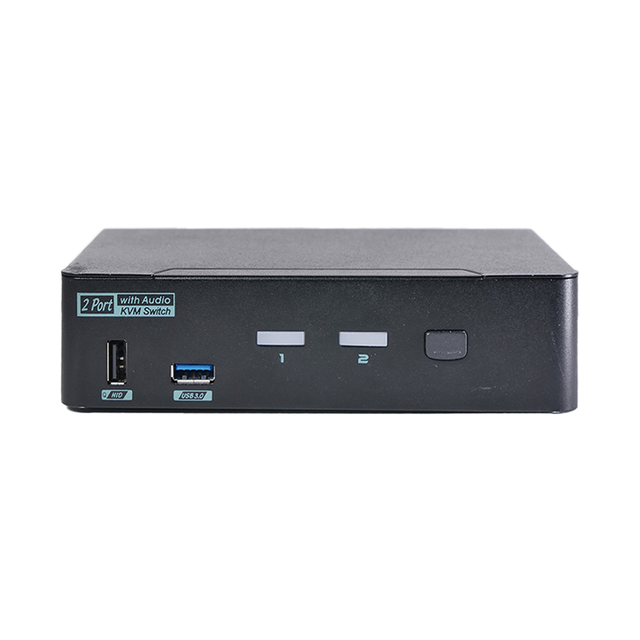
Level1Techs USB-C KVM Switch v3
Expert rating6 / 10
- Computers:
- 2
- Monitors:
- 1
- Video Out:
- DisplayPort 1.4
- Tested Max:
- 4K@90Hz
- Power Delivery:
- 60W per port
- EDID Emulation:
- No
- Price:
- $395.00
Consumercarts is reader-supported. Learn more
Disclaimer: The price and specification of the given product may differ from the actual product. Please confirm on the retailer's website before buying.
Manufacturer: Level1Techs Last updated: September 16, 2026
Where to buy
- Level1Techs StoreGo to store
Level1Techs USB-C KVM Switch v3 Review
The Level1Techs USB-C KVM Switch v3 switches two USB-C computers to one DisplayPort 1.4 monitor, with 2x USB 3.1 Gen 1 and 4x USB 2.0 HID ports, 3.5mm audio, keyboard hotkey switching and a 135W power supply delivering up to 60W of USB Power Delivery per port.
This is the most expensive switch in its class, it drives one monitor, it has no EDID emulation and no Ethernet. On a spec sheet it loses to a 179 dollar ATEN.
What you're buying is three things. Headroom up to 5K at 75Hz. Tolerance for peripherals that violate the USB HID spec, the ones that take down a 40 dollar switch. And direct engineering support from Wendell Wilson on the forum, which owners cite more than any feature.
Also worth knowing: the 135W on the box is the power brick, not what reaches your laptop. That's 60W per port, shared.
Specifications
Computers: 2, one USB-C cable each
Monitor: 1, DisplayPort 1.4 out
Tested good: 4K@90Hz, 1440p@120Hz
Not recommended beyond: 5K@75Hz
USB: 2x USB 3.1 Gen 1 (5Gbps), 4x USB 2.0 HID, 1A max per port
Power Delivery: 60W max per port, 135W budget shared
PD profiles: 5V/3A and 20V/3A only
EDID emulation: no
Switching: front button, keyboard hotkeys on HID ports
Audio: 3.5mm mic in, 3.5mm headphone out
Ethernet: none
Cables: not included
OEM base: Rextron CAAB-P3112
In the box
The switch, a 135W auto-sensing power supply and a US power cord. That's it.
No USB-C cables, no DisplayPort cable, no rack mount kit. Level1Techs sells the cables separately at 14 and 15 dollars.
So budget roughly 45 dollars on top for two USB-C cables and a DisplayPort cable. On a 395 dollar switch that stings less than it would elsewhere, but it's worth knowing before you order.
Cables must be under 4 metres and rated for both USB-C and DisplayPort. Wendell's own diagnosis of one owner's fault was total cable length.
About that 135W
135W is the power brick's output. It is not what reaches your laptop.
The chipset advertises exactly two Power Delivery profiles: 5V/3A, which is 15W, and 20V/3A, which is 60W. An owner measuring it found 60W maximum per port, and confirmed that attaching a bigger supply changes nothing.
The 135W is a budget split across both ports by a rear switch, with four preset modes. The most generous gives PC1 45W and PC2 60W.
So a 16-inch MacBook Pro or a gaming laptop will charge slowly, or not keep up under load at all.
The USB3 versus DisplayPort trade-off
This is the thing owners don't understand before buying, and it's the best reason to read past the spec sheet.
One USB-C cable cannot carry full DisplayPort 1.4 bandwidth and 5Gbps USB at the same time. There isn't room. Level1Techs says so plainly rather than hiding it.
So there's a rear switch. USB3 mode gives you 5Gbps but costs 25 percent of your DisplayPort bandwidth. USB2 mode frees the full display link but drops your USB to 480Mbps.
One owner running 5K had to sit in USB2 mode, which capped their USB Ethernet adapter at 45 to 50 Mbps instead of a gigabit.
No EDID emulation, and they say so
Level1Techs prints it in bold on their own product page: this KVM does not support monitor emulation.
Switch away and the monitor and KVM re-handshake. Your windows shuffle. They tell you that up front, which is more than UGREEN, CKL or most of the field do.
They also hand you the fixes. Windows 11: Settings, System, Display, Multiple Displays, tick "Remember windows locations based on monitor connection" and untick "Minimize windows when a monitor is disconnected".
Windows 10: PersistentWindows on GitHub. macOS: untick "Automatically rearrange Spaces based on most recent use" in Mission Control.
At 395 dollars, a 179 dollar ATEN having EDID and this not having it is the hardest thing to defend.
What you're actually paying for
USB 3.0 here is a hard physical cutover, not device remapping. That sounds like a technicality. It isn't.
Cheap switches emulate and remap USB devices, and Level1Techs names the failure mode directly: one misbehaving HID device can bring down the whole stack. That's why a flaky RGB keyboard takes your mouse out on a 40 dollar switch.
Put your gaming peripherals in the blue USB 3.0 ports and they get a clean cutover. The cost is that hotkey switching only works on the white HID ports.
The other thing you're paying for is Wendell answering forum threads personally, offering diagnostic cables and ferrite clamps. Owners cite that more than any spec.
Known incompatibilities
Level1Techs publishes its problems, which is rare and worth trusting.
Steam Deck will not fast charge. It wants 15V/3A, the switch offers 5V or 20V only, so the Deck falls back to 15W trickle. Confirmed as a chipset limitation with no fix.
Corsair keyboards work, but Corsair hotkey switching does not. Workaround is Corsair BIOS mode, which disables the keyboard's features.
QMK keyboards work with N-key rollover disabled. Wendell runs a Model M this way.
Macs enforce USB hub depth limits, and exceeding them causes random disconnections. That's macOS, not the switch.
Razer DeathAdder V2 needs a USB 3.0 port, and plugging it into a HID port first requires a KVM reboot.
What owners report
The evidence base here is almost entirely the Level1Techs forum. There are no independent reviews and no substantial Reddit threads on the v3.
Monitor wake is the most common complaint. One MacBook and Samsung ViewFinity owner gets the monitor powering on with no video on return, needing a physical unplug. Wendell pointed at total cable length under 10 feet. Thread ended unresolved.
Another reports a black screen switching back to PC1 at 4K60 on official Level1 cables. Also unresolved.
No firmware update mechanism exists for this model, so nothing gets patched.
That's a thin evidence base for a 395 dollar product. Weigh it accordingly.
Versus the competition
ATEN US3311 Duo Flex, 179 dollars: 4K@144Hz, 100W PD on port one, and Video DynaSync EDID. Winner on price, EDID and refresh. Loses on port two being 15W only and needing a software utility for hotkeys.
AV Access iDock C20, 247 to 260 dollars: dual 4K60 monitors, EDID emulation, 60W to both laptops, gigabit Ethernet. Winner on features per dollar. Loses on refresh ceiling and no hotkeys.
TESmart 3-port USB-C, 168 refurbished or 280 new: three computers, hotkeys, IR remote, mouse gestures, 5-year warranty on registration. Loses badly on PD, which is input port one only.
A plain USB-C dock and swapping the cable yourself: free, perfect signal integrity, ten seconds per switch. Genuinely right if you switch twice a day.
Price and availability
395 dollars, in stock, 60 units at time of writing. Sold direct only.
International orders from the store are currently suspended over tariffs and refused shipments. Overseas buyers have to use a form and prepay duties.
Cables are extra, around 45 dollars for the set.
The warranty is not stated on this product's page. The sibling Combo model says one year parts and labour, so probably the same, but we couldn't confirm it for this SKU.
At this price you are not buying spec sheet value. You're buying headroom, peripheral tolerance and access to the person who designed it.
FAQ: setup
What does my computer need?
A USB-C port doing both USB and DisplayPort Alt Mode. A USB-C data-only port will not work at all. Some desktops need Thunderbolt enabled in UEFI.
Do I need to buy cables?
Yes. None are included. Two USB-C and one DisplayPort, all under 4 metres and rated for both protocols.
Do hotkeys work?
On the white HID ports, yes. Leading code is Left-Ctrl, Right-Ctrl, Scroll Lock or Num Lock, then the port number. Peripherals in the blue USB 3.0 ports don't get hotkeys.
Why do my windows move when I switch?
No monitor emulation. Level1Techs says so openly and gives you the OS fixes above.
FAQ: performance
What resolution can it actually do?
Tested good at 4K@90Hz and 1440p@120Hz. Level1Techs does not recommend it past 5K@75Hz.
Will my laptop charge at full speed?
Up to 60W per port, and the 135W budget is shared between both. A thin-and-light will be fine. A 16-inch MacBook Pro or a gaming laptop will not keep up under load.
Does the other laptop keep charging when I'm not on it?
The rear Power Mode switch allocates watts to both ports independently of which is selected, so it should. Level1Techs never states it outright for this model.
Will my Steam Deck charge?
No, only at 15W. Documented and unfixable.
FAQ: buying
Is 395 dollars worth it?
If you run peripherals that break cheap switches, or you need past 4K60, or you value being able to reach the designer. Otherwise the ATEN US3311 at 179 does more on paper.
What's the cheapest thing that beats it on features?
ATEN US3311 at 179 dollars. EDID, 100W on one port, 4K@144Hz.
What if I need two monitors?
This does one. AV Access iDock C20 at around 250 does two with EDID and Ethernet.
Can I buy it outside the US?
Not through the store right now. International orders are suspended, form and prepaid duties only.
Our verdict
Reviewed by Burooj Alam. Rated by us, not by users.
Expert rating6 / 10
At 395 dollars this is the most expensive switch in its class and it drives one monitor, has no EDID emulation, no Ethernet and 60W of Power Delivery per port. A 179 dollar ATEN US3311 beats it on all four. What Level1Techs actually sells is headroom to 5K at 75Hz, USB 3.0 as a hard cutover so spec-violating gaming peripherals don't take down the stack, and a published incompatibility list plus direct support from the person who designed it. Those three things are real and nobody else offers them. They are not worth 216 dollars to most buyers. Buy it if a cheap KVM has already eaten your keyboard or your audio interface. Otherwise buy the ATEN.
Best for
- A cheap KVM has already failed you on a gaming keyboard, high-polling mouse or audio interface
- You need more than 4K60, up to 5K at 75Hz
- You value a published incompatibility list and direct support from the designer
- You want one USB-C cable per machine carrying video, data and charge
Not for
- You need two monitors. This drives one, and the AV Access iDock C20 does two for less
- You want EDID emulation. The 179 dollar ATEN US3311 has it and this does not
- You're charging a 16-inch MacBook Pro or a gaming laptop. 60W per port won't keep up
- You own a Steam Deck. It will not fast charge, and that's documented and unfixable
- You need Ethernet switched. Level1Techs deliberately leaves it out
- You're ordering from outside the US, where store orders are currently suspended
Specifications
What these specs meanHow much this switch can do compared with other desk KVM switches, rated from its specifications.
Identity
| Brand | Level1Techs |
|---|---|
| Model Number | USB-C KVM Switch v3 (with USB Power Delivery / 135watts) |
| Switching Method | Front push button; keyboard hotkeys on HID ports (Left-Ctrl, Right-Ctrl, Scroll Lock or Num Lock, then port number) |
Topology
| Computers Supported | 2 computers |
|---|---|
| Displays Per Computer | 1 displays |
| KVM Segment | Desk |
Video & Features
| Video Standard | DisplayPort 1.4 out |
|---|---|
| Max Resolution | Not recommended beyond 5K@75Hz; tested good at 4K@90Hz and 1440p@120Hz |
| USB Hub Ports | 2 |
| Audio Support | Yes |
Per display capability
| Max Resolution Single Display | 5120x2880 |
|---|---|
| Max Refresh At Max Resolution | 75 Hz |
| Max Refresh At 4K | 90 Hz |
Display continuity
| EDID Emulation | No |
|---|
USB peripheral switching
| USB Switching Speed | USB 3.0 5Gbps |
|---|
USB-C and power delivery
| Power Delivery Wattage | 60W maximum per port, 135W PSU budget shared across both, 4 allocation modes |
|---|
Physical and power
| External Power Required | Yes |
|---|---|
| Power Supply | 135W auto-sensing PSU, 19.5V DC, included |
In the box and price
| Price | 395.00 USD |
|---|---|
| Included Cables | None. USB-C and DisplayPort cables sold separately |
FAQs
What are the key specifications of the Level1Techs USB-C KVM Switch v3 (USB-C / 2 Computers / 1 Monitor / DisplayPort 1.4 / 135W PSU)?
Key specs for the Level1Techs USB-C KVM Switch v3: USB Hub Ports 2x USB 3.1 Gen 1 (5Gbps) + 4x USB 2.0 HID, Max Resolution Not recommended beyond 5K@75Hz; tested good at 4K@90Hz and 1440p@120Hz, Max Resolution Per Display 5120x2880, Max Refresh At Max Resolution 75 Hz, Connection Type USB-C (USB + DisplayPort Alt Mode required), USB Version USB 3.1 Gen 1 (5Gbps).
Who is the Level1Techs USB-C KVM Switch v3 (USB-C / 2 Computers / 1 Monitor / DisplayPort 1.4 / 135W PSU) best suited to?
Best suited to: A cheap KVM has already failed you on a gaming keyboard, high-polling mouse or audio interface; You need more than 4K60, up to 5K at 75Hz; You value a published incompatibility list and direct support from the designer; You want one USB-C cable per machine carrying video, data and charge.
What are the drawbacks of the Level1Techs USB-C KVM Switch v3 (USB-C / 2 Computers / 1 Monitor / DisplayPort 1.4 / 135W PSU)?
You need two monitors. This drives one, and the AV Access iDock C20 does two for less. You want EDID emulation. The 179 dollar ATEN US3311 has it and this does not. You're charging a 16-inch MacBook Pro or a gaming laptop. 60W per port won't keep up. You own a Steam Deck. It will not fast charge, and that's documented and unfixable. You need Ethernet switched. Level1Techs deliberately leaves it out. You're ordering from outside the US, where store orders are currently suspended.
Compare and read more
- Adder ALIF1002P (Network DVI Extender Transmitter & Receiver) vs Level1Techs USB-C KVM Switch v3 (USB-C / 2 Computers / 1 Monitor / DisplayPort 1.4 / 135W PSU)
- Adder AdderLink IPEPS (IPEPS) (1 Server / IP-Based Remote KVM over IP / Single-Port Extender) vs Level1Techs USB-C KVM Switch v3 (USB-C / 2 Computers / 1 Monitor / DisplayPort 1.4 / 135W PSU)
- Adder ADDERView PRO (AV4PRO-DVI) (4 Computers / DVI / Secure Desktop KVM) vs Level1Techs USB-C KVM Switch v3 (USB-C / 2 Computers / 1 Monitor / DisplayPort 1.4 / 135W PSU)
- Adder AdderView PRO AV4PRO (4-8 Computers / 1-4 Monitors / DVI-VGA / Modular Multi-Head) vs Level1Techs USB-C KVM Switch v3 (USB-C / 2 Computers / 1 Monitor / DisplayPort 1.4 / 135W PSU)
- Adder ALIF1104T (HDMI KVM-over-IP Transmitter over 1GbE) vs Level1Techs USB-C KVM Switch v3 (USB-C / 2 Computers / 1 Monitor / DisplayPort 1.4 / 135W PSU)
- Best KVM Switches (2026 Buying Guide)