
Consumercarts is reader-supported. Learn more
Adder Technology Adder AdderView PRO AV4PRO vs Level1Techs USB-C KVM Switch v3: Comparison
Adder Technology Adder AdderView PRO vs Level1Techs USB-C KVM Switch v3: the max resolution single display difference
Max resolution single display is where these two genuinely part company, Adder Technology Adder AdderView PRO 1920x1200 against Level1Techs USB-C KVM Switch v3 5120x2880, a 84% lead for Level1Techs USB-C KVM Switch v3.
Who each one is for
The Adder Technology Adder AdderView PRO is the one to take for broadcast and security operations needing rack-mounted, RS232-controllable switching, though it is not built for single-desk users who only need to switch between two computers and buyers needing HDMI or DisplayPort instead of DVI/VGA. It is equally the pick for control room and NOC operators managing 4-8 machines across multiple monitors. Avoid it for budget shoppers, since modular head configurations cost more than a fixed 4-port switch. Buy the Level1Techs USB-C KVM Switch v3 for you need more than 4K60, up to 5K at 75Hz. The same goes for A cheap KVM has already failed you on a gaming keyboard, high-polling mouse or audio interface. It is the wrong buy for you need two monitors. This drives one, and the AV Access iDock C20 does two for less. Our rating of the Adder Technology Adder AdderView PRO (8/10): A serious modular KVM built for control rooms that need to scale past 4 computers, overkill for a simple desk setup.
Frequently asked questions
Do the Adder Technology Adder AdderView PRO and Level1Techs USB-C KVM Switch v3 differ on computers supported?
Yes. Computers Supported reads 4 computers, cascadable to 8 on the Adder Technology Adder AdderView PRO versus 2 computers on the Level1Techs USB-C KVM Switch v3.
Is the USB Hub Ports the same on the Adder Technology Adder AdderView PRO and Level1Techs USB-C KVM Switch v3?
It is. Both are listed at 2, so it is not a reason to pick one over the other.

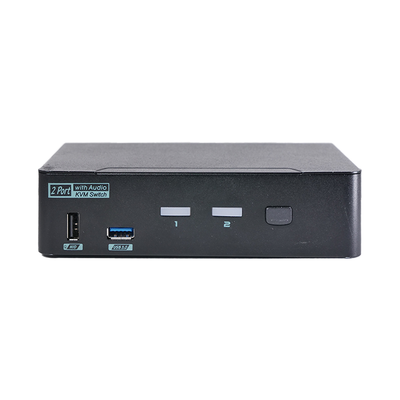
Specs and benchmarks
Capability Score
- Adder Technology Adder AdderView PRO AV4PRO
- –
- Level1Techs USB-C KVM Switch v3
- 5.0/10
These are different kinds of KVM, scored on separate scales, so the two scores can't be compared directly.
Brand
- Adder Technology Adder AdderView PRO AV4PRO
- Adder
- Level1Techs USB-C KVM Switch v3
- Level1Techs
Computers Supported
- Adder Technology Adder AdderView PRO AV4PRO
- 4 computers, cascadable to 8
- Level1Techs USB-C KVM Switch v3
- 2 computers
Model Number
- Adder Technology Adder AdderView PRO AV4PRO
- AV4PRO
- Level1Techs USB-C KVM Switch v3
- USB-C KVM Switch v3 (with USB Power Delivery / 135watts)
Displays Per Computer
- Adder Technology Adder AdderView PRO AV4PRO
- 1 displays
- Level1Techs USB-C KVM Switch v3
- 1 displays
Switching Method
- Adder Technology Adder AdderView PRO AV4PRO
- Front-panel button, hotkey, RS232 remote
- Level1Techs USB-C KVM Switch v3
- Front push button; keyboard hotkeys on HID ports (Left-Ctrl, Right-Ctrl, Scroll Lock or Num Lock, then port number)
Video Standard
- Adder Technology Adder AdderView PRO AV4PRO
- DVI-I / VGA
- Level1Techs USB-C KVM Switch v3
- DisplayPort 1.4 out
Max Resolution
- Adder Technology Adder AdderView PRO AV4PRO
- 1920x1200 per head-84%
- Level1Techs USB-C KVM Switch v3
- Not recommended beyond 5K@75Hz; tested good at 4K@90Hz and 1440p@120HzBest
USB Hub Ports
- Adder Technology Adder AdderView PRO AV4PRO
- 2
- Level1Techs USB-C KVM Switch v3
- 2
KVM Segment
- Adder Technology Adder AdderView PRO AV4PRO
- Desk
- Level1Techs USB-C KVM Switch v3
- Desk
Audio Support
- Adder Technology Adder AdderView PRO AV4PRO
- Yes
- Level1Techs USB-C KVM Switch v3
- Yes
Max Resolution Single Display
- Adder Technology Adder AdderView PRO AV4PRO
- 1920x1200-84%
- Level1Techs USB-C KVM Switch v3
- 5120x2880Best


Which one should you pick?
Choose Adder Technology Adder AdderView PRO AV4PRO if you want the higher USB hub ports (2 vs 2).
Choose Level1Techs USB-C KVM Switch v3 if you want the higher max resolution (Not recommended beyond 5K@75Hz; tested good at 4K@90Hz and 1440p@120Hz vs 1920x1200 per head) and the higher max resolution single display (5120x2880 vs 1920x1200).
Price comparison
| Retailer | Adder Technology Adder AdderView PRO AV4PRO | Level1Techs USB-C KVM Switch v3 |
|---|---|---|
| Level1Techs Store | $395.00 View on Level1Techs Store |
Disclaimer: The price and specification of the given product may differ from the actual product. Please confirm on the retailer's website before buying.
Verdict
Adder Technology Adder AdderView PRO AV4PRO
8 / 10 Expert Rating
A serious modular KVM built for control rooms that need to scale past 4 computers, overkill for a simple desk setup.
Level1Techs USB-C KVM Switch v3
6 / 10 Expert Rating
At 395 dollars this is the most expensive switch in its class and it drives one monitor, has no EDID emulation, no Ethernet and 60W of Power Delivery per port.
More comparisons in KVM Switches
- Adder Technology Adder AdderView PRO AV4PRO vs UGREEN DisplayPort KVM Switch 2-in-1-Out
- Adder Technology Adder AdderView PRO AV4PRO vs SmartAVI SM-EDPN-4D-S
- Adder Technology Adder AdderView PRO AV4PRO vs Adder Technology ADDERLink ALIF2112T
- Adder Technology Adder AdderView PRO AV4PRO vs CKL CKL-62TH
- Adder Technology Adder AdderView PRO AV4PRO vs StarTech.com StarTech SV831DUSBUK
- Adder Technology Adder AdderView PRO AV4PRO vs SIIG 2x2 Dual View USB HDMI KVM Switch