
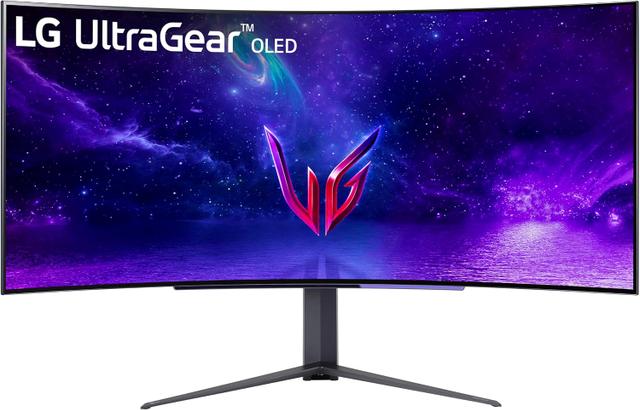
LG UltraGear 45GR95QE-B
Expert rating9 / 10
- Panel:
- 45" Curved WOLED
- Resolution:
- 3440x1440
- Refresh Rate:
- 240Hz
Consumercarts is reader-supported. Learn more
Disclaimer: The price and specification of the given product may differ from the actual product. Please confirm on the retailer's website before buying.
Manufacturer: LG Last updated: 2026-09-12
LG UltraGear 45GR95QE-B Review
LG UltraGear 45GR95QE-B 45-inch curved ultrawide WOLED gaming monitor with 240Hz refresh, 0.03ms response and 800R curvature for an immersive field of view.
This is LG's flagship ultrawide gaming statement piece, an 800R-curved 45-inch WOLED panel that wraps far enough around your peripheral vision to genuinely change how racing and flight sims feel, while still hitting a 240Hz refresh rate that most 45-inch panels can't touch. It's an expensive, desk-dominating monitor, but for sim racers and open-world explorers it delivers an immersion level flat 27 and 32-inch monitors simply can't match.
Immersion at a Real Cost
The sheer size and curvature demand a deep desk and careful seating distance, but for genre fans this is one of the few monitors where the marketing claim of 'immersive' is actually earned.
Comparison to Alternatives
Compared to the Corsair Xeneon Flex 45WQHD240, both are 45-inch 240Hz WOLED ultrawides, but LG's fixed 800R curve trades Corsair's bendable flat-to-curved flexibility for a simpler, sturdier stand design. Against the Samsung Odyssey Neo G9 G95NC, the LG offers OLED contrast and a tighter curve at the cost of Samsung's even wider 57-inch dual-UHD canvas.
Our verdict
Reviewed by Burooj Alam. Rated by us, not by users.
Expert rating9 / 10
The best pure-immersion ultrawide gaming monitor on the market for sim and open-world fans who can afford it.
Best for
- Sim racing and flight sim enthusiasts wanting wraparound FOV
- High-end gaming rigs paired with a top-tier GPU
- Buyers wanting the biggest OLED ultrawide without going dual-UHD
Not for
- Small-desk setups without adequate viewing distance
- Productivity users who need flat edges for spreadsheet alignment
- Budget-conscious shoppers
Specifications
What these specs meanIdentity
| Brand | LG |
|---|---|
| Model Number | 45GR95QE-B |
| Series | UltraGear |
| Color Gamut | 98.5% DCI-P3 |
Panel
| Panel Type | WOLED |
|---|---|
| Screen Size | 45 in |
| Resolution | 3440 x 1440 (UWQHD) |
| Aspect Ratio | 21:9 |
Performance
| Refresh Rate | 240 Hz |
|---|---|
| Response Time | 0.03ms (GtG) |
| Adaptive Sync | NVIDIA G-Sync, AMD FreeSync Premium Pro |
Features
| HDR Support | Yes |
|---|---|
| Curved | Yes |
Screen geometry
| Native Resolution | 3440x1440 |
|---|---|
| Screen Curvature | 800R |
Motion
| Max Refresh Rate | 240 Hz |
|---|
HDR and brightness
| HDR Certification | DisplayHDR True Black 400 |
|---|
Color
| DCI-P3 Coverage | 98.5 % |
|---|
FAQs
What are the key specifications of the LG UltraGear 45GR95QE-B (45-Inch Curved Ultrawide WOLED/240Hz/0.03ms/98.5% DCI-P3/DisplayHDR True Black 400)?
Key specs for the LG UltraGear 45GR95QE-B: Resolution 3440 x 1440 (UWQHD), Refresh Rate 240 Hz, Panel Type WOLED, Response Time 0.03ms (GtG), HDR Formats VESA DisplayHDR True Black 400, HDR Support Yes.
Will the LG UltraGear 45GR95QE-B (45-Inch Curved Ultrawide WOLED/240Hz/0.03ms/98.5% DCI-P3/DisplayHDR True Black 400) work with my current setup?
The LG UltraGear 45GR95QE-B (45-Inch Curved Ultrawide WOLED/240Hz/0.03ms/98.5% DCI-P3/DisplayHDR True Black 400) lists Panel Type is WOLED. Check that against the hardware you already own before buying, since this is the field that most often decides whether a part fits.
Who is the LG UltraGear 45GR95QE-B (45-Inch Curved Ultrawide WOLED/240Hz/0.03ms/98.5% DCI-P3/DisplayHDR True Black 400) best suited to?
Best suited to: Sim racing and flight sim enthusiasts wanting wraparound FOV; High-end gaming rigs paired with a top-tier GPU; Buyers wanting the biggest OLED ultrawide without going dual-UHD.
What are the drawbacks of the LG UltraGear 45GR95QE-B (45-Inch Curved Ultrawide WOLED/240Hz/0.03ms/98.5% DCI-P3/DisplayHDR True Black 400)?
Not the best fit for: Small-desk setups without adequate viewing distance; Productivity users who need flat edges for spreadsheet alignment; Budget-conscious shoppers.
Compare and read more
- AOC AGON PRO AG276QSG2 (27-Inch QHD Mini-LED IPS/300Hz/1ms/98% DCI-P3/G-Sync Ultimate/1152-Zone Backlight) vs LG UltraGear 45GR95QE-B (45-Inch Curved Ultrawide WOLED/240Hz/0.03ms/98.5% DCI-P3/DisplayHDR True Black 400)
- Acer Predator XB273U GX (27-Inch QHD IPS/270Hz/0.5ms/95% DCI-P3/HDR10/NVIDIA Reflex Latency Analyzer) vs LG UltraGear 45GR95QE-B (45-Inch Curved Ultrawide WOLED/240Hz/0.03ms/98.5% DCI-P3/DisplayHDR True Black 400)
- Acer Predator XB273U (27-Inch QHD IPS/170Hz/1ms GTG/95% DCI-P3/G-Sync Compatible) vs LG UltraGear 45GR95QE-B (45-Inch Curved Ultrawide WOLED/240Hz/0.03ms/98.5% DCI-P3/DisplayHDR True Black 400)
- Acer Nitro XV320QU (32-Inch QHD IPS/170Hz/1ms VRB/95%+ DCI-P3/HDR10/KVM Switch) vs LG UltraGear 45GR95QE-B (45-Inch Curved Ultrawide WOLED/240Hz/0.03ms/98.5% DCI-P3/DisplayHDR True Black 400)
- AOC 27G4X (27-Inch QHD IPS/180Hz/1ms MPRT/Standard Gamut/HDR10/Budget High-Refresh Value) vs LG UltraGear 45GR95QE-B (45-Inch Curved Ultrawide WOLED/240Hz/0.03ms/98.5% DCI-P3/DisplayHDR True Black 400)
- Best Monitor for Competitive Gaming (240Hz+) in 2026
- HDR400 vs HDR True Black 400: Why the Same Number Means Different Things
- OLED vs Mini-LED Monitor: Which Is Better for Gaming