
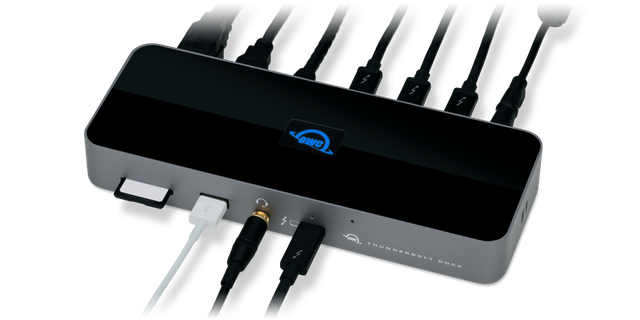
OWC Thunderbolt Dock
Expert rating8 / 10
- Connection Type:
- Thunderbolt 4
- Total Ports:
- 14
- Max Display Support:
- Dual 4K
- Power Delivery:
- 96W
Consumercarts is reader-supported. Learn more
Disclaimer: The price and specification of the given product may differ from the actual product. Please confirm on the retailer's website before buying.
Manufacturer: OWC Last updated: 2026-10-10
OWC Thunderbolt Dock Review
The OWC Thunderbolt Dock packs 11 ports including four Thunderbolt 4 ports, an SD card reader, Gigabit Ethernet, and 96W host charging into a Thunderbolt 4 dock built by a storage-focused manufacturer.
OWC made its name in Mac storage and memory upgrades before building docks, and it shows here: the Thunderbolt Dock has an SD UHS-II card reader built in, aimed at photographers and videographers who shuttle memory cards all day. USB-A ports keep older peripherals alive, and video goes out over the Thunderbolt 4 ports, so you will need USB-C or Thunderbolt display cables or adapters.
Comparison to Alternatives
Against the catalog's OWC Thunderbolt 5 Hub, the Hub is the newer, faster sibling with 140W charging and 2.5GbE, while the Thunderbolt Dock trades some speed for a lower price and the dual SD/microSD readers the Hub doesn't have. Against the CalDigit TS4, the TS4 offers more total ports at a similar price, but neither CalDigit dock includes a memory card reader, which is the OWC's clearest niche advantage for creative professionals.
Our verdict
Reviewed by Burooj Alam. Rated by us, not by users.
Expert rating8 / 10
A strong Thunderbolt 4 dock for creative professionals who need built-in card readers.
Best for
- Photographers and videographers who import from SD cards daily
- Mac creative workstations needing dual 4K output and fast storage links
- Users who want four Thunderbolt 4 ports and 96W host charging from one cable
Not for
- Buyers who need microSD or built-in HDMI or DisplayPort outputs
- Setups requiring more than dual external displays
- Anyone needing 2.5GbE or faster wired networking
Specifications
What these specs meanIdentity
| Brand | OWC |
|---|---|
| Model Number | Thunderbolt Dock (11-Port, OWCTB4DOCK) |
| Connection Type | Thunderbolt 4 |
| Port Configuration | 4x TB4 (1 host, 3 downstream, 15W), 2x USB-A 10Gbps, 1x USB-A 2.0, SD UHS-II, GbE, 3.5mm combo audio |
| Max Display Support | Dual 4K |
Host connection
| Host Interface | Thunderbolt 4 |
|---|---|
| Thunderbolt Version | 4 |
Ports & Power
| Max Display Resolution | Dual 4K@60Hz or single 8K@60Hz |
|---|---|
| Total Ports | 11 |
| Ethernet | Yes |
Host power
| Host Power Delivery | 96 W |
|---|---|
| Bus Powered | No |
Display engine
| Video Path | Thunderbolt Native |
|---|---|
| DisplayLink Driver Required | No |
| Max Displays Windows | 2 |
| Max Displays Mac Base | 1 |
| Max Displays Mac Pro Max | 2 |
Display output
| Max Single Display Resolution | 8K |
|---|---|
| Max Single Display Refresh | 60 Hz |
| Max Dual Display Resolution | 4K |
| Max Dual Display Refresh | 60 Hz |
Video ports
| HDMI Port Count | 0 |
|---|---|
| HDMI Version | None |
| DisplayPort Port Count | 0 |
| DisplayPort Version | None |
Data ports
| Downstream Thunderbolt Port Count | 3 |
|---|---|
| USB-A Port Count | 3 |
| Max USB Data Rate | 10Gbps |
Downstream power
| Downstream Thunderbolt Port Power | 15 W |
|---|
Network and storage
| Ethernet Speed | 1GbE |
|---|---|
| SD Card Slot | UHS-II |
| microSD Card Slot | None |
Audio and control
| Audio Jack Configuration | Single Combo |
|---|
Compatibility and physical
| macOS Supported | Yes |
|---|---|
| Windows Supported | Yes |
FAQs
What are the key specifications of the OWC Thunderbolt Dock (Thunderbolt 4 / 11 Ports / 96W Host Charging / Dual 4K@60Hz / Mac/Windows / ~$300)?
Key specs for the OWC Thunderbolt Dock: Power Delivery 96 W, Host Power Delivery 96 W, Ethernet Yes, Ethernet Speed 1GbE, Connection Type Thunderbolt 4, Port Configuration 4x TB4 (1 host, 3 downstream, 15W), 2x USB-A 10Gbps, 1x USB-A 2.0, SD UHS-II, GbE, 3.5mm combo audio.
Who is the OWC Thunderbolt Dock (Thunderbolt 4 / 11 Ports / 96W Host Charging / Dual 4K@60Hz / Mac/Windows / ~$300) best suited to?
Best suited to: Photographers and videographers who import from SD cards daily; Mac creative workstations needing dual 4K output and fast storage links; Users who want four Thunderbolt 4 ports and 96W host charging from one cable.
What are the drawbacks of the OWC Thunderbolt Dock (Thunderbolt 4 / 11 Ports / 96W Host Charging / Dual 4K@60Hz / Mac/Windows / ~$300)?
Not the best fit for: Buyers who don't need a card reader and want to save money elsewhere; Setups requiring more than dual external displays; Anyone needing 2.5GbE or faster wired networking.
Compare and read more
- Dell WD22TB4 (Thunderbolt 4 / 130W Power Delivery on Dell Systems / Quad Display / Gigabit Ethernet) vs OWC Thunderbolt Dock (Thunderbolt 4 / 11 Ports / 96W Host Charging / Dual 4K@60Hz / Mac/Windows)
- OWC Thunderbolt Dock (Thunderbolt 4 / 11 Ports / 96W Host Charging / Dual 4K@60Hz / Mac/Windows) vs Sonnet Echo 11 Thunderbolt 4 Dock (Thunderbolt 4 / 11 Ports / 90W Host Charging / Dual 4K@60Hz / Mac/Windows)
- OWC Thunderbolt Dock (Thunderbolt 4 / 11 Ports / 96W Host Charging / Dual 4K@60Hz / Mac/Windows) vs UGREEN Revodok Pro 209 (USB-C DisplayLink Dock, 9 Ports, 85W Charging)
- Anker 555 8-in-1 Hub (USB-C / 8 Ports / Single External Monitor / Ethernet / Best Value) vs OWC Thunderbolt Dock (Thunderbolt 4 / 11 Ports / 96W Host Charging / Dual 4K@60Hz / Mac/Windows)
- Anker 777 Thunderbolt Docking Station (Apex, 12-in-1 / Triple 4K / Single 8K / Dual HDMI) vs OWC Thunderbolt Dock (Thunderbolt 4 / 11 Ports / 96W Host Charging / Dual 4K@60Hz / Mac/Windows)
- Best Docking Station for a Single-Cable Laptop Setup
- EDID Emulation Explained: Why Your Monitor Resets When You Switch