
Consumercarts is reader-supported. Learn more
Dell WD22TB4 vs OWC Thunderbolt Dock: Comparison
Dell WD22TB4 vs OWC Thunderbolt Dock host power delivery compared
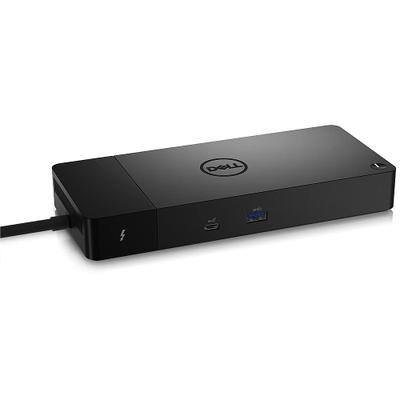
Start with host power delivery, because it is the widest measured gap between them: Dell WD22TB4 90 W against OWC Thunderbolt Dock 96 W, 6% in favour of OWC Thunderbolt Dock. Displayport port count is not the same on both, 2 on the Dell WD22TB4 versus 0 on the OWC Thunderbolt Dock. They differ on displayport version too, 1.4 on the Dell WD22TB4 versus None on the OWC Thunderbolt Dock.
Dell WD22TB4 vs OWC Thunderbolt Dock: which one fits your build
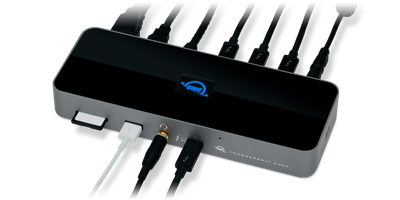
Take the Dell WD22TB4 for IT fleet deployments across mixed Dell and non-Dell laptops needing four-display support. Avoid it for users on Thunderbolt 5 hardware wanting to use its full bandwidth, this tops out at Thunderbolt 4 speeds. The OWC Thunderbolt Dock suits photographers and videographers who import from SD cards daily, though it is not the pick for buyers who need microSD or built-in HDMI or DisplayPort outputs and setups requiring more than dual external displays. The same goes for Mac creative workstations needing dual 4K output and fast storage links. Our rating of the Dell WD22TB4 (8/10): A fleet-focused Thunderbolt 4 dock whose four-display support outruns most single-user alternatives. Our rating of the OWC Thunderbolt Dock (8/10): A strong Thunderbolt 4 dock for creative professionals who need built-in card readers.
What Dell WD22TB4 and OWC Thunderbolt Dock have in common
Where they agree, they agree completely, ethernet, ethernet speed, host interface, thunderbolt version and bus powered included, so the decision does not turn on any of those. They match on 3 further specifications as well.
Frequently asked questions
Do the Dell WD22TB4 and OWC Thunderbolt Dock differ on connection type?
Yes. Connection Type reads Thunderbolt 4 / USB-C DisplayPort Alt Mode on the Dell WD22TB4 versus Thunderbolt 4 on the OWC Thunderbolt Dock.
Is the USB-A Port Count the same on the Dell WD22TB4 and OWC Thunderbolt Dock?
It is. Both are listed at 3, so it is not a reason to pick one over the other.
Specs and benchmarks
Brand
- Dell WD22TB4
- Dell
- OWC Thunderbolt Dock
- OWC
Connection Type
- Dell WD22TB4
- Thunderbolt 4 / USB-C DisplayPort Alt Mode
- OWC Thunderbolt Dock
- Thunderbolt 4
Host Interface
- Dell WD22TB4
- Thunderbolt 4
- OWC Thunderbolt Dock
- Thunderbolt 4
Model Number
- Dell WD22TB4
- WD22TB4
- OWC Thunderbolt Dock
- Thunderbolt Dock (11-Port, OWCTB4DOCK)
Port Configuration
- Dell WD22TB4
- 2x Thunderbolt 4 downstream, 2x DisplayPort 1.4, 1x HDMI 2.0, 1x USB-C 10Gbps with DP 1.4 Alt Mode, 1x USB-C 10Gbps, 3x USB-A 5Gbps, Gigabit Ethernet
- OWC Thunderbolt Dock
- 4x TB4 (1 host, 3 downstream, 15W), 2x USB-A 10Gbps, 1x USB-A 2.0, SD UHS-II, GbE, 3.5mm combo audio
Thunderbolt Version
- Dell WD22TB4
- 4
- OWC Thunderbolt Dock
- 4
Max Display Support
- Dell WD22TB4
- Up to 4 external displays
- OWC Thunderbolt Dock
- Dual 4K
Host Power Delivery
- Dell WD22TB4
- 90 W-6%
- OWC Thunderbolt Dock
- 96 W
Ethernet
- Dell WD22TB4
- Yes
- OWC Thunderbolt Dock
- Yes
Bus Powered
- Dell WD22TB4
- No
- OWC Thunderbolt Dock
- No
Max Displays Windows
- Dell WD22TB4
- 4
- OWC Thunderbolt Dock
- 2
HDMI Port Count
- Dell WD22TB4
- 1
- OWC Thunderbolt Dock
- 0
HDMI Version
- Dell WD22TB4
- 2.0
- OWC Thunderbolt Dock
- None
DisplayPort Port Count
- Dell WD22TB4
- 2
- OWC Thunderbolt Dock
- 0
DisplayPort Version
- Dell WD22TB4
- 1.4
- OWC Thunderbolt Dock
- None
Downstream Thunderbolt Port Count
- Dell WD22TB4
- 2
- OWC Thunderbolt Dock
- 3
USB-A Port Count
- Dell WD22TB4
- 3
- OWC Thunderbolt Dock
- 3
Max USB Data Rate
- Dell WD22TB4
- 10Gbps
- OWC Thunderbolt Dock
- 10Gbps
Ethernet Speed
- Dell WD22TB4
- 1GbE
- OWC Thunderbolt Dock
- 1GbE
Windows Supported
- Dell WD22TB4
- Yes
- OWC Thunderbolt Dock
- Yes
OS Compatibility
- Dell WD22TB4
- Windows 10/11, Ubuntu 20.04+, ChromeOS M107+
- OWC Thunderbolt Dock
- macOS 11.1+, Windows 10+


Which one should you pick?
Choose Dell WD22TB4 if you already have it on hand or find it at a lower price.
Choose OWC Thunderbolt Dock if you want the higher host power delivery (96 W vs 90 W).
Price comparison
| Retailer | Dell WD22TB4 | OWC Thunderbolt Dock |
|---|---|---|
| Newegg | View on Newegg | |
| Consumercarts listing | $300.00 View on Consumercarts listing |
Disclaimer: The price and specification of the given product may differ from the actual product. Please confirm on the retailer's website before buying.
Verdict
Dell WD22TB4
8 / 10 Expert Rating
A fleet-focused Thunderbolt 4 dock whose four-display support outruns most single-user alternatives.
OWC Thunderbolt Dock
8 / 10 Expert Rating
A strong Thunderbolt 4 dock for creative professionals who need built-in card readers.