
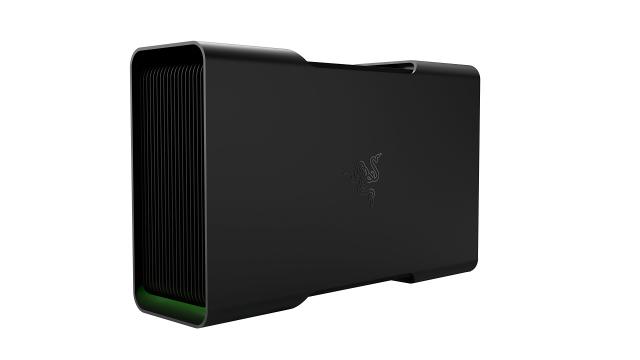
Razer Core V2
Expert rating6 / 10
- Connection:
- Thunderbolt 3
- PSU:
- 500W
- Host Charging:
- 100W
- GPU Fit:
- Up to 310mm, dual-slot
Consumercarts is reader-supported. Learn more
Disclaimer: The price and specification of the given product may differ from the actual product. Please confirm on the retailer's website before buying.
Manufacturer: Razer Last updated: 2026-09-12
Where to buy
- AmazonGo to store
Razer Core V2 Review
If you're looking at the original Razer Core V2 eGPU enclosure and wondering whether the 2017 Thunderbolt 3 box is still worth buying used or refurbished for a full-size desktop GPU,
we'd say it's a fine cheap way into eGPU if you already own the laptop and cable, but it's a discontinued product running Thunderbolt 3 bandwidth, so budget for a used unit and don't expect anywhere near the 850W Sonnet or Thunderbolt 5 Razer Core X V2's headroom.
What It Actually Is
The Core V2 was Razer's second-generation eGPU box, launched alongside the original Blade Stealth in 2017. It's a 500W-PSU aluminum enclosure with a single PCIe x16 slot, four USB 3.0 ports, and Gigabit Ethernet on the back, plus 100W of USB-C power delivery so a Thunderbolt 3 laptop can charge while gaming. There's no RGB, no Chroma lighting, and no fancy chassis design; it's a plain black box that does one job.
Comparison to Alternatives
This is the enclosure the Razer Core X Chroma and Razer Core X V2 eventually replaced, and the difference shows. The Core X Chroma bumped the PSU to 700W and added RGB underglow; the Core X V2 jumped to Thunderbolt 5 with an 850W PSU and 140W of charging. If you can find a Core V2 used for under $100, it's a cheap way to run a mid-range card on an older Thunderbolt 3 Mac or Windows laptop, but anyone buying new should look at the Razer Core X Chroma or a Sonnet eGFX Breakaway Box 650 instead.
Our verdict
Reviewed by Burooj Alam. Rated by us, not by users.
Expert rating6 / 10
A capable but dated TB3 box. Fine secondhand, not worth seeking out new.
Best for
- Owners of an older Thunderbolt 3 MacBook Pro or Blade Stealth wanting a budget used eGPU box
- Anyone who already has a compatible mid-range GPU and just needs an enclosure
- Buyers who don't care about RGB and just want 100W of laptop charging built in
Not for
- Anyone buying new in 2026, since it's long discontinued and Thunderbolt 3 caps bandwidth well below TB5 boxes
- RTX 4080/4090-class cards that want more than 375W of GPU power
- Buyers who want current warranty support from Razer
Specifications
What these specs meanIdentity
| Brand | Razer |
|---|---|
| Model Number | Core V2 |
Connectivity
| Connection Standard | Thunderbolt 3 |
|---|---|
| Extra Ports | 4 |
Power & Compatibility
| PSU Wattage | 500 W |
|---|---|
| Host Power Delivery | 100 W |
| Max GPU Length | 310 mm |
| Cooling Type | Active Fan |
FAQs
What are the key specifications of the Razer Core V2 (Thunderbolt 3 eGPU Enclosure / 500W PSU / 100W Laptop Charging / Original Full-Size GPU Box, Pre-Chroma)?
Key specs for the Razer Core V2: Connection Standard Thunderbolt 3, Extra Ports 4x USB 3.0 Type-A, 1x Gigabit Ethernet, Cooling Type Active Fan, GPU Compatibility GTX 10-series through RTX 20-series, dual-slot cards.
Who is the Razer Core V2 (Thunderbolt 3 eGPU Enclosure / 500W PSU / 100W Laptop Charging / Original Full-Size GPU Box, Pre-Chroma) best suited to?
Best suited to: Owners of an older Thunderbolt 3 MacBook Pro or Blade Stealth wanting a budget used eGPU box; Anyone who already has a compatible mid-range GPU and just needs an enclosure; Buyers who don't care about RGB and just want 100W of laptop charging built in.
What are the drawbacks of the Razer Core V2 (Thunderbolt 3 eGPU Enclosure / 500W PSU / 100W Laptop Charging / Original Full-Size GPU Box, Pre-Chroma)?
Not the best fit for: Anyone buying new in 2026, since it's long discontinued and Thunderbolt 3 caps bandwidth well below TB5 boxes; RTX 4080/4090-class cards that want more than 375W of GPU power; Buyers who want current warranty support from Razer.
Compare and read more
- AKiTiO Node (Thunderbolt 3 eGPU Enclosure / 500W PSU / 85W Laptop Charging / Original Node, Pre-Titan) vs Razer Core V2 (Thunderbolt 3 eGPU Enclosure / 500W PSU / 100W Laptop Charging / Original Full-Size GPU Box, Pre-Chroma)
- Alienware Graphics Amplifier (Proprietary PCIe Connector / 460W PSU / Full-Length GPU / Compatible Alienware & Dell G-Series Only) vs Razer Core V2 (Thunderbolt 3 eGPU Enclosure / 500W PSU / 100W Laptop Charging / Original Full-Size GPU Box, Pre-Chroma)
- OWC Mercury Helios 3 (Thunderbolt 3 eGPU Enclosure / 400W PSU / Bus-Powered Charging / Predecessor to Helios FX) vs Razer Core V2 (Thunderbolt 3 eGPU Enclosure / 500W PSU / 100W Laptop Charging / Original Full-Size GPU Box, Pre-Chroma)
- PowerColor Gaming Station (Thunderbolt 3 eGPU Enclosure / 500W PSU / Full-Length GPU / Gigabit Ethernet) vs Razer Core V2 (Thunderbolt 3 eGPU Enclosure / 500W PSU / 100W Laptop Charging / Original Full-Size GPU Box, Pre-Chroma)
- Razer Core V2 (Thunderbolt 3 eGPU Enclosure / 500W PSU / 100W Laptop Charging / Original Full-Size GPU Box, Pre-Chroma) vs Sonnet eGFX Breakaway Box 350 (Thunderbolt 3 / 350W PSU / Single-Slot GPU / Ultra-Low-Noise Fan / Compact)
- Thunderbolt vs OCuLink for eGPUs: Same Lanes, Different Real-World Speed
- Laptop Ports Explained: USB-C, Thunderbolt 5, USB4, and What You Actually Need