
Consumercarts is reader-supported. Learn more
PowerColor Gaming Station vs Razer Core V2: Comparison
PowerColor Gaming Station vs Razer Core V2 extra ports compared
Extra ports is where these two genuinely part company, PowerColor Gaming Station 1 against Razer Core V2 4, a 75% lead for Razer Core V2. Host power delivery runs the same way, 60 W on the PowerColor Gaming Station versus 100 W on the Razer Core V2, another win for Razer Core V2. Gpu compatibility is not the same on both, AMD Radeon and NVIDIA cards up to RTX 20-series... on the PowerColor Gaming Station versus GTX 10-series through RTX 20-series, dual-slot cards on the Razer Core V2.
Which should you buy, PowerColor Gaming Station or Razer Core V2?
The PowerColor Gaming Station suits buyers who find remaining new-old-stock at a discount and anyone wanting a plain, RGB-free eGPU box with decent I/O, though it is not the pick for anyone wanting Thunderbolt 4/5 or USB4 bandwidth and buyers who need more than 60W of laptop charging. Avoid it for cards drawing near or above 375W, which push past its comfortable PSU headroom. it is not built for buyers who want current warranty support from Razer. It also earns its place with owners of an older Thunderbolt 3 MacBook Pro or Blade Stealth wanting a budget used eGPU box. It is the wrong buy for anyone buying new in 2026, since it's long discontinued and Thunderbolt 3 caps bandwidth well below TB5 boxes. Our rating of the PowerColor Gaming Station (6/10): competent Thunderbolt 3 box from a GPU maker, but discontinued and outpaced by newer standards. Our rating of the Razer Core V2 (6/10): A capable but dated TB3 box. Fine secondhand, not worth seeking out new.
PowerColor Gaming Station vs Razer Core V2 price
The PowerColor Gaming Station asks 10% more, $329 against $300 for the Razer Core V2.
What PowerColor Gaming Station and Razer Core V2 have in common
Where they agree, they agree completely, cooling type, connection standard, psu wattage and max gpu length included, so the decision does not turn on any of those.
Frequently asked questions
Which is cheaper, PowerColor Gaming Station or Razer Core V2?
The PowerColor Gaming Station asks 10% more, $329 against $300 for the Razer Core V2.

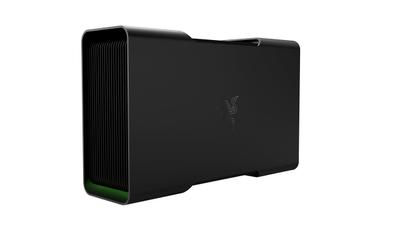
Specs and benchmarks
Brand
- PowerColor Gaming Station
- PowerColor
- Razer Core V2
- Razer
Connection Standard
- PowerColor Gaming Station
- Thunderbolt 3
- Razer Core V2
- Thunderbolt 3
Model Number
- PowerColor Gaming Station
- Gaming Station
- Razer Core V2
- Core V2
Extra Ports
- PowerColor Gaming Station
- 1-75%
- Razer Core V2
- 4Best
PSU Wattage
- PowerColor Gaming Station
- 500 W
- Razer Core V2
- 500 W
Host Power Delivery
- PowerColor Gaming Station
- 60 W-40%
- Razer Core V2
- 100 WBest
Max GPU Length
- PowerColor Gaming Station
- 310 mm
- Razer Core V2
- 310 mm
Cooling Type
- PowerColor Gaming Station
- Active Fan
- Razer Core V2
- Active Fan
GPU Compatibility
- PowerColor Gaming Station
- AMD Radeon and NVIDIA cards up to RTX 20-series / RX 6000-series, dual-slot
- Razer Core V2
- GTX 10-series through RTX 20-series, dual-slot cards
Price
- PowerColor Gaming Station
- Launched around $329 (2018)
- Razer Core V2
- Launched at $299.99 (2017)


Which one should you pick?
Choose PowerColor Gaming Station if you want the higher PSU wattage (500 W vs 500 W) and the higher max GPU length (310 mm vs 310 mm).
Choose Razer Core V2 if you want the higher extra ports (4 vs 1) and the higher host power delivery (100 W vs 60 W).
Price comparison
| Retailer | PowerColor Gaming Station | Razer Core V2 |
|---|---|---|
| Amazon | $329.00 View on Amazon | $299.99 View on Amazon |
| PowerColor | View on PowerColor |
Disclaimer: The price and specification of the given product may differ from the actual product. Please confirm on the retailer's website before buying.
Verdict
PowerColor Gaming Station
6 / 10 Expert Rating
Competent Thunderbolt 3 box from a GPU maker, but discontinued and outpaced by newer standards.
Razer Core V2
6 / 10 Expert Rating
A capable but dated TB3 box.