
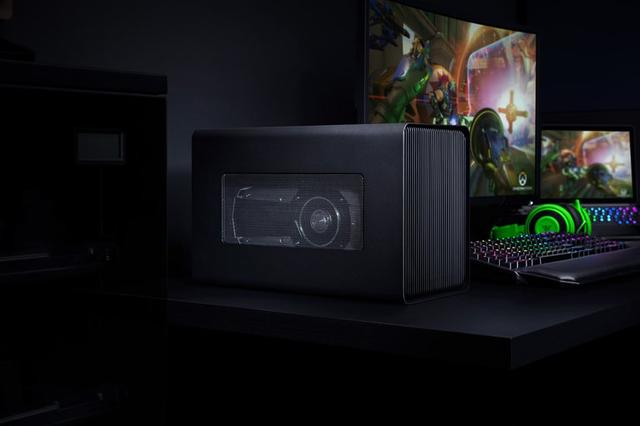
Razer Core X
Expert rating7.5 / 10
- Connection Standard:
- Thunderbolt 3
- PSU Wattage:
- 650 W
- Max GPU Length:
- 330 mm, triple-slot
Consumercarts is reader-supported. Learn more
Disclaimer: The price and specification of the given product may differ from the actual product. Please confirm on the retailer's website before buying.
Manufacturer: Razer Last updated: 2026-09-12
Where to buy
- AmazonGo to store
Razer Core X Review
Razer Core X eGPU enclosure Thunderbolt 3 650W PSU triple-slot no RGB Windows Mac
The plain-black sibling to the Chroma, Razer's original Core X strips out the RGB lighting and cuts the price while keeping the same vented aluminum shell and a 650W internal supply strong enough for nearly any single desktop card of the era. It became a favorite budget pick precisely because it does nothing flashy: plug in over Thunderbolt 3, drop in a card up to triple-slot width, and go.
Overview
Released in 2019 as a lower-cost alternative to the RGB-equipped Core X Chroma, the Core X uses the same vented steel-and-aluminum chassis and 650W internal PSU but omits Razer's Chroma lighting and per-key-style effects. It accepts full-length, triple-slot-wide graphics cards, charges a connected laptop at up to 100W over the same Thunderbolt 3 cable, and adds four USB 3.0 ports plus Gigabit Ethernet for use as a desktop dock.
Comparison to Alternatives
Against its own sibling, the Razer Core X Chroma, the Core X is functionally identical minus the lighting, so it's the better pick for anyone who doesn't want to pay for RGB. Compared to the newer Razer Core X V2 (Thunderbolt 5, 850W), the original Core X is limited to Thunderbolt 3 speeds and lower PSU headroom, but it remains far cheaper on the secondary market. Versus the Sonnet eGPU Breakaway Box 750ex, the Core X has a larger internal PSU but fewer certified compatibility guarantees for Mac users, where Sonnet's official Apple certification carries more weight.
Our verdict
Reviewed by Burooj Alam. Rated by us, not by users.
Expert rating7.5 / 10
A no-frills, high-value Thunderbolt 3 enclosure that remains one of the best-regarded budget eGPU boxes even years after launch.
Best for
- Buyers who want Core X Chroma capacity without paying for RGB lighting
- Windows or Intel Mac users needing a big internal PSU for power-hungry cards
- Shoppers hunting the enclosure on the used/discounted market
Not for
- Anyone wanting the fastest Thunderbolt 5 bandwidth available today
- Apple Silicon Mac owners needing official eGPU support
- Users who specifically want RGB chassis lighting
Specifications
What these specs meanIdentity
| Brand | Razer |
|---|---|
| Model Number | Core X |
Connectivity
| Connection Standard | Thunderbolt 3 |
|---|---|
| Extra Ports | 4 |
Power & Compatibility
| PSU Wattage | 650 W |
|---|---|
| Host Power Delivery | 100 W |
| Max GPU Length | 330 mm |
| Cooling Type | Active Fan (rear exhaust) |
FAQs
What are the key specifications of the Razer Core X (Thunderbolt 3 eGPU Enclosure / 650W PSU / Triple-Slot GPU Support / No RGB / Vented Aluminum Chassis)?
Key specs for the Razer Core X: Connection Standard Thunderbolt 3, Extra Ports 4x USB 3.0 Type-A, 1x Gigabit Ethernet, Cooling Type Active Fan (rear exhaust), GPU Compatibility Most desktop cards up to ~330mm length; no factory-installed GPU.
Who is the Razer Core X (Thunderbolt 3 eGPU Enclosure / 650W PSU / Triple-Slot GPU Support / No RGB / Vented Aluminum Chassis) best suited to?
Best suited to: Buyers who want Core X Chroma capacity without paying for RGB lighting; Windows or Intel Mac users needing a big internal PSU for power-hungry cards; Shoppers hunting the enclosure on the used/discounted market.
What are the drawbacks of the Razer Core X (Thunderbolt 3 eGPU Enclosure / 650W PSU / Triple-Slot GPU Support / No RGB / Vented Aluminum Chassis)?
Not the best fit for: Anyone wanting the fastest Thunderbolt 5 bandwidth available today; Apple Silicon Mac owners needing official eGPU support; Users who specifically want RGB chassis lighting.
Compare and read more
- AOOSTAR AG01 (OCuLink eGPU Dock / 400W Built-In PSU / Open-Frame / Budget Handheld & Mini PC GPU Dock) vs Razer Core X (Thunderbolt 3 eGPU Enclosure / 650W PSU / Triple-Slot GPU Support / No RGB / Vented Aluminum Chassis)
- AOOSTAR AG02 (OCuLink + USB4 eGPU Dock / 800W Built-In PSU / Open-Frame / Up to RTX 4090) vs Razer Core X (Thunderbolt 3 eGPU Enclosure / 650W PSU / Triple-Slot GPU Support / No RGB / Vented Aluminum Chassis)
- GIGABYTE AORUS RTX 3080 Gaming Box Rev 2.0 (Pre-Installed RTX 3080 10GB / Thunderbolt 3 / WATERFORCE AIO Cooling / Plug-and-Play) vs Razer Core X (Thunderbolt 3 eGPU Enclosure / 650W PSU / Triple-Slot GPU Support / No RGB / Vented Aluminum Chassis)
- Razer Core X (Thunderbolt 3 eGPU Enclosure / 650W PSU / Triple-Slot GPU Support / No RGB / Vented Aluminum Chassis) vs Sonnet eGFX Breakaway Box 550 (Thunderbolt 3 / 550W PSU / 87W Laptop Charging / Single-Wide to Double-Wide GPU)
- Razer Core X (Thunderbolt 3 eGPU Enclosure / 650W PSU / Triple-Slot GPU Support / No RGB / Vented Aluminum Chassis) vs Sonnet eGFX Breakaway Box 650 (Thunderbolt 3 / 650W PSU / 87W Laptop Charging / Double-Wide GPU / Mac-Certified)
- Razer Core X (Thunderbolt 3 eGPU Enclosure / 650W PSU / Triple-Slot GPU Support / No RGB / Vented Aluminum Chassis) vs Sonnet eGFX Breakaway Puck (Pre-Installed GPU / Thunderbolt 3 / Compact / 60W PD)
- Thunderbolt vs OCuLink for eGPUs: Same Lanes, Different Real-World Speed
- Laptop Ports Explained: USB-C, Thunderbolt 5, USB4, and What You Actually Need