
Consumercarts is reader-supported. Learn more
Dell WD19S vs Wavlink Universal Docking Station: Comparison
What is the difference between Dell WD19S and Wavlink Universal Docking Station?
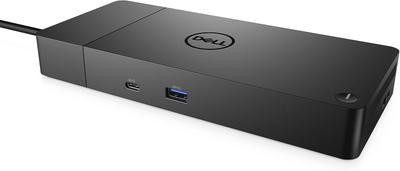
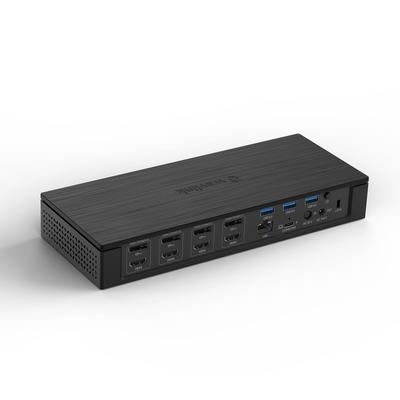
The first real difference is host power delivery: Dell WD19S 90 W against Wavlink Universal Docking Station None. Max display support is not the same on both, Up to 4 displays on the Dell WD19S versus Dual display on the Wavlink Universal Docking Station. They differ on max display resolution too, Single/dual 4K@60Hz on the Dell WD19S versus Dual 4K@30Hz on the Wavlink Universal Docking Station. There is a split on os compatibility as well, Windows on the Dell WD19S versus Windows only on the Wavlink Universal Docking Station.
Dell WD19S vs Wavlink Universal Docking Station: which one fits your build
The Dell WD19S suits standard office desks with a single external monitor and Dell laptop fleets where budget matters more than Thunderbolt speed, though it is not built for dual-monitor or multi-display desk setups and users wanting Thunderbolt-level bandwidth. Buy the Wavlink Universal Docking Station for older Windows laptops and desktops with only USB-A ports and budget dual-monitor upgrades without replacing existing hardware, though it is not the pick for Mac users, since DisplayLink support here is Windows-only and anyone needing the dock to also charge the host laptop. Our rating of the Dell WD19S (6/10): A reliable, no-frills budget dock for single-monitor Dell office desks. Our rating of the Wavlink Universal Docking Station (6/10): A niche but genuinely useful fix for older USB-A-only Windows machines needing dual monitors.
Which is cheaper, Dell WD19S or Wavlink Universal Docking Station?
The Dell WD19S asks 67% more, $150 against $90.00 for the Wavlink Universal Docking Station.
Frequently asked questions
Do the Dell WD19S and Wavlink Universal Docking Station differ on connection type?
Yes. Connection Type reads USB-C on the Dell WD19S versus USB-A on the Wavlink Universal Docking Station.
Is the Ethernet the same on the Dell WD19S and Wavlink Universal Docking Station?
It is. Both are listed at Yes, so it is not a reason to pick one over the other.
Which is cheaper, Dell WD19S or Wavlink Universal Docking Station?
The Dell WD19S asks 67% more, $150 against $90.00 for the Wavlink Universal Docking Station.
Specs and benchmarks
Brand
- Dell WD19S
- Dell
- Wavlink Universal Docking Station
- Wavlink
Connection Type
- Dell WD19S
- USB-C (USB 3.2 Gen 2, non-Thunderbolt)
- Wavlink Universal Docking Station
- USB-A (DisplayLink, no USB-C required on host)
Model Number
- Dell WD19S
- WD19S
- Wavlink Universal Docking Station
- Universal Docking Station
Port Configuration
- Dell WD19S
- 1x USB-C upstream, 2x DisplayPort++ 1.4, 1x HDMI 2.0 (shared with rear USB-C DP), 3x USB-A 5Gbps, 2x USB-C 10Gbps (rear with DP 1.4), 1x GbE
- Wavlink Universal Docking Station
- 1x USB-A upstream, 2x HDMI (DisplayLink), 4x USB-A, 1x GbE, 3.5mm audio
Max Display Support
- Dell WD19S
- Up to 4 displays (HBR3 with DSC)
- Wavlink Universal Docking Station
- Dual display
Max Display Resolution
- Dell WD19S
- Single/dual 4K@60Hz (HBR3 with DSC)
- Wavlink Universal Docking Station
- Dual 4K@30Hz (DisplayLink)
Total Ports
- Dell WD19S
- 9
- Wavlink Universal Docking Station
- 9
Host Power Delivery
- Dell WD19S
- 90 W
- Wavlink Universal Docking Station
- None (bus-powered, no host charging)
Ethernet
- Dell WD19S
- Yes
- Wavlink Universal Docking Station
- Yes
OS Compatibility
- Dell WD19S
- Windows
- Wavlink Universal Docking Station
- Windows only
Price
- Dell WD19S
- ~$150
- Wavlink Universal Docking Station
- ~$90


Which one should you pick?
Choose Dell WD19S if you want the higher total ports (9 vs 9).
Choose Wavlink Universal Docking Station if you already have it on hand or find it at a lower price.
Price comparison
| Retailer | Dell WD19S | Wavlink Universal Docking Station |
|---|---|---|
| Newegg | $150.00 View on Newegg | |
| Consumercarts listing | $90.00 View on Consumercarts listing |
Disclaimer: The price and specification of the given product may differ from the actual product. Please confirm on the retailer's website before buying.
Verdict
Dell WD19S
6 / 10 Expert Rating
A reliable, no-frills budget dock for single-monitor Dell office desks.
Wavlink Universal Docking Station
6 / 10 Expert Rating
A niche but genuinely useful fix for older USB-A-only Windows machines needing dual monitors.