
Consumercarts is reader-supported. Learn more
Dell Universal Dock UD22 vs Kensington SD1620P: Comparison
What is the difference between Dell Universal Dock UD22 and Kensington SD1620P?
The first real difference is host power delivery: Dell Universal Dock UD22 96 W against Kensington SD1620P 100W passthrough charging. Dell Universal Dock UD22 also leads on total ports, 10 on the Dell Universal Dock UD22 versus 6 on the Kensington SD1620P. Os compatibility is not the same on both, Windows 10/11, macOS 12.2.1+, ChromeOS R100+, Ubuntu 20.04+ on the Dell Universal Dock UD22 versus Windows, Mac, Chrome OS on the Kensington SD1620P.
Who each one is for
The Dell Universal Dock UD22 suits mixed-vendor offices running Dell, Mac, and Chromebook laptops and triple-monitor productivity setups without needing Thunderbolt, though it is the wrong buy for users who specifically want Thunderbolt-level bandwidth and single-display minimalist desk setups, since it's overbuilt for that. The Kensington SD1620P is the one to take for hybrid workers docking at different desks throughout the week and travelers needing dual external 4K monitors without a permanent setup, though it is not the pick for users needing wired Ethernet and permanent desk setups better served by a full-size dock. Our rating of the Dell Universal Dock UD22 (7/10): the pragmatic choice for offices mixing Dell, Mac, and Chromebook hardware on one dock standard. Our rating of the Kensington SD1620P (7/10): A well-balanced portable dock for hybrid workers who need dual 4K displays away from a fixed desk.
Dell Universal Dock UD22 vs Kensington SD1620P price
At the last price check the Kensington SD1620P was $130 and the Dell Universal Dock UD22 $220, a 69% premium.
Frequently asked questions
Do the Dell Universal Dock UD22 and Kensington SD1620P differ on port configuration?
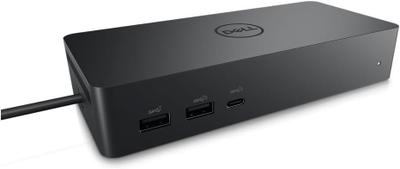
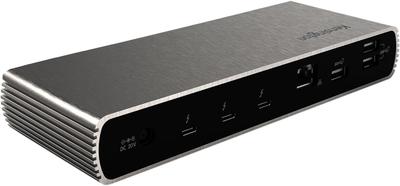
Yes. Port Configuration reads 1x USB-C upstream, 4x USB-A 10Gbps, 2x USB-C 10Gbps... on the Dell Universal Dock UD22 versus 1x USB-C upstream, 2x HDMI/DisplayPort, 2x USB-A, 1x USB-C... on the Kensington SD1620P.
Specs and benchmarks
Brand
- Dell Universal Dock UD22
- Dell
- Kensington SD1620P
- Kensington
Connection Type
- Dell Universal Dock UD22
- USB-C (USB 3.2 Gen 2, DP 1.4 Alt Mode, non-Thunderbolt)
- Kensington SD1620P
- USB-C (USB 3.2, portable pocket dock)
Model Number
- Dell Universal Dock UD22
- Universal Dock UD22
- Kensington SD1620P
- SD1620P
Port Configuration
- Dell Universal Dock UD22
- 1x USB-C upstream, 4x USB-A 10Gbps, 2x USB-C 10Gbps (one with DP 1.4 Alt Mode), 1x HDMI 2.0, 2x DisplayPort 1.2, 1x GbE
- Kensington SD1620P
- 1x USB-C upstream, 2x HDMI/DisplayPort, 2x USB-A, 1x USB-C data
Max Display Support
- Dell Universal Dock UD22
- Quad 4K@60Hz (with DisplayLink driver); dual 4K@60Hz native
- Kensington SD1620P
- Dual display
Max Display Resolution
- Dell Universal Dock UD22
- 5K@60Hz single (DSC); 4K@60Hz multi-display
- Kensington SD1620P
- Dual 4K@60Hz
Total Ports
- Dell Universal Dock UD22
- 10Best
- Kensington SD1620P
- 6-40%
Host Power Delivery
- Dell Universal Dock UD22
- 96 W
- Kensington SD1620P
- 100W passthrough charging
Ethernet
- Dell Universal Dock UD22
- Yes
- Kensington SD1620P
- No
OS Compatibility
- Dell Universal Dock UD22
- Windows 10/11, macOS 12.2.1+, ChromeOS R100+, Ubuntu 20.04+
- Kensington SD1620P
- Windows, Mac, Chrome OS
Price
- Dell Universal Dock UD22
- ~$220
- Kensington SD1620P
- ~$130


Which one should you pick?
Choose Dell Universal Dock UD22 if you want the higher total ports (10 vs 6).
Choose Kensington SD1620P if you already have it on hand or find it at a lower price.
Price comparison
| Retailer | Dell Universal Dock UD22 | Kensington SD1620P |
|---|---|---|
| Amazon | $220.00 View on Amazon | |
| Newegg | View on Newegg | |
| Consumercarts listing | $130.00 View on Consumercarts listing |
Disclaimer: The price and specification of the given product may differ from the actual product. Please confirm on the retailer's website before buying.
Verdict
Dell Universal Dock UD22
7 / 10 Expert Rating
The pragmatic choice for offices mixing Dell, Mac, and Chromebook hardware on one dock standard.
Kensington SD1620P
7 / 10 Expert Rating
A well-balanced portable dock for hybrid workers who need dual 4K displays away from a fixed desk.