
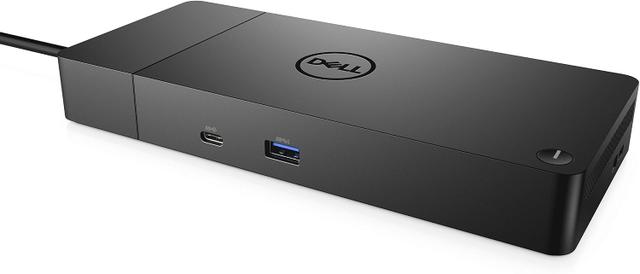
Dell WD19S
Expert rating6 / 10
- Connection Type:
- USB-C (non-Thunderbolt)
- Total Ports:
- 8
- Max Display Support:
- Single display
- Power Delivery:
- 65W
Consumercarts is reader-supported. Learn more
Disclaimer: The price and specification of the given product may differ from the actual product. Please confirm on the retailer's website before buying.
Manufacturer: Dell Last updated: September 12, 2026
Where to buy
- NeweggGo to store
Dell WD19S Review
The Dell WD19S is a budget office dock offering single 4K@60Hz display output, 8 ports, and 65W charging, a stripped-down sibling of the WD19TB aimed at single-monitor desks.
Not every desk needs the WD19TB's Thunderbolt bandwidth or dual-display output; the WD19S is Dell's answer for the far more common single-monitor office setup. It keeps the familiar WD-series design and Dell driver support while dropping the price by skipping Thunderbolt and a second display output, making it the dock IT departments buy in bulk for standard cubicle desks rather than executive suites.
Comparison to Alternatives
Against the catalog's Dell WD19TB, the WD19TB adds Thunderbolt 3, dual 4K support, and much higher 130W charging for roughly $100 more, making the WD19S the right downgrade when a desk only has one monitor and a standard business laptop. Against the HP USB-C Dock G5, both target budget-conscious office fleets, but the WD19S's tighter Dell driver integration makes it the smoother choice specifically for Dell laptop deployments.
Our verdict
Reviewed by Burooj Alam. Rated by us, not by users.
Expert rating6 / 10
A reliable, no-frills budget dock for single-monitor Dell office desks.
Best for
- Standard office desks with a single external monitor
- Dell laptop fleets where budget matters more than Thunderbolt speed
- IT departments buying docks in bulk for cubicle deployments
Not for
- Dual-monitor or multi-display desk setups
- Users wanting Thunderbolt-level bandwidth
- Creative professionals needing high-power charging above 65W
Specifications
What these specs meanIdentity
| Brand | Dell |
|---|---|
| Model Number | WD19S |
| Connection Type | USB-C (USB 3.2 Gen 2, non-Thunderbolt) |
| Port Configuration | 1x USB-C upstream, 2x DisplayPort++ 1.4, 1x HDMI 2.0 (shared with rear USB-C DP), 3x USB-A 5Gbps, 2x USB-C 10Gbps (rear with DP 1.4), 1x GbE |
| Max Display Support | Up to 4 displays (HBR3 with DSC) |
Host connection
| Host Interface | USB-C 3.2 Gen 2 |
|---|---|
| Thunderbolt Version | None |
| Host Cable Length | 1 m |
Ports & Power
| Max Display Resolution | Single/dual 4K@60Hz (HBR3 with DSC) |
|---|---|
| Total Ports | 9 |
| Ethernet | Yes |
Host power
| Host Power Delivery | 90 W |
|---|---|
| Host Power Delivery Alt | 130 W |
| External PSU Wattage | 130 W |
| Bus Powered | No |
Display engine
| Max Displays Windows | 4 |
|---|
Display output
| Max Single Display Resolution | 4K |
|---|---|
| Max Single Display Refresh | 60 Hz |
| Max Dual Display Resolution | 4K |
| Max Dual Display Refresh | 60 Hz |
Video ports
| HDMI Port Count | 1 |
|---|---|
| HDMI Version | 2.0 |
| DisplayPort Port Count | 2 |
| DisplayPort Version | 1.4 |
| USB-C Video Output Count | 1 |
Data ports
| Downstream Thunderbolt Port Count | 0 |
|---|---|
| USB-A Port Count | 3 |
| USB-C Data Port Count | 2 |
| Max USB Data Rate | 10Gbps |
Network and storage
| Ethernet Speed | 1GbE |
|---|
Compatibility and physical
| Weight | 590 g |
|---|
FAQs
What are the key specifications of the Dell WD19S (USB-C / 8 Ports / 65W Host Charging / Single 4K@60Hz / Windows / ~$150)?
Key specs for the Dell WD19S: Power Delivery 90 W, Host Power Delivery 90 W, Host Power Delivery Alt 130 W, Ethernet Yes, Ethernet Speed 1GbE, Connection Type USB-C (USB 3.2 Gen 2, non-Thunderbolt).
Who is the Dell WD19S (USB-C / 8 Ports / 65W Host Charging / Single 4K@60Hz / Windows / ~$150) best suited to?
Best suited to: Standard office desks with a single external monitor; Dell laptop fleets where budget matters more than Thunderbolt speed; IT departments buying docks in bulk for cubicle deployments.
What are the drawbacks of the Dell WD19S (USB-C / 8 Ports / 65W Host Charging / Single 4K@60Hz / Windows / ~$150)?
Not the best fit for: Dual-monitor or multi-display desk setups; Users wanting Thunderbolt-level bandwidth; Creative professionals needing high-power charging above 65W.
Compare and read more
- ASUS DC5 Universal Dock (USB-C / 5 Ports / 100W Pass-Through Charging / Single 4K@60Hz / Windows/Mac/Chrome) vs Dell WD19S (USB-C / 8 Ports / 65W Host Charging / Single 4K@60Hz / Windows)
- Dell WD19S (USB-C / 8 Ports / 65W Host Charging / Single 4K@60Hz / Windows) vs HP USB-C Dock G5 (USB-C / 8 Ports / 65W Host Charging / Dual 4K@30Hz / Windows)
- Dell WD19S (USB-C / 8 Ports / 65W Host Charging / Single 4K@60Hz / Windows) vs Wavlink Universal Docking Station (USB-A / 9 Ports / No Host Charging / Dual 4K@30Hz DisplayLink / Windows Only)
- Anker 575 USB-C Docking Station (13-in-1, 85W Pass-Through, Dual Display) vs Dell WD19S (USB-C / 8 Ports / 65W Host Charging / Single 4K@60Hz / Windows)
- Dell WD19S (USB-C / 8 Ports / 65W Host Charging / Single 4K@60Hz / Windows) vs HP Thunderbolt Dock G4 (Thunderbolt 4 / 120W Power Delivery / Up to 4 Displays / HDMI + DisplayPort / RJ-45 Ethernet)
- Why Your Docking Station Only Shows One External Display on a MacBook
- Why "Total Ports" on a Docking Station Doesn't Tell You Anything