
Consumercarts is reader-supported. Learn more
AV Access iDock C10 USB-C KVM Docking Station vs CKL CKL-64DP-4: Comparison
What is the difference between AV Access iDock C10 USB-C KVM Docking and CKL CKL-64DP-4?
Start with max resolution single display, because it is the widest measured gap between them: AV Access iDock C10 USB-C KVM Docking 3840x2160 against CKL CKL-64DP-4 7680x4320, 75% in favour of CKL CKL-64DP-4. CKL CKL-64DP-4 also leads on max refresh at max resolution, 3840x2160 on the AV Access iDock C10 USB-C KVM Docking versus 7680x4320 on the CKL CKL-64DP-4. AV Access iDock C10 USB-C KVM Docking also leads on usb hub ports, 3 on the AV Access iDock C10 USB-C KVM Docking versus 1 on the CKL CKL-64DP-4.
Who each one is for
Take the AV Access iDock C10 USB-C KVM Docking for two-computer, two-monitor setups specifically involving USB-C laptops wanting docking station features alongside KVM switching. Avoid it for budget buyers who don't need USB-C docking, Ethernet, or SD card features, a simpler HDMI-only KVM covers basic switching for less. The CKL CKL-64DP-4 is the one to take for four-computer single-monitor DisplayPort setups and high refresh-rate DisplayPort switching, though it is not the pick for users needing EDID emulation for stable desktop layout. Our rating of the AV Access iDock C10 USB-C KVM Docking (9/10): the best KVM for two-computer, two-monitor setups with USB-C laptops, docking station features alongside stable EDID-based switching. Our rating of the CKL CKL-64DP-4 (6.2/10): A 4-port single-monitor DisplayPort 1.4 KVM with an 8K/144Hz spec sheet, extending CKL's budget high-refresh lineup to more computers.
AV Access iDock C10 USB-C KVM Docking vs CKL CKL-64DP-4 price
Cost splits them too. CKL CKL-64DP-4 sits at $189, AV Access iDock C10 USB-C KVM Docking at $204, 8% more.
Frequently asked questions
Do the AV Access iDock C10 USB-C KVM Docking and CKL CKL-64DP-4 differ on computers supported?
Yes. Computers Supported reads 2 computers, 2 monitors on the AV Access iDock C10 USB-C KVM Docking versus 4 computers on the CKL CKL-64DP-4.
Is the KVM Segment the same on the AV Access iDock C10 USB-C KVM Docking and CKL CKL-64DP-4?
It is. Both are listed at Desk, so it is not a reason to pick one over the other.
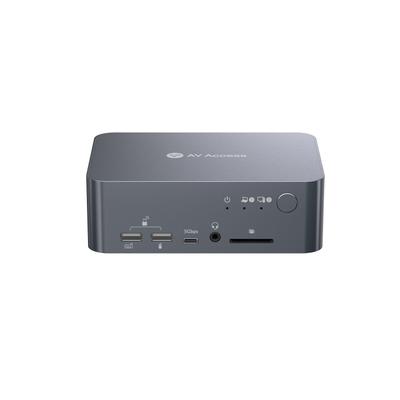

Specs and benchmarks
Capability Score
- AV Access iDock C10 USB-C KVM Docking Station
- 6.0/10Best
- CKL CKL-64DP-4
- 6.0/10Best
How much this switch can do, rated from its video support, monitor handling, USB speed and switching options. 10 is the most capable.
Computers Supported
- AV Access iDock C10 USB-C KVM Docking Station
- 2 computers, 2 monitors
- CKL CKL-64DP-4
- 4 computers
Displays Per Computer
- AV Access iDock C10 USB-C KVM Docking Station
- 2 displays
- CKL CKL-64DP-4
- 1 displays
Video Standard
- AV Access iDock C10 USB-C KVM Docking Station
- USB-C
- CKL CKL-64DP-4
- DisplayPort
Max Resolution
- AV Access iDock C10 USB-C KVM Docking Station
- Dual 4K@60Hz-75%
- CKL CKL-64DP-4
- 8K (also supports 5K@50/60Hz, 4K@144Hz, 2K@144Hz)Best
USB Hub Ports
- AV Access iDock C10 USB-C KVM Docking Station
- 3Best
- CKL CKL-64DP-4
- 1-67%
KVM Segment
- AV Access iDock C10 USB-C KVM Docking Station
- Desk
- CKL CKL-64DP-4
- Desk
Max Resolution Single Display
- AV Access iDock C10 USB-C KVM Docking Station
- 3840x2160-75%
- CKL CKL-64DP-4
- 7680x4320Best
Max Refresh At Max Resolution
- AV Access iDock C10 USB-C KVM Docking Station
- 60 Hz-75%
- CKL CKL-64DP-4
- 30Hz (at 8K); up to 144Hz at 4KBest
Max Refresh At 4K
- AV Access iDock C10 USB-C KVM Docking Station
- 60 Hz
- CKL CKL-64DP-4
- 144 Hz
EDID Emulation
- AV Access iDock C10 USB-C KVM Docking Station
- Yes
- CKL CKL-64DP-4
- No
USB Switching Speed
- AV Access iDock C10 USB-C KVM Docking Station
- USB 3.0 5Gbps
- CKL CKL-64DP-4
- USB 3.0 5Gbps
Power Delivery Wattage
- AV Access iDock C10 USB-C KVM Docking Station
- 60W per device (USB-C)
- CKL CKL-64DP-4
- No
External Power Required
- AV Access iDock C10 USB-C KVM Docking Station
- Yes
- CKL CKL-64DP-4
- No
Price
- AV Access iDock C10 USB-C KVM Docking Station
- 203.99 USD
- CKL CKL-64DP-4
- 189.00 USD


Which one should you pick?
Choose AV Access iDock C10 USB-C KVM Docking Station if you want the higher USB hub ports (3 vs 1).
Choose CKL CKL-64DP-4 if you want the higher max resolution (8K (also supports 5K@50/60Hz, 4K@144Hz, 2K@144Hz) vs Dual 4K@60Hz), the higher max resolution single display (7680x4320 vs 3840x2160) and the higher max refresh at max resolution (30Hz (at 8K); up to 144Hz at 4K vs 60 Hz).
Price comparison
| Retailer | AV Access iDock C10 USB-C KVM Docking Station | CKL CKL-64DP-4 |
|---|---|---|
| Consumercarts listing | $203.99 View on Consumercarts listing | |
| CKL Store | $189.00 View on CKL Store |
Disclaimer: The price and specification of the given product may differ from the actual product. Please confirm on the retailer's website before buying.
Verdict
AV Access iDock C10 USB-C KVM Docking Station
9 / 10 Expert Rating
The best KVM for two-computer, two-monitor setups with USB-C laptops, docking station features alongside stable EDID-based switching.
CKL CKL-64DP-4
6.2 / 10 Expert Rating
A 4-port single-monitor DisplayPort 1.4 KVM with an 8K/144Hz spec sheet, extending CKL's budget high-refresh lineup to more computers.
Compare AV Access iDock C10 USB-C KVM Docking Station with
- AV Access iDock C10 USB-C KVM Docking Station vs Adder AV4PRO-VGA-Quad (4-Port / 4 Monitors / VGA Quad-Head KVM)
- AV Access iDock C10 USB-C KVM Docking Station vs Adder AV4PRO-VGA-Triple (4-Port / 3 Monitors / VGA Triple-Head KVM)
- AV Access iDock C10 USB-C KVM Docking Station vs J-Tech Digital JTECH-KV41 (HDMI / 4 Computers / 4K@60Hz / Budget)
- AV Access iDock C10 USB-C KVM Docking Station vs JCYMELE SW273 4K144Hz DisplayPort KVM Switch (2 PCs / 2 Monitors)