
Consumercarts is reader-supported. Learn more
AV Access iDock C10 USB-C KVM Docking Station vs J-Tech Digital JTECH-KV41: Comparison
AV Access iDock C10 USB-C KVM Docking vs J-Tech Digital JTECH-KV41 max resolution compared
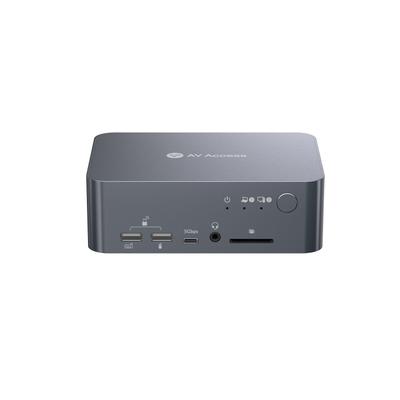
Measured rather than claimed: in Capability Score the AV Access iDock C10 USB-C KVM Docking returns 6 against 5.9, a 2% lead. Video connector is not the same on both, Mixed on the AV Access iDock C10 USB-C KVM Docking versus HDMI on the J-Tech Digital JTECH-KV41.
Who each one is for
Take the AV Access iDock C10 USB-C KVM Docking for two-computer, two-monitor setups specifically involving USB-C laptops wanting docking station features alongside KVM switching. Avoid it for budget buyers who don't need USB-C docking, Ethernet, or SD card features, a simpler HDMI-only KVM covers basic switching for less. Take the J-Tech Digital JTECH-KV41 for budget buyers switching between four computers who don't need USB 3.0 speeds. It is the wrong buy for users doing fine text or color-critical work who would notice 4:2:0 chroma subsampling. Our rating of the AV Access iDock C10 USB-C KVM Docking (9/10): the best KVM for two-computer, two-monitor setups with USB-C laptops, docking station features alongside stable EDID-based switching. Our rating of the J-Tech Digital JTECH-KV41 (7/10): A budget-friendly 4-port HDMI KVM switch that trades some color fidelity at 4K for a lower price.
AV Access iDock C10 USB-C KVM Docking vs J-Tech Digital JTECH-KV41 price
Cost splits them too. J-Tech Digital JTECH-KV41 sits at $100, AV Access iDock C10 USB-C KVM Docking at $204, 104% more.
What AV Access iDock C10 USB-C KVM Docking and J-Tech Digital JTECH-KV41 have in common
Everything else lines up. Max resolution single display, max refresh at max resolution, kvm segment, max refresh at 4k and button switching read the same on both, so those are not worth weighing.
Frequently asked questions
Do the AV Access iDock C10 USB-C KVM Docking and J-Tech Digital JTECH-KV41 differ on computers supported?
Yes. Computers Supported reads 2 computers, 2 monitors on the AV Access iDock C10 USB-C KVM Docking versus 4 computers on the J-Tech Digital JTECH-KV41.

Specs and benchmarks
Capability Score
- AV Access iDock C10 USB-C KVM Docking Station
- 6.0/10Best
- J-Tech Digital JTECH-KV41
- 5.9/10-2%
How much this switch can do, rated from its video support, monitor handling, USB speed and switching options. 10 is the most capable.
Brand
- AV Access iDock C10 USB-C KVM Docking Station
- AV Access
- J-Tech Digital JTECH-KV41
- J-Tech Digital
Computers Supported
- AV Access iDock C10 USB-C KVM Docking Station
- 2 computers, 2 monitors
- J-Tech Digital JTECH-KV41
- 4 computers
Model Number
- AV Access iDock C10 USB-C KVM Docking Station
- iDock C10
- J-Tech Digital JTECH-KV41
- JTECH-KV41
Video Standard
- AV Access iDock C10 USB-C KVM Docking Station
- USB-C
- J-Tech Digital JTECH-KV41
- HDMI
Max Resolution
- AV Access iDock C10 USB-C KVM Docking Station
- Dual 4K@60Hz
- J-Tech Digital JTECH-KV41
- 4K @ 60Hz
KVM Segment
- AV Access iDock C10 USB-C KVM Docking Station
- Desk
- J-Tech Digital JTECH-KV41
- Desk
Video Connector
- AV Access iDock C10 USB-C KVM Docking Station
- Mixed
- J-Tech Digital JTECH-KV41
- HDMI
Max Resolution Single Display
- AV Access iDock C10 USB-C KVM Docking Station
- 3840x2160
- J-Tech Digital JTECH-KV41
- 3840x2160
Max Refresh At Max Resolution
- AV Access iDock C10 USB-C KVM Docking Station
- 60 Hz
- J-Tech Digital JTECH-KV41
- 60 Hz
Max Refresh At 4K
- AV Access iDock C10 USB-C KVM Docking Station
- 60 Hz
- J-Tech Digital JTECH-KV41
- 60 Hz
EDID Emulation
- AV Access iDock C10 USB-C KVM Docking Station
- Yes
- J-Tech Digital JTECH-KV41
- Yes (fixed EDID)
USB Switching Speed
- AV Access iDock C10 USB-C KVM Docking Station
- USB 3.0 5GbpsBest
- J-Tech Digital JTECH-KV41
- USB 2.0
Button Switching
- AV Access iDock C10 USB-C KVM Docking Station
- Yes
- J-Tech Digital JTECH-KV41
- Yes
Price
- AV Access iDock C10 USB-C KVM Docking Station
- 203.99 USD
- J-Tech Digital JTECH-KV41
- 100 USD


Which one should you pick?
Choose AV Access iDock C10 USB-C KVM Docking Station if you want the higher capability score (6.0 vs 5.9).
Choose J-Tech Digital JTECH-KV41 if you already have it on hand or find it at a lower price.
Price comparison
| Retailer | AV Access iDock C10 USB-C KVM Docking Station | J-Tech Digital JTECH-KV41 |
|---|---|---|
| Consumercarts listing | $203.99 View on Consumercarts listing | $100.00 View on Consumercarts listing |
Disclaimer: The price and specification of the given product may differ from the actual product. Please confirm on the retailer's website before buying.
Verdict
AV Access iDock C10 USB-C KVM Docking Station
9 / 10 Expert Rating
The best KVM for two-computer, two-monitor setups with USB-C laptops, docking station features alongside stable EDID-based switching.
J-Tech Digital JTECH-KV41
7 / 10 Expert Rating
A budget-friendly 4-port HDMI KVM switch that trades some color fidelity at 4K for a lower price.
Compare AV Access iDock C10 USB-C KVM Docking Station with
- AV Access iDock C10 USB-C KVM Docking Station vs CKL CKL-64DP-4 (4-Port Single Monitor DisplayPort 1.4 KVM Switch / 8K@30Hz or 4K@144Hz)
- AV Access iDock C10 USB-C KVM Docking Station vs Adder AV4PRO-VGA-Quad (4-Port / 4 Monitors / VGA Quad-Head KVM)
- AV Access iDock C10 USB-C KVM Docking Station vs Adder AV4PRO-VGA-Triple (4-Port / 3 Monitors / VGA Triple-Head KVM)
- AV Access iDock C10 USB-C KVM Docking Station vs JCYMELE SW273 4K144Hz DisplayPort KVM Switch (2 PCs / 2 Monitors)