
Consumercarts is reader-supported. Learn more
Disclaimer: The price and specification of the given product may differ from the actual product. Please confirm on the retailer's website before buying.
Manufacturer: AOC Last updated: 2026-10-10
AOC 24G2 Review
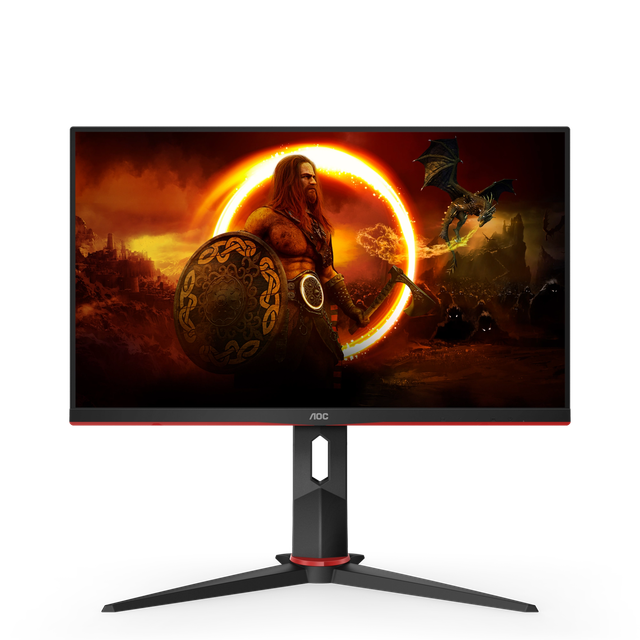
The 24G2 is AOC's long-running budget 144Hz favorite, frequently recommended as a "best budget 144Hz" pick thanks to a fully adjustable ergonomic stand rarely found at this price point.
The IPS panel delivers a standard sRGB gamut without wide-color-gamut claims, appropriate for its budget gaming positioning rather than color-critical work. 144Hz with a 1ms MPRT response time offers a meaningful step up from standard 60-75Hz budget monitors, delivering noticeably smoother motion for mainstream gaming. Against the Gigabyte M27Q X also in this catalog, the 24G2's smaller 23.8-inch size and lower 144Hz refresh rate reflect its more budget-focused positioning, while the M27Q X targets a step-up 240Hz QHD experience.
Panel Technology and Picture Quality
The IPS panel delivers a standard sRGB gamut without wide-color-gamut claims, appropriate for its budget gaming positioning rather than color-critical work.
Refresh Rate and Motion Performance
144Hz with a 1ms MPRT response time offers a meaningful step up from standard 60-75Hz budget monitors, delivering noticeably smoother motion for mainstream gaming.
Comparison to Alternatives
Against the Gigabyte M27Q X also in this catalog, the 24G2's smaller 23.8-inch size and lower 144Hz refresh rate reflect its more budget-focused positioning, while the M27Q X targets a step-up 240Hz QHD experience.
Our verdict
Reviewed by Burooj Alam. Rated by us, not by users.
Best for
- Extremely budget-conscious gamers wanting a fully adjustable ergonomic stand
- First-time gaming monitor buyers looking for a well-reviewed, dependable budget option
Not for
- Buyers wanting wide-gamut color coverage or HDR support
- Competitive players wanting higher refresh rates than 144Hz
Specifications
What these specs meanIdentity
| Brand | AOC |
|---|---|
| Model Number | 24G2 |
| Series | 24G2 |
| Color Gamut | 100% sRGB |
Panel
| Panel Type | IPS |
|---|---|
| Screen Size | 23.8 in |
| Resolution | 1920 x 1080 (Full HD) |
| Aspect Ratio | 16:9 |
Performance
| Refresh Rate | 144 Hz |
|---|---|
| Adaptive Sync | AMD FreeSync, G-Sync Compatible |
Features
| HDR Support | No |
|---|---|
| Curved | No |
Panel technology
| Panel Technology | IPS |
|---|---|
| Panel Coating | Matte anti-glare |
Screen geometry
| Native Resolution | 1920x1080 |
|---|---|
| Screen Curvature | Flat |
Motion
| Max Refresh Rate | 144 Hz |
|---|---|
| Response Time MPRT | 1 ms |
Adaptive sync
| VRR Standard | FreeSync |
|---|---|
| VRR Range Minimum | 48 Hz |
HDR and brightness
| HDR Certification | None |
|---|---|
| SDR Brightness | 250 nits |
| Native Contrast Ratio | 1000:1 |
Color
| Color Depth | 6-bit + FRC |
|---|
Connectivity
| DisplayPort Version | 1.2 |
|---|---|
| HDMI Version | 1.4 |
Stand, mounting and form
| Height Adjustment Range | 130 mm |
|---|---|
| Pivot To Portrait | Yes |
| VESA Mount Pattern | 100x100 |
| Built-in Speakers | No |
Government data
Australian Energy Rating data
| Active standby power | 0.21 W | Australian Energy Rating label · Registration ACM3530: AOC 24G2, LCD, 60.47 cm screen · Source |
| Labelled energy consumption | 85 kWh/yr | Australian Energy Rating label · Registration ACM3530: AOC 24G2, LCD, 60.47 cm screen · Source |
Values declared by the registrant under the Australian/New Zealand GEMS energy rating test method. Compare only with other Energy Rating values, not with ENERGY STAR figures.
Retrieved 23 Sept 2026
Energy Rating data, Commonwealth of Australia (Department of Climate Change, Energy, the Environment and Water), via data.gov.au, licensed CC BY 3.0 AU (creativecommons.org/licenses/by/3.0/au/).
FAQs
What are the key specifications of the AOC 24G2 (23.8-Inch 1080p IPS/144Hz/1ms MPRT/Standard sRGB/No HDR/Long-Running Budget Favorite)?
Key specs for the AOC 24G2: Resolution 1920 x 1080 (Full HD), Refresh Rate 144 Hz, Panel Type IPS, Response Time MPRT 1 ms.
Will the AOC 24G2 (23.8-Inch 1080p IPS/144Hz/1ms MPRT/Standard sRGB/No HDR/Long-Running Budget Favorite) work with my current setup?
The AOC 24G2 (23.8-Inch 1080p IPS/144Hz/1ms MPRT/Standard sRGB/No HDR/Long-Running Budget Favorite) lists Panel Type is IPS. Check that against the hardware you already own before buying, since this is the field that most often decides whether a part fits.
Who is the AOC 24G2 (23.8-Inch 1080p IPS/144Hz/1ms MPRT/Standard sRGB/No HDR/Long-Running Budget Favorite) best suited to?
Best suited to: Extremely budget-conscious gamers wanting a fully adjustable ergonomic stand; First-time gaming monitor buyers looking for a well-reviewed, dependable budget option.
What are the drawbacks of the AOC 24G2 (23.8-Inch 1080p IPS/144Hz/1ms MPRT/Standard sRGB/No HDR/Long-Running Budget Favorite)?
Not the best fit for: Buyers wanting wide-gamut color coverage or HDR support; Competitive players wanting higher refresh rates than 144Hz.
Compare and read more
- AOC 24G2 (23.8-Inch 1080p IPS/144Hz/1ms MPRT/Standard sRGB/No HDR/Long-Running Budget Favorite) vs ASUS ZenScreen Fold OLED MQ17QH (17.3-Inch Foldable 1920x1920/60Hz/Built-In Battery/USB-C Single Cable)
- Acer Predator XB273U GX (27-Inch QHD IPS/270Hz/0.5ms/95% DCI-P3/HDR10/NVIDIA Reflex Latency Analyzer) vs AOC 24G2 (23.8-Inch 1080p IPS/144Hz/1ms MPRT/Standard sRGB/No HDR/Long-Running Budget Favorite)
- AOC 24G2 (23.8-Inch 1080p IPS/144Hz/1ms MPRT/Standard sRGB/No HDR/Long-Running Budget Favorite) vs Arzopa S1 Table (15.6-Inch 1080p Portable IPS/60Hz/USB-C Single Cable/Budget Entry Monitor)
- AOC 24G2 (23.8-Inch 1080p IPS/144Hz/1ms MPRT/Standard sRGB/No HDR/Long-Running Budget Favorite) vs ASUS ROG Swift PG27AQDP (27-Inch QHD QD-OLED/240Hz/0.03ms/99% DCI-P3/True Black 400/DisplayPort 2.1)
- AOC 24G2 (23.8-Inch 1080p IPS/144Hz/1ms MPRT/Standard sRGB/No HDR/Long-Running Budget Favorite) vs ASUS ZenScreen Go MB16AWP (15.6-Inch 1080p Wireless Portable IPS/60Hz/5ms/Built-In Battery/Miracast)
- HDR400 vs HDR True Black 400: Why the Same Number Means Different Things
- OLED vs Mini-LED Monitor: Which Is Better for Gaming