
Consumercarts is reader-supported. Learn more
Disclaimer: The price and specification of the given product may differ from the actual product. Please confirm on the retailer's website before buying.
Manufacturer: Corsair Last updated: September 11, 2026
Corsair Xeneon 32UHD144 Review
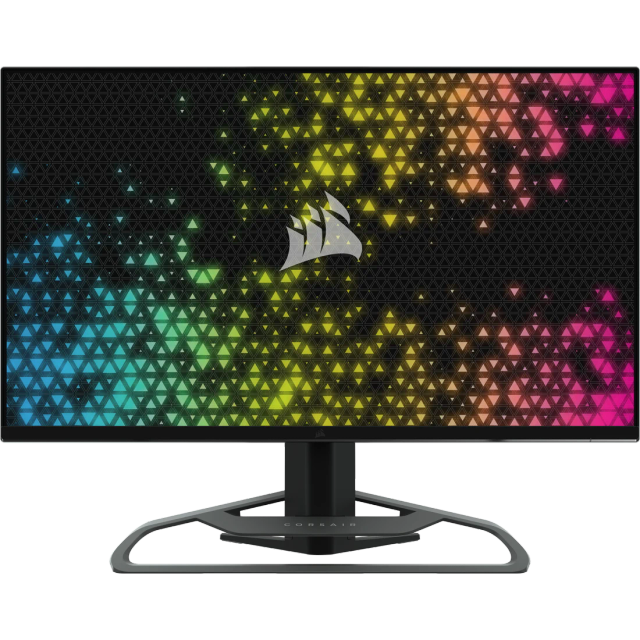
The Xeneon 32UHD144 sits below Corsair's flagship OLED lines, offering a 4K/144Hz IPS panel with HDMI 2.1 connectivity and a KVM-capable USB-C hub for buyers who want strong 4K gaming without OLED pricing.
The IPS panel delivers approximately 90%+ DCI-P3 color coverage with VESA DisplayHDR 600 certification, a solidly documented HDR tier for a non-OLED 4K gaming monitor. 144Hz at native 4K with a 1ms response time offers strong gaming performance, and HDMI 2.1 connectivity ensures full-bandwidth 4K/144 signal support on compatible consoles and graphics cards. Against the Corsair Xeneon 27QHD240 also in this catalog, the 32UHD144 targets 4K resolution and a larger screen at a more moderate refresh rate, while the 27QHD240 prioritizes QHD's easier-to-sustain higher refresh rate on an OLED panel.
Panel Technology and Picture Quality
The IPS panel delivers approximately 90%+ DCI-P3 color coverage with VESA DisplayHDR 600 certification, a solidly documented HDR tier for a non-OLED 4K gaming monitor.
Refresh Rate and Motion Performance
144Hz at native 4K with a 1ms response time offers strong gaming performance, and HDMI 2.1 connectivity ensures full-bandwidth 4K/144 signal support on compatible consoles and graphics cards.
Comparison to Alternatives
Against the Corsair Xeneon 27QHD240 also in this catalog, the 32UHD144 targets 4K resolution and a larger screen at a more moderate refresh rate, while the 27QHD240 prioritizes QHD's easier-to-sustain higher refresh rate on an OLED panel.
Our verdict
Reviewed by Burooj Alam. Rated by us, not by users.
Best for
- 4K gamers wanting HDMI 2.1 connectivity and a KVM-capable USB-C hub without OLED pricing
- Corsair ecosystem buyers wanting a step-down IPS option below the flagship OLED lines
Not for
- Buyers wanting OLED contrast and near-instant response time
- Competitive esports players wanting refresh rates above 144Hz
Specifications
What these specs meanIdentity
| Brand | Corsair |
|---|---|
| Model Number | 32UHD144 |
| Series | Xeneon 32UHD144 |
| Color Gamut | 98% DCI-P3, 100% Adobe RGB, 100% sRGB |
Panel
| Panel Type | IPS |
|---|---|
| Screen Size | 32 in |
| Resolution | 3840 x 2160 (4K UHD) |
| Aspect Ratio | 16:9 |
Performance
| Refresh Rate | 144 Hz |
|---|---|
| Adaptive Sync | AMD FreeSync Premium, NVIDIA G-Sync Compatible |
Features
| HDR Support | Yes |
|---|---|
| Curved | No |
Panel technology
| Panel Technology | IPS |
|---|---|
| Panel Coating | Matte anti-glare |
Screen geometry
| Native Resolution | 3840x2160 |
|---|---|
| Screen Curvature | Flat |
Motion
| Max Refresh Rate | 144 Hz |
|---|---|
| Response Time MPRT | 1 ms |
Adaptive sync
| VRR Standard | FreeSync Premium |
|---|
HDR and brightness
| HDR Certification | DisplayHDR 600 |
|---|---|
| SDR Brightness | 400 nits |
| Native Contrast Ratio | 1000:1 |
Color
| DCI-P3 Coverage | 98 % |
|---|---|
| Color Depth | 8-bit + FRC |
Connectivity
| DisplayPort Version | 1.4 |
|---|---|
| USB-C DP Alt Mode | Yes |
| USB Hub Ports | 2 |
Stand, mounting and form
| Height Adjustment Range | 110 mm |
|---|---|
| VESA Mount Pattern | 100x100 |
FAQs
What are the key specifications of the Corsair Xeneon 32UHD144 (32-Inch 4K IPS/144Hz/1ms/90%+ DCI-P3/DisplayHDR 600/HDMI 2.1 KVM Hub)?
Key specs for the Corsair Xeneon 32UHD144: Resolution 3840 x 2160 (4K UHD), Refresh Rate 144 Hz, Panel Type IPS, Response Time MPRT 1 ms, Screen Size 32 in, SDR Brightness 400 nits.
Will the Corsair Xeneon 32UHD144 (32-Inch 4K IPS/144Hz/1ms/90%+ DCI-P3/DisplayHDR 600/HDMI 2.1 KVM Hub) work with my current setup?
The Corsair Xeneon 32UHD144 (32-Inch 4K IPS/144Hz/1ms/90%+ DCI-P3/DisplayHDR 600/HDMI 2.1 KVM Hub) lists Panel Type is IPS. Check that against the hardware you already own before buying, since this is the field that most often decides whether a part fits.
Who is the Corsair Xeneon 32UHD144 (32-Inch 4K IPS/144Hz/1ms/90%+ DCI-P3/DisplayHDR 600/HDMI 2.1 KVM Hub) best suited to?
Best suited to: 4K gamers wanting HDMI 2.1 connectivity and a KVM-capable USB-C hub without OLED pricing; Corsair ecosystem buyers wanting a step-down IPS option below the flagship OLED lines.
What are the drawbacks of the Corsair Xeneon 32UHD144 (32-Inch 4K IPS/144Hz/1ms/90%+ DCI-P3/DisplayHDR 600/HDMI 2.1 KVM Hub)?
Not the best fit for: Buyers wanting OLED contrast and near-instant response time; Competitive esports players wanting refresh rates above 144Hz.
Compare and read more
- Acer Nitro XV320QU (32-Inch QHD IPS/170Hz/1ms VRB/95%+ DCI-P3/HDR10/KVM Switch) vs Corsair Xeneon 32UHD144 (32-Inch 4K IPS/144Hz/1ms/90%+ DCI-P3/DisplayHDR 600/HDMI 2.1 KVM Hub)
- AOC 27G4X (27-Inch QHD IPS/180Hz/1ms MPRT/Standard Gamut/HDR10/Budget High-Refresh Value) vs Corsair Xeneon 32UHD144 (32-Inch 4K IPS/144Hz/1ms/90%+ DCI-P3/DisplayHDR 600/HDMI 2.1 KVM Hub)
- Acer Nitro VG272U (27-Inch QHD IPS/180Hz/1ms VRB/90% DCI-P3/AMD FreeSync Premium Budget Pick) vs Corsair Xeneon 32UHD144 (32-Inch 4K IPS/144Hz/1ms/90%+ DCI-P3/DisplayHDR 600/HDMI 2.1 KVM Hub)
- Acer Predator XB273U (27-Inch QHD IPS/170Hz/1ms GTG/95% DCI-P3/G-Sync Compatible) vs Corsair Xeneon 32UHD144 (32-Inch 4K IPS/144Hz/1ms/90%+ DCI-P3/DisplayHDR 600/HDMI 2.1 KVM Hub)
- AOC 16T3 (15.6-Inch 1080p Portable Touchscreen IPS/60Hz/5ms/USB-C Single Cable) vs Corsair Xeneon 32UHD144 (32-Inch 4K IPS/144Hz/1ms/90%+ DCI-P3/DisplayHDR 600/HDMI 2.1 KVM Hub)
- Best Monitor for Competitive Gaming (240Hz+) in 2026
- HDR400 vs HDR True Black 400: Why the Same Number Means Different Things