
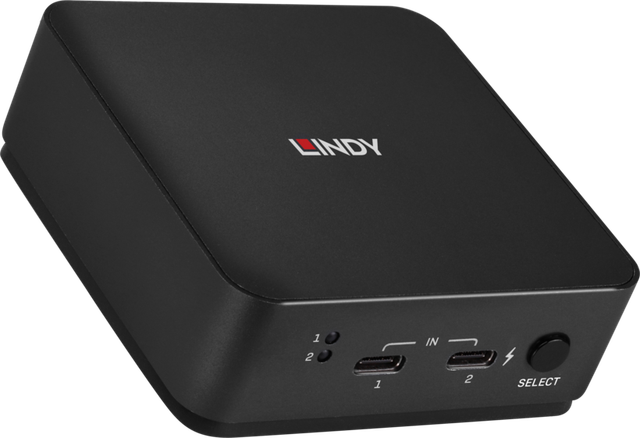
Lindy 2 Port Type C Dual HDMI 4K60 KVM Switch
Expert rating6.9 / 10
- Computers:
- 2
- Monitors:
- 2 (MST/SST)
- Video Standard:
- USB-C
- Max Resolution:
- 4K (3840x2160@60Hz)
Consumercarts is reader-supported. Learn more
Disclaimer: The price and specification of the given product may differ from the actual product. Please confirm on the retailer's website before buying.
Manufacturer: LINDY Last updated: 2026-09-15
Where to buy
- LINDYGo to store
Lindy 2 Port Type C Dual HDMI 4K60 KVM Switch Review
Looking for a USB-C KVM switch that outputs to two HDMI monitors instead of one, the Lindy 2 Port Type C Dual HDMI 4K60 KVM Switch (42321) covers two USB-C laptops or docks feeding a dual-monitor desk setup.
It takes two USB-C inputs (DP Alt Mode) and switches them to two HDMI displays, supporting both MST extended-desktop and SST mirror modes, so you don't lose your dual-monitor layout when you swap machines. It'll also push up to 100W of Power Delivery back to whichever laptop is on port 2, which is enough to charge most ultrabooks.
Video & Power
Each HDMI output tops out at 4K60 4:4:4 with HDCP 2.2 support, and audio rides along over the HDMI pass-through rather than a separate jack. The 100W USB-C PD on the second port is a genuine laptop-charging spec, not just a trickle-charge number.
Build
It's a small metal cube (78 x 78 x 26.8mm) with a physical button plus autoswitching, and the only cables in the box are two 0.5m USB-C to USB-C leads - you'll need your own HDMI cables for the display side.
Our verdict
Reviewed by Burooj Alam. Rated by us, not by users.
Expert rating6.9 / 10
A USB-C dual-HDMI 4K60 KVM, LINDY's answer for a modern USB-C laptop desk with legacy HDMI displays.
Best for
- Two USB-C laptops sharing a dual-monitor HDMI desk setup
- Hybrid work switching between a work laptop and personal machine with charging
- MST/SST dual-display continuity when swapping sources
Not for
- Desktops without USB-C DisplayPort Alt Mode output
- Single-monitor users (dual HDMI output is the whole point here)
- Anyone needing a keyboard/mouse hub beyond 2 USB 2.0 ports
Specifications
What these specs meanHow much this switch can do compared with other desk KVM switches, rated from its specifications.
Identity
| Switching Method | Push Button & Autoswitching |
|---|
Topology
| Computers Supported | 2 computers |
|---|---|
| Displays Per Computer | 2 displays |
| KVM Segment | Desk |
Video & Features
| Video Standard | USB-C |
|---|---|
| Max Resolution | 3840x2160@60Hz 4:4:4 8-bit (4K) |
| USB Hub Ports | 2 |
| Audio Support | Yes |
Video interface
| Video Interface Version | HDMI 2.0 via USB-C DP Alt Mode |
|---|
Per display capability
| Max Resolution Single Display | 3840x2160 |
|---|---|
| Max Refresh At Max Resolution | 60 Hz |
| Max Refresh At 4K | 60 Hz |
Display continuity
| HDCP Version | HDCP 2.2 |
|---|---|
| HDR Passthrough | Yes |
USB peripheral switching
| USB Switching Speed | USB 2.0 |
|---|
USB-C and power delivery
| Power Delivery Wattage | 100 W |
|---|
Physical and power
| Housing Material | Metal |
|---|---|
| Power Supply | 7.5V input |
In the box and price
| Price | 239.14 USD |
|---|---|
| Included Cables | 2x USB Type-C cables, 0.5m |
FAQs
What are the key specifications of the Lindy 2 Port Type C Dual HDMI 4K60 KVM Switch (USB-C / 2 Computers / 4K@60Hz / ~£239)?
Key specs for the Lindy 2 Port Type C Dual HDMI 4K60 KVM Switch: USB Hub Ports 2 (USB 2.0), Max Resolution 3840x2160@60Hz 4:4:4 8-bit (4K), Max Refresh At Max Resolution 60 Hz, Max Resolution Per Display 3840x2160, USB Version USB 3.2 Gen 2 (console), USB 2.0 (hub), Audio Support Yes (HDMI pass-through).
Who is the Lindy 2 Port Type C Dual HDMI 4K60 KVM Switch (USB-C / 2 Computers / 4K@60Hz / ~£239) best suited to?
Best suited to: Two USB-C laptops sharing a dual-monitor HDMI desk setup; Hybrid work switching between a work laptop and personal machine with charging; MST/SST dual-display continuity when swapping sources.
What are the drawbacks of the Lindy 2 Port Type C Dual HDMI 4K60 KVM Switch (USB-C / 2 Computers / 4K@60Hz / ~£239)?
Not the best fit for: Desktops without USB-C DisplayPort Alt Mode output; Single-monitor users (dual HDMI output is the whole point here); Anyone needing a keyboard/mouse hub beyond 2 USB 2.0 ports.
Compare and read more
- Adder AdderLink IPEPS (IPEPS) (1 Server / IP-Based Remote KVM over IP / Single-Port Extender) vs Lindy 2 Port Type C Dual HDMI 4K60 KVM Switch (USB-C / 2 Computers / 4K@60Hz / ~£239)
- Adder ADDERView PRO (AV4PRO-DVI) (4 Computers / DVI / Secure Desktop KVM) vs Lindy 2 Port Type C Dual HDMI 4K60 KVM Switch (USB-C / 2 Computers / 4K@60Hz / ~£239)
- Adder AdderView PRO AV4PRO (4-8 Computers / 1-4 Monitors / DVI-VGA / Modular Multi-Head) vs Lindy 2 Port Type C Dual HDMI 4K60 KVM Switch (USB-C / 2 Computers / 4K@60Hz / ~£239)
- Adder ALIF1002P (Network DVI Extender Transmitter & Receiver) vs Lindy 2 Port Type C Dual HDMI 4K60 KVM Switch (USB-C / 2 Computers / 4K@60Hz / ~£239)
- Adder ALIF1104T (HDMI KVM-over-IP Transmitter over 1GbE) vs Lindy 2 Port Type C Dual HDMI 4K60 KVM Switch (USB-C / 2 Computers / 4K@60Hz / ~£239)
- EDID Emulation Explained: Why Your Monitor Resets When You Switch
- Does a KVM Switch Work With Two Different Monitors?