
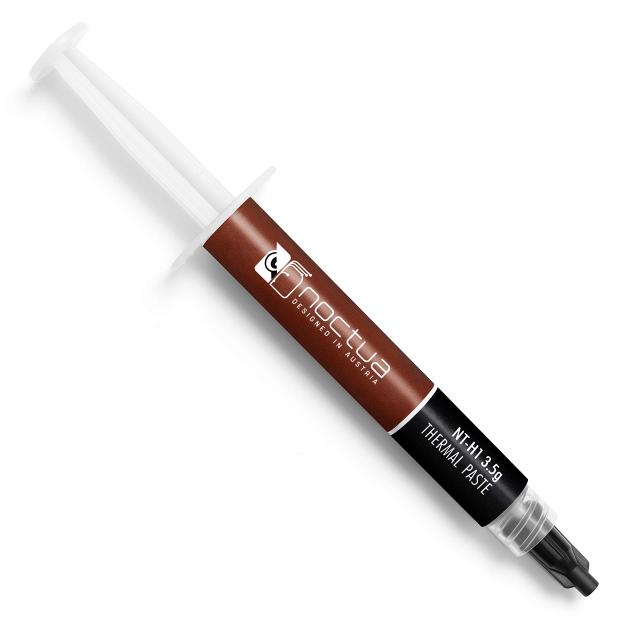
Noctua NT-H1
Expert rating7.4 / 10
- Model:
- Noctua NT-H1
- Compound Type:
- Metal-Oxide (no metallic particles)
- Thermal Conductivity:
- 12.8 W/mK
- Electrical Conductivity:
- Non-Conductive
- Package Size:
- 3.5g / 10g tubes
- Recommended Use:
- Mainstream CPU/GPU, High-end CPU/GPU (Noctua's original flagship paste, superseded by NT-H2)
- Reapplication Interval:
- Long-term stable
- Safety Notes:
- None
Consumercarts is reader-supported. Learn more
Disclaimer: The price and specification of the given product may differ from the actual product. Please confirm on the retailer's website before buying.
Manufacturer: Noctua Last updated: September 10, 2026
Where to buy
- AmazonGo to store
Noctua NT-H1 Review
Noctua's first in-house thermal compound built a reputation on consistency rather than chasing conductivity numbers, and it still holds up as a dependable choice years after NT-H2 took over as the brand's flagship. Noctua does not publish a thermal conductivity figure for NT-H1; it is a non-conductive metal oxide paste superseded by NT-H2. For builders who already own NT-H1 or find it discounted, it remains a legitimate mainstream-to-high-end option rather than an outdated afterthought.
Noctua's first in-house thermal compound built a reputation on consistency rather than chasing conductivity numbers, and it still holds up as a dependable choice years after NT-H2 took over as the brand's flagship. Noctua does not publish a thermal conductivity figure for NT-H1; it is a non-conductive metal oxide paste superseded by NT-H2. For builders who already own NT-H1 or find it discounted, it remains a legitimate mainstream-to-high-end option rather than an outdated afterthought.
Thermal Performance and Conductivity
Noctua does not publish a W/mK figure for it, so compare it on independent temperature tests rather than a spec sheet number. It won't match liquid metal or the newest ultra-high-conductivity formulas, but for air and AIO cooling on mainstream to upper-mid CPUs, the difference rarely shows up in real temperatures.
Compound Type and Composition
NT-H1 uses a metal-oxide compound with no metallic particles, the same non-conductive safety approach Noctua carried into NT-H2. It's a proven formulation rather than an experimental one, tested across a full generation of CPU sockets before NT-H2 replaced it as the flagship.
Application and Consistency
The paste applies with a medium, workable consistency, not as thick as NT-H2's peanut-butter texture. It spreads evenly under mounting pressure and doesn't require the cleaning wipes NT-H2 ships with, though careful application still matters for even coverage.
Electrical Safety
Fully non-conductive. NT-H1 carries no short-circuit risk even with excess paste or an imperfect application, making it safe for first-time builders and anyone uncomfortable handling liquid metal.
Longevity and Pump-Out Resistance
NT-H1 offers solid multi-year stability, though NT-H2 specifically improved on pump-out resistance over this formula. Builds that go years between repasting should lean toward NT-H2 or a newer high-conductivity compound instead.
Comparison to Alternatives
Against Noctua's own NT-H2, covered elsewhere on this site, NT-H2 wins on both conductivity and long-term pump-out resistance for a similar price, making it the better buy for a fresh purchase. Against Arctic MX-4, NT-H1 offers noticeably higher conductivity at a comparable price point.
Who This Paste Is Actually For
Builders who already have NT-H1 on hand or find it at a discount versus NT-H2.
Mainstream to upper-mid CPU builds that don't need liquid metal-tier performance.
Not for: Buyers making a fresh purchase decision. NT-H2 is the same brand, similar price, and simply newer.
Not for: Extreme overclocking or delidded CPU setups, where higher-conductivity compounds make a measurable difference.
Our verdict
Reviewed by Burooj Alam. Rated by us, not by users.
Expert rating7.4 / 10
A long-running favorite for its ease of application and reliability, now largely superseded by NT-H2 but still a safe, proven choice.
Best for
- Builders who already have NT-H1 on hand or find it at a discount versus NT-H2.
- Mainstream to upper-mid CPU builds that don't need liquid metal-tier performance.
Not for
- Buyers making a fresh purchase decision. NT-H2 is the same brand, similar price, and simply newer.
- Extreme overclocking or delidded CPU setups, where higher-conductivity compounds make a measurable difference.
Specifications
What these specs meanIdentity and form
| Brand | Noctua |
|---|---|
| Model | Noctua NT-H1 , NT-H1 |
Electrical and board risk
| Paste Segment | Standard Paste |
|---|
Cure and durability
| Rated Lifespan | 5 years |
|---|
| Compound Type | Metal-Oxide |
|---|---|
| Electrical Conductivity | Insulating |
| Package Size | 3.5g / 10g tubes |
| Recommended Use | Mainstream CPU/GPU, High-end CPU/GPU (Noctua's original flagship paste, superseded by NT-H2) |
| Reapplication Interval | Can be stored unopened at room temperature for at least 3 years; usable on the CPU for 5 years or more |
| Safety Notes | Not electrically conductive and non-corroding; safe with copper or aluminium coolers, nickel-plated or not |
FAQs
Is Noctua NT-H1 electrically conductive?
No. Noctua states NT-H1 is not electrically conductive and non-corroding, so it is safe with copper or aluminium coolers whether nickel-plated or not.
How long can Noctua NT-H1 be used before repasting?
Noctua says NT-H1 can be used on the CPU for 5 years or more, and can be stored unopened at room temperature for at least 3 years.
Does Noctua publish a thermal conductivity number for NT-H1?
No. Noctua does not specify a thermal conductivity or thermal resistance figure for NT-H1, so any W/mK number attributed to it is not manufacturer-published data.
Compare and read more
- 3M Thermally Conductive Acrylic Interface Pad 5590H (Acrylic Pad/Non-Conductive/2.08 W/mK) vs Noctua NT-H1 (Metal-Oxide / Non-Conductive / Superseded by NT-H2)
- Akasa AK-450 Silver Compound 450 (Silver-Based/5g Syringe/Spreader Card Included) vs Noctua NT-H1 (Metal-Oxide / Non-Conductive / Superseded by NT-H2)
- Alphacool Apex 2 Thermal Paste (Non-Conductive/6.7 W/mK/High-end CPU/GPU) vs Noctua NT-H1 (Metal-Oxide / Non-Conductive / Superseded by NT-H2)
- Alphacool Apex Thermal Pad Soft 18W/mK (Silicone-Based Pad/Non-Conductive/High-end CPU/GPU) vs Noctua NT-H1 (Metal-Oxide / Non-Conductive / Superseded by NT-H2)
- Arctic MX-7 (Carbon-Based/Non-Conductive/ULTIMATE Performance Successor to MX-6) vs Noctua NT-H1 (Metal-Oxide / Non-Conductive / Superseded by NT-H2)
- Thermal Paste vs Thermal Pad vs Liquid Metal: Which One to Use
- What Is Thermal Paste? What It Does and Why It Matters