
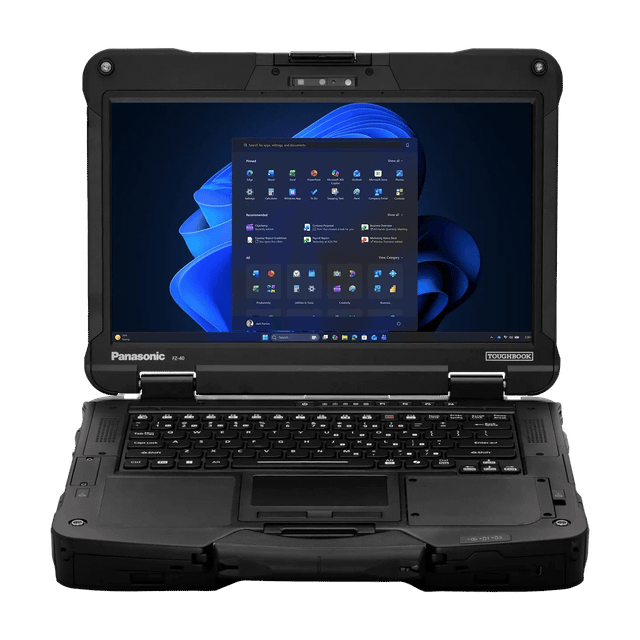
Panasonic Toughbook 40
Expert rating7.4 / 10
- CPU:
- Core i7-1370P vPro
- RAM:
- 16GB DDR5, upgradeable
- Display:
- 14" FHD sunlight-readable
- Rugged rating:
- MIL-STD-810H
Upgrade and repair this laptop
Consumercarts is reader-supported. Learn more
Disclaimer: The price and specification of the given product may differ from the actual product. Please confirm on the retailer's website before buying.
Manufacturer: Panasonic Last updated: 2026-10-10
Where to buy
- Panasonic Toughbook StoreGo to store
Panasonic Toughbook 40 Review
Panasonic Toughbook 40 fully rugged laptop with Intel Core i7-1370P vPro, 16GB upgradeable DDR5, 512GB SSD, 14-inch sunlight-readable touchscreen, MIL-STD-810H and IP66 rated.
The Toughbook 40 is Panasonic's flagship fully-rugged 14-inch laptop for field service, utilities, defense and public safety, with a modular bay for extra batteries, ports or a smart card reader.
Overview
Unlike most ultrabooks, the Toughbook 40 keeps a genuinely user-serviceable design: SO-DIMM memory, a swappable modular bay, and a hot-swappable battery, wrapped in a magnesium-alloy rugged shell rated to MIL-STD-810H drop and IP66 dust/water standards.
Our verdict
Reviewed by Burooj Alam. Rated by us, not by users.
Expert rating7.4 / 10
The Toughbook 40 is built for field service, utility and public safety work, where drop, dust and water resistance matter. It has a Core i7-1370P, 16GB of DDR5, a 14-inch touch display, Thunderbolt 4 and WiFi 6E, with a free SO-DIMM slot up to 64GB.
It weighs 1.8 kg and is not a thin everyday laptop. Graphics are integrated, there is one M.2 slot already filled, and the 1920x1080 IPS screen is a modest spec for a rugged machine.
Best for
- Field service, utility and public safety deployments
- Environments needing drop/dust/water resistance
Not for
- Buyers wanting a thin, light everyday laptop
Specifications
What these specs meanIdentity and variant
| Brand | Other |
|---|---|
| Series | Toughbook 40 |
| Series ID | panasonic-toughbook-40 |
| SKU Name | Panasonic Toughbook 40 (Core i7-1370P vPro, 16GB, 512GB) |
| Region Sold | Global |
Class and platform
| Laptop Class | Business |
|---|---|
| Release Year | 2023 |
| Operating System | Windows 11 Pro |
| Weight | 1.8 kg |
Processor
| CPU Brand | Intel |
|---|---|
| CPU Model | Core i7-1370P |
| CPU Cores | 14 |
Sustained power
| Sustained Power Source | Not Measured |
|---|
Graphics
| GPU Brand | Intel |
|---|---|
| GPU Model | Iris Xe Graphics |
Memory
| RAM Capacity | 16 GB |
|---|---|
| RAM Type | DDR5 |
| Memory Form Factor | SO-DIMM |
| Memory Soldered | No |
| Max RAM Supported | 64 GB |
Upgradability
| RAM Slots | 2 |
|---|---|
| RAM Slots Free | 1 |
| Storage Slots | 1 |
| Storage Slots Free | 0 |
| Storage Form Factor | M.2 2280 |
| Storage Interface | PCIe 4.0 x4 |
| SATA Bay Present | No |
Storage as shipped
| Storage Capacity | 512 GB |
|---|---|
| Storage Type | NVMe SSD |
Display
| Display Size | 14 inches |
|---|---|
| Resolution Width | 1920 px |
| Resolution Height | 1080 px |
| Panel Type | IPS |
| Touchscreen | Yes |
Battery and ports
| Thunderbolt Support | Thunderbolt 4 |
|---|---|
| WiFi Standard | WiFi 6E |
FAQs
Can you upgrade the RAM in the Panasonic Toughbook 40?
Yes. It uses SO-DIMM memory in 2 slots (1 free as shipped). It ships with 16 GB of DDR5. The maximum supported is 64 GB.
Can you upgrade the SSD in the Panasonic Toughbook 40?
Yes. It has 1 M.2 2280 slot (PCIe 4.0 x4). As shipped the slot is in use, so upgrading means replacing the existing drive. It ships with 512 GB NVMe SSD.
What display does the Panasonic Toughbook 40 have?
The Panasonic Toughbook 40 has a 14-inch, 1920x1080, IPS touch display.
Does the Panasonic Toughbook 40 have Thunderbolt?
Yes. It supports Thunderbolt 4.
Compare and read more
- HP EliteBook 840 G11 (Core Ultra 7 165U, 16GB, 512GB) vs Panasonic Toughbook 40 (Core i7-1370P vPro, 16GB, 512GB)
- Lenovo ThinkBook 14 G6 IAP (Core i5-1335U, 16GB, 512GB) vs Panasonic Toughbook 40 (Core i7-1370P vPro, 16GB, 512GB)
- Lenovo ThinkPad T14 Gen 5 (Core Ultra 7 155U, 16GB, 512GB) vs Panasonic Toughbook 40 (Core i7-1370P vPro, 16GB, 512GB)
- Lenovo ThinkPad X1 Carbon Gen 13 Aura (16GB, Core Ultra 7 256V, WUXGA) vs Panasonic Toughbook 40 (Core i7-1370P vPro, 16GB, 512GB)
- Lenovo ThinkPad X1 Carbon Gen 13 Aura (32GB OLED, Core Ultra 7 258V) vs Panasonic Toughbook 40 (Core i7-1370P vPro, 16GB, 512GB)
- Best Thermal Paste for Laptops (2026): Why Pump-Out Ruins Regular Paste
- How Much RAM Do You Actually Need in a Laptop (2026)