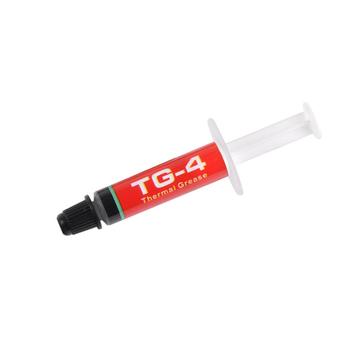
- Compound Type
- Silicone-Based
- Thermal Conductivity
- 3.3 W/mK
- Electrical Conductivity
- Non-Conductive
- Package Size
- 1.5g

Hardware finder
Updated October 10, 2026
149 thermal compounds from 43 brands.
Consumercarts is reader-supported. Learn more
Showing 149 Thermal Paste found



New to this? Read how much thermal paste to apply and thermal paste vs pad vs liquid metal.
Compounds listed by form, material class, thermal conductivity with the source of the figure, electrical conductivity, and how long the application is rated to last.
Conductivity figures are widely inflated in marketing, so each record states whether the number came from a datasheet, a vendor claim or third party measurement.
Popular matchups: Arctic MX-4 vs Corsair TM30 and Arctic MX-7 vs Noctua NT-H1. For laptops see best thermal paste for laptops, for graphics cards best thermal paste for the RTX 50 series, and if you are new to it, what thermal paste is.
For a normal build, paste choice is worth one or two degrees. Application technique and cooler mounting pressure are worth far more. Buy something reputable, apply it properly, and stop optimising.
W/mK figures are measured under conditions each manufacturer chooses, and there is no shared standard. A paste claiming 16 W/mK is not demonstrably better than one claiming 8 W/mK. Independent testing under a real cooler is the only meaningful comparison.
Standard ceramic and carbon pastes are non conductive and safe around pins and surface components. Liquid metal is electrically conductive, will short a board if it escapes, and corrodes aluminium. It belongs on a delidded CPU or a bare die, applied by someone who has done it before.
Paste fills microscopic gaps between two flat surfaces. Pads bridge real physical gaps, for example VRAM and VRM on a graphics card, and the thickness has to match the gap. A pad where paste belongs is a large thermal penalty. Graphite sheets are reusable and forgiving, and slightly worse than good paste.
Laptops and anything that heats and cools sharply suffer pump out, where thin paste migrates away from the die over months. A thicker, higher viscosity paste or a phase change pad holds up much better there than a thin high performance compound.
A 4g tube covers several desktop applications. Buying a large syringe for one build means most of it dries out on a shelf.
Standard paste every two to five years depending on quality and load. Phase change pads last far longer and graphite pads effectively never need replacing. Watch temperatures rather than the calendar.
Only for experienced users. It conducts electricity, and a bead that spreads onto surrounding components can short a board permanently. The thermal gain over a good paste is usually small.
Yes. Thermal paste does not care which die it sits on. Graphics cards also need correct thermal pad thicknesses, which is the part that goes wrong.
A pea-sized amount in the centre for most processors. Too little leaves air gaps, too much can spill onto the board, and both are worse than the right amount.
Within a degree or two for most users, and they never dry out or pump out. They suit machines you open often, since they are reusable.
Only a little. Between a good mainstream paste and a premium one the gap is usually a few degrees at most, smaller than the difference your cooler or mounting pressure makes. Pay more for easier spreading, longer life or a non-conductive formula, not for a headline W/mK figure.
For most builds, a non-conductive carbon or metal-oxide paste such as Arctic MX-4, MX-6 or Noctua NT-H1 is the safe choice. Use liquid metal only on delidded or direct-die setups, and a phase-change pad like Honeywell PTM7950 in a laptop you do not want to open again.